OPC-Fellows · a local-first workbench for a one-person company
A small kernel (shell, todos, module contract) plus occupation plugins.







Why · Download · Quick start · Write a module · Built-in occupations · Architecture · Ecosystem · Contributing
A local-first Electron workbench for a one-person company. Built on Cordis / DeepSeek Harness.
This tree is the full daily-driver product. The public snapshot keeps the kernel and contracts. Personal site catalogs, signing identities, and sourcing stacks stay out of default code.
Why
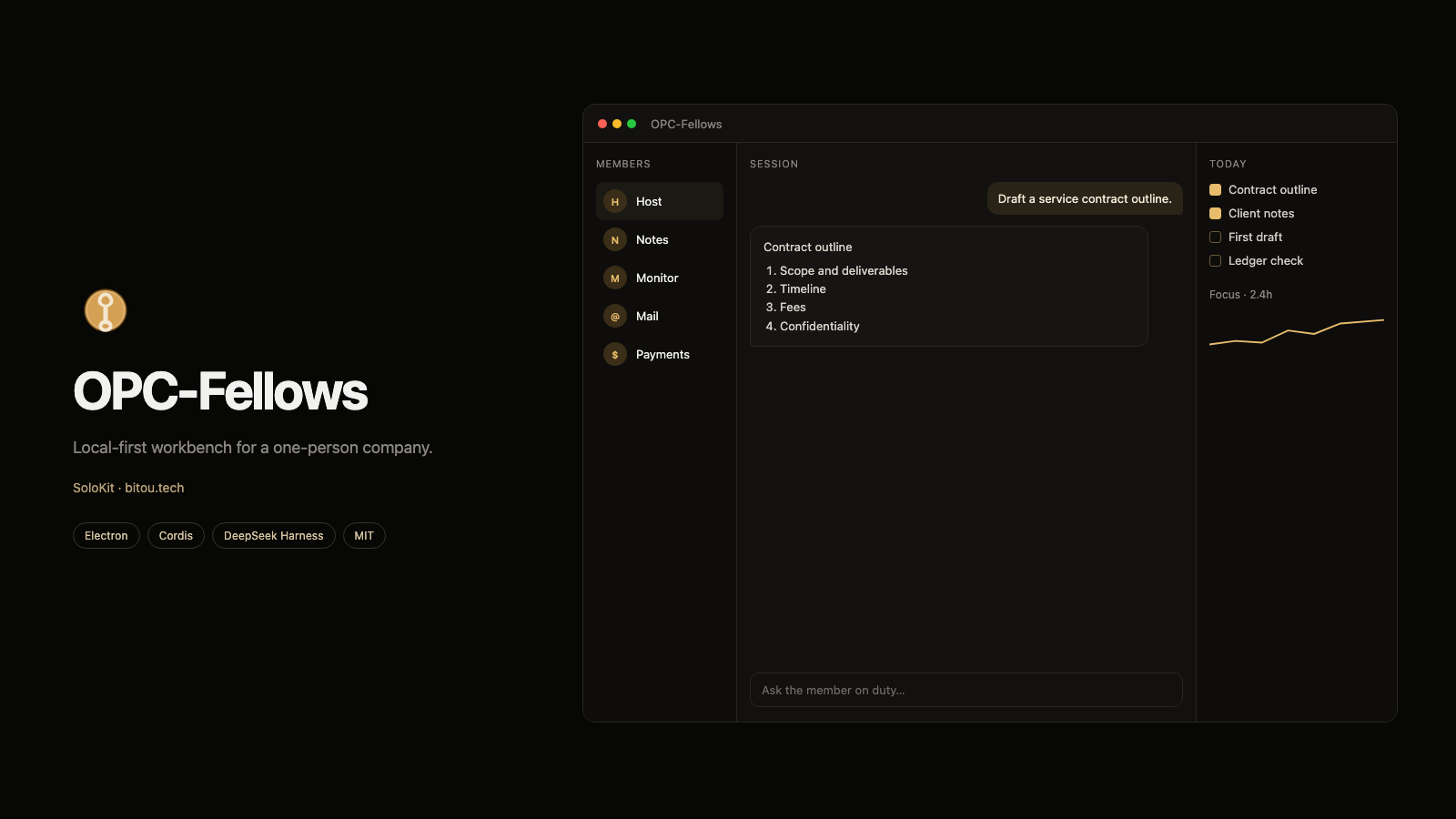
A one-person company gets one workbench. You pick a member (an occupation) or a project (a multi-member job), push the work in a session, and the right pane is the Panel that identity is watching. New features are modules. The kernel union types stay small.
| Concept | Meaning |
|---|---|
| Kernel | Always on: shell, todos, search, settings, module registry, members / projects |
| Module | One Cordis plugin + one manifest. Enable / disable. Install from a local folder or Git |
| Member | One embodiment of a module: persona, home Panel, recommended Skills. The UI never says Agent |
| Todo | A kernel service. Any module writes through todos.ingestAgent, deduped by dedupeKey |
Vocabulary lives in CONTEXT.md. Modular design lives in docs/module-architecture-design.md.
Why this split
The popular desktop workbenches on dsh-plugin — OpenDesign, iPolloWork, dsh-desktop, dsh-web — treat Harness as the runtime and capabilities as plugins. OPC-Fellows walks the same road. The shell is a one-person-company roster, not another dsh web skin.
H1–H8 already send the center-pane chat through dsh --profile opc. Scratch notes notes_add hang on opc's dsh ctx.tools; payments / monitor / micro-sourcing still run on Electron ctx.tools. See ADR 0005.
- Local first: business data stays in
userData; model keys go through Settings → Model andsafeStorage - Everything plugs in: occupations, Panels, and Skills are modules; the kernel only keeps contracts
- Capability allow-list: a module may call only what its manifest declares; dangerous ones confirm at install
- Contracts match dsh:
apply(ctx), custom package.json fields, layered capabilities — easy to port from the Harness ecosystem
What the trunk keeps
src/kernel/          trunk: boot, IPC bridge, storage, todos, nav, module registry, members
src/modules/         built-in occupations (reference implementations)
examples/            smallest third-party module
docs/                architecture and ADRs
| Stays in the trunk | Stays out of defaults |
|---|---|
| Module contract, capabilities, install | Personal site catalog (fill in Work situation) |
| Todos / reminders / agent inbox | Social signatures, WeChat author, Coze workflow IDs |
Local storage and safeStorage |
Packaging identity, notarization Team ID |
examples/hello-module |
Real product catalog (see examples/catalog.example.json) |
Credentials travel as env vars or on-device safeStorage. The repo has no hardcoded keys. Legacy ~/.dsh is still readable; new keys should be entered in Settings. After launch the product catalog, social signature, and WeChat author are empty until you fill them in. See examples/catalog.example.json.
Download
A local-first desktop workbench: data stays on your own machine. Latest build: v0.7.3.
| Platform | Availability |
|---|---|
| macOS (Apple Silicon) | ✅ Available |
| Windows | ❌ Not available yet |
| Linux | ❌ Not available yet |
Direct downloads:
- OPC.Agent.Team.-.Solokit-0.7.3-mac-arm64.dmg — disk image; drag the app into Applications.
- OPC.Agent.Team.-.Solokit-0.7.3-mac-arm64.zip — zip archive; unzip and run.
First open: you must allow the app. The current build is not Apple-signed or notarized — the certificate pipeline is not wired up yet. That is not a broken installer. After you put the app in Applications, run:
xattr -cr "/Applications/OPC Agent Team - Solokit.app"
Then right-click the app → Open.
The on-screen name is still OPC Agent Team - Solokit. Renaming it would migrate the data directory, so that waits for a later release.
latest-mac.yml is the update manifest for a future auto-update source.
To run from source, see Quick start below.
Quick start
Needs Node.js ^22.19.0 or >=24.0.0, and pnpm 10+. Electron 42+ no longer downloads its binary in its own postinstall; this repo uses postinstall: install-electron, so the first pnpm install takes a while.
pnpm install
pnpm dev
The workbench starts maximized.
Optional:
export DEEPSEEK_API_KEY=sk-...   # optional; overrides the key saved in Settings → Model
pnpm test                        # kernel + shared unit tests
pnpm dsh                         # local DeepSeek Harness CLI
Copy .env.example if you prefer a dotenv file. Never commit a real .env.
Package locally with pnpm pack (dir), pnpm dist, or pnpm dist:mac to produce a macOS installer. The current CI / release pipeline has not wired up Apple signing and notarization, so published release artifacts need the Gatekeeper workaround above.
Write a module
A third-party module is an npm package. The desktop workbench reads the ownworkbuddy field (main-process apply(ctx), optional UI mount(root, api)); the agent runtime reads the official dsh.bundle. Write both during the transition. You do not need to touch preload.
Minimal sample: examples/hello-module.
{
  "main": "dsh-plugin.js",
  "ownworkbuddy": {
    "id": "hello",
    "title": "Hello",
    "kind": "view",
    "main": "index.js",
    "capabilities": [],
    "ui": "ui.js"
  },
  "dsh": {
    "bundle": { "patch": "./cordis.patch.yml" }
  }
}
export default function apply(ctx) {
  ctx.workbench.nav({ id: 'hello', title: 'Hello', mark: 'Hi', kind: 'view', order: 200 })
  ctx.bridge.handle('hello:ping', () => ({ ok: true, at: new Date().toISOString() }))
}
Install from a local folder or Git on the Extensions page. To join the dsh stack (this initializes $DSH_HOME/profiles/opc):
pnpm dsh plugin --profile opc add ./examples/hello-module
pnpm dsh plugin --profile opc add ./packages/opc-kernel
pnpm dsh plugin --profile opc add ./packages/occupation-notes
pnpm dsh plugin --profile opc add ./packages/occupation-monitor
pnpm dsh plugin --profile opc add ./packages/occupation-payments
pnpm dsh plugin --profile opc add ./packages/occupation-micro
Disabling a module that has dsh.bundle writes { id: opc-<module>, disabled: true } into the opc profile cordis.patch.yml.
A module may only use capabilities declared in its manifest (storage / todos:write / secrets / subprocess …). Undeclared calls are rejected. subprocess and secrets prompt at install.
Built-in modules register statically at build time (builtin:<id>) so asar does not have to dynamic-import them. Modules must not reach into each other's stores; cross-module traffic goes through kernel services.
Built-in occupations
These occupations live in the current product to prove the contract. They are not the kernel. Without keys they degrade to local features and do not send unauthenticated requests.
| Module | What it does |
|---|---|
| Notes | Local notes |
| Companion | Standalone reminder window; due todos jump to screen center |
| Project monitor | Repo / site posture; optional GET /api/stats |
| Social ammo | Multi-platform copy from product capabilities |
| Micro sourcing | Public-forum pain points clustered into product ideas |
| Growth hacker | Experiments, loops, and channels; no copy, no traffic refresh |
| Creator accounts | Domestic-platform accounts and day logs (manual data) |
| WeChat intel | Local read-only bridge to WeChat Intelligence Hub; never sends WeChat, chats stay on device |
| Mail triage | Local Mail.app + iCloud / Gmail / QQ IMAP; triage and drafts only, no sending |
| Payments | Local ledger; optional Creem sync |
| DeepSeek Harness | Center-pane chat and Local API share one SDK session; not a hireable occupation |
Site stats, sourcing proxies, and Creem keys are module settings. Env-var cheat sheet:
| Variable | Use |
|---|---|
DEEPSEEK_API_KEY |
LLM (overrides Settings → Model; still reads legacy ~/.dsh) |
OPC_USER_DATA |
userData passed to the opc child (notes notes.json) |
OWNWORKBUDDY_STATS_KEY |
Shared secret for monitor GET /api/stats |
CREEM_API_KEY |
Payments override for the on-device key |
HTTPS_PROXY |
Sourcing scan proxy (Reddit from mainland China) |
Architecture
Target (ADR 0005)
  Thin Electron shell (window / tray / companion)
    dsh --profile opc
      dsh-base (llm / tools / sessions / agent-loop)
      OPC kernel bundle (todos, members, projects)
      Occupation bundles → ctx.tools + right-pane Panel

Today (H8)
  Electron main
    applyOpcKernel (cordis.patch.yml order)
      services: modules / workbench / bridge / storage / secrets
                todos / llm / tools / dshRuntime / scheduler / notify / search / repository / agents
      built-in modules (in-process) + installed third-party modules
    Same dsh --profile opc for center-pane chat and Local API /agent/task
  preload: workbench.invoke / subscribe (checked per module)
  renderer: left members & projects · center session · right Panel
Shell mental model: docs/agent-workspace-design.md. Runtime host: docs/adr/0005-dsh-as-composition-host.md.
Ecosystem
The module contract follows DeepSeek Harness community conventions. For discovery and comparison, start with the official topic and the starred desktop / plugin projects:
| Project | Role next to this repo |
|---|---|
| deepseek-ai/deepseek-harness | Runtime. Local pnpm dsh; today one dsh --profile opc process |
| nexu-io/open-design | Local-first desktop + dsh as a first-class runtime |
| Devin-AXIS/iPolloWork | Member / project / plugin lifecycle to compare |
| anywhere-labs/dsh-desktop | Harness inside a shippable client |
| zhu1090093659/dsh-web | Web GUI plugin family |
| liustack/modlens | Single-capability plugin README / install UX |
| dsh-market/dsh-market | In-app plugin market |
| awesome-dsh-plugin/awesome-dsh-plugin | Curated plugin list |
Full list: github.com/topics/dsh-plugin.
The author runs this workbench against the SoloKit line (Studio / PromptMan / SaaS Cost / CutWeave and the rest) and the 榆关 tool wall. That is a configuration, not the trunk.
Contributing
The public trunk is Alfred-Lau/OPC-Fellows: main only, no leftover agent branches or signing history. Chinese docs: README.zh-CN.md.
PRs against the trunk contract are welcome: kernel services, module manifests, capabilities, sample modules, docs. Do not weld personal sites, signing identities, or secret defaults into src/shared.
By submitting a pull request you license your contribution under the MIT License.
Good first cuts: English UI strings, an examples/ module, tests for one occupation, or issues labeled good first issue.
UI copy is still hardcoded Chinese. The i18n plan is docs/i18n-plan.md — help here travels far.
Security
- Business data stays in on-device
userData. There is no first-party backend for it. - WeChat intel is a local read-only index. Chats are not uploaded, keys do not leave the machine, messages are not sent.
- Mail triage reads the inbox and writes local drafts. Online mailboxes use app-specific passwords in
safeStorage. The app does not send mail. - Third-party modules run on a capability allow-list. Dangerous permissions confirm at install.
- Report vulnerabilities in private. Do not paste credentials or user data into a public issue. See SECURITY.md.
License and thanks
MIT License. Runtime depends on Cordis and DeepSeek Harness. Cover and badges follow the usual desktop-workbench look on dsh-plugin.
Website: OPC-Fellows
No comments yet. Be the first to write one.