dsh-usage-panel
A DeepSeek Harness (dsh) plugin that adds a Token usage page: KPI cards, a 26-week activity
heatmap, a per-model stacked bar chart and a model donut — all folded from the durable Session logs
already on your machine.
It has two entry points that render the same page:
- a row in the left sidebar, which opens the page in the main column (no Settings dialog), and
- Settings → 用量 / Usage, beside the other settings pages.
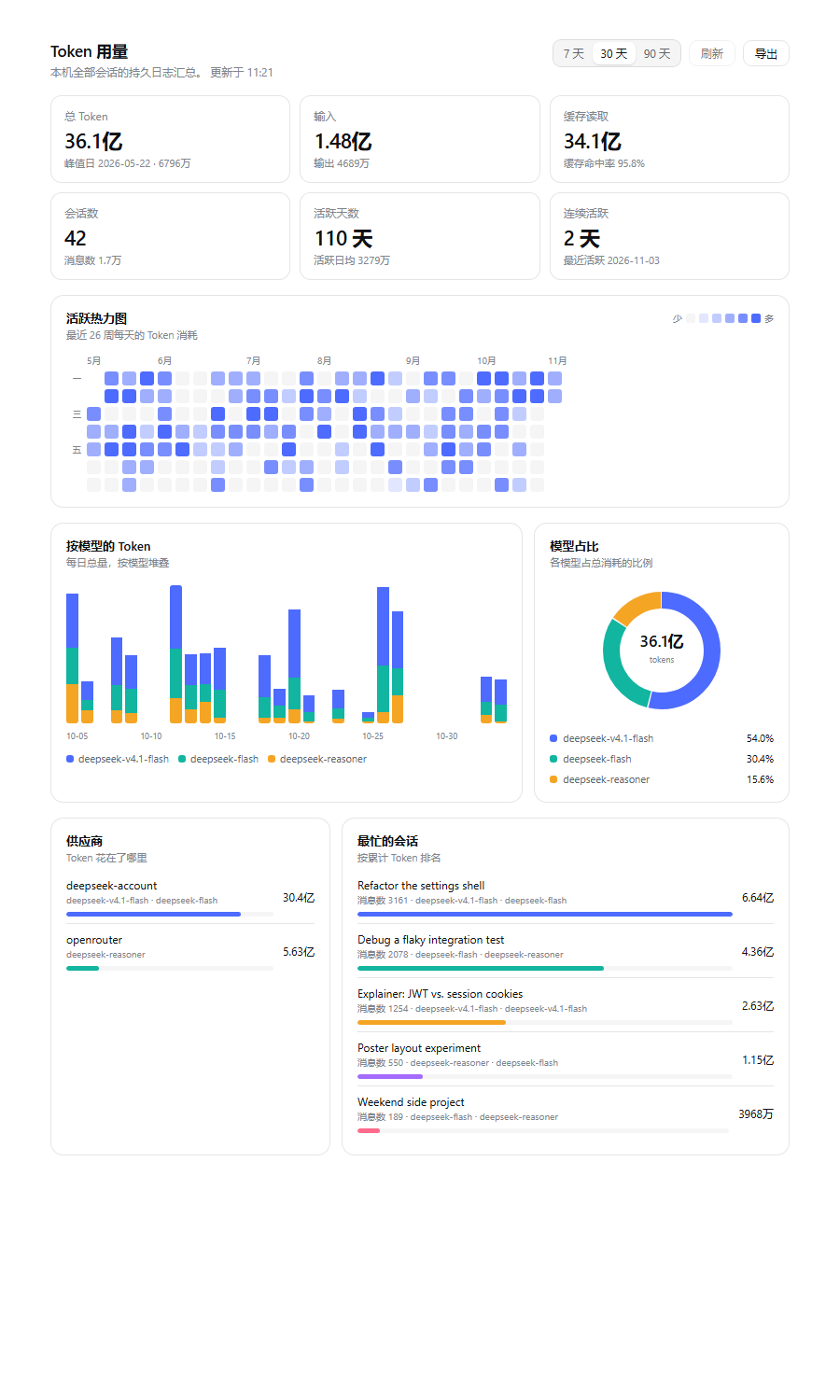
The screenshots use the synthetic dataset in dev/sample-summary.json; reproduce them with
node dev/preview.mjs zh --sample. No real Session data is included in this repository.
What it shows
| Block | Meaning |
|---|---|
| KPI cards | Total tokens, input/output, cache read + hit rate, Sessions, active days and the current streak |
| Activity heatmap | Token volume per local day over the last 26 weeks, with a hover breakdown |
| Tokens by model | Daily total stacked by model for the last 7 / 30 / 90 days |
| Model share | Each model's share of all tokens |
| Providers | Tokens split by the provider that served each request |
| Busiest Sessions | Top Sessions by accumulated tokens, with their message count and models |
The page follows the harness language (zh / en) and theme (light and dark) automatically,
because it renders with the settings shell's own design tokens.
Export writes the current range's daily series or the per-model table as CSV, or the whole summary as JSON — all generated in the page, nothing is uploaded.
How it works
Two halves, one package:
- Host (
lib/index.js) — a Cordis plugin that registers one route,GET /usage-panel/api/summary?days=30[&refresh=1], on the harness web server. It scans$DSH_HOME/sessions/**/session.v*.jsonl[.zstd], decodes the concatenated Zstandard frames, foldsassistant/messageusage records by day, model, provider and Session, and answers JSON. Per-file results are cached on the artifact's size/mtime and resumed from the last decoded frame boundary, so a warm request is served from memory and an appended batch costs only its own bytes. - Browser (
lib/client.js) — a client-module bundle (window.__ModuleLoader__.load) that registers asettings.sectionpage and fetches the summary. It uses only the platformreactmodule and inline theme tokens, so nothing else has to be composed.
Nothing here is model-facing: no tool, no prompt, no provider request.
Install
A dsh profile composes its tree from bundles. This package declares
dsh.bundle.patch = ./cordis.patch.yml, so installing it as a profile bundle is enough.
# 1. make the package available to the profile (a link is fine for local development)
dsh plugin --profile desktop add link:E:/path/to/dsh-usage-panel

# 2. select the bundle — package.json, in dsh.profile.bundles
#    "@deepseek-ai/dsh-base",
#    "@deepseek-ai/dsh-web-app",
#    "dsh-usage-panel"
With HMR enabled the running composition picks the bundle up immediately; otherwise restart the harness. Then open Settings → 用量 / Usage.
If you would rather not edit the profile by hand, install through the Web sidebar's Plugins
page or the plugin_manager tool, which maintain dsh.profile.bundles for you.
Verify the host route
curl.exe "http://127.0.0.1:60341/usage-panel/api/summary?days=30"
It answers {"ok":true,...} with the folded summary. Requests with ?refresh=1 bypass the
20-second cache.
Develop
dev/preview.mjs renders the real lib/client.js against the live route with a small
React-compatible runtime and the harness's own light-theme tokens, then optionally screenshots it —
handy when you are iterating on the page without reloading the GUI:
node dev/preview.mjs zh --shot assets/preview-zh.png
node dev/preview.mjs en

# render the synthetic dataset instead of a live host (what the screenshots use)
node dev/preview.mjs zh --sample --shot assets/preview-zh.png
node dev/preview.mjs en --sample

# render the main-column page instead of the Settings section
node dev/preview.mjs zh --sample --panel
Without --sample it calls a running host, so it never touches the repository's assets unless you
ask it to.
Set DSH_ORIGIN when the host listens somewhere else. dev/tokens.json holds the resolved
--dsw-alias-* values used by the preview page.
Limits
- Local sessions only. The fold reads this machine's
$DSH_HOME/sessions; it never calls a provider, so it cannot see usage from another install. - Tokens, not money. Prices change and differ per provider, so no cost figure is derived.
- Usage-bearing events only. Sessions written before provider usage reporting existed count their messages but contribute zero tokens.
- Route has no authentication. Like every other non-
/apiweb-server route it relies on the loopback bind; it exposes local token totals to whatever can reach the port.
Layout
dsh-usage-panel/
├─ package.json          dsh.manifestVersion / dsh.bundle / dsh.client
├─ cordis.patch.yml      the bundle: one insert naming this package
├─ lib/index.js          host: log scan, fold, HTTP route
├─ lib/client.js         browser: settings.section page
├─ dev/preview.mjs       offline render + screenshot harness
├─ dev/tokens.json       resolved theme tokens for the preview
└─ assets/               preview screenshots
MIT licensed.
No comments yet. Be the first to write one.