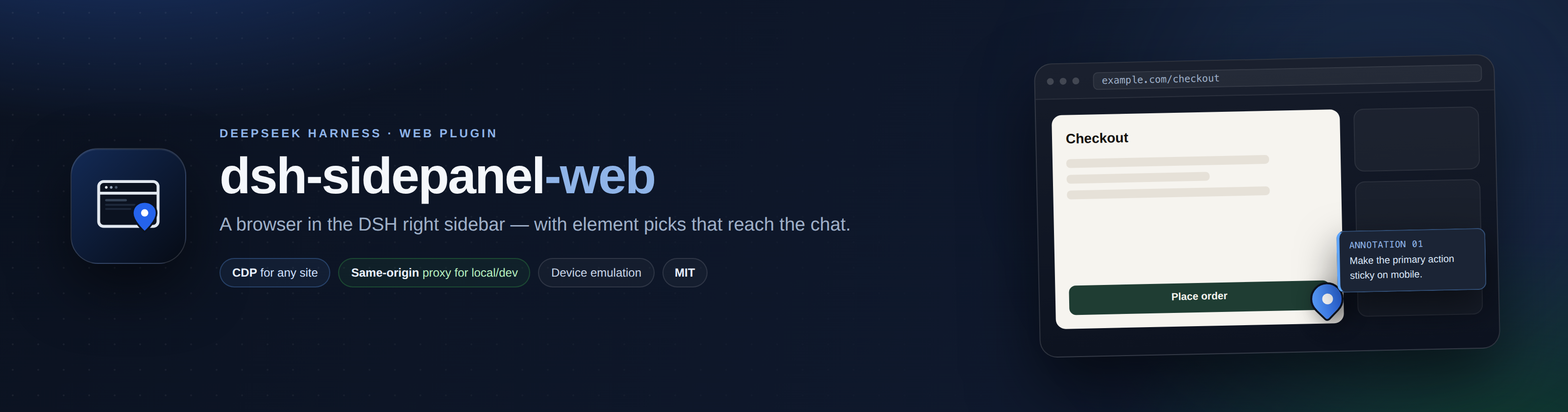
A browser in the right sidebar of DeepSeek Harness Web — with element picks that reach the chat.





English · Català
dsh-sidepanel-web adds a Browser tab to the DSH right sidebar. Open a page next to the conversation, pick the element you are talking about, write a note, and send it to the composer with its selector, styles, size and a cropped screenshot attached.
[!TIP] One panel, two carriers. Local/dev pages go through a same-origin proxy and stay fully interactive. Any public page is rendered by a real Chromium over CDP, so
X-Frame-Optionsand CSP cannot block it. The panel picks the carrier from the URL; the switch is one click away.
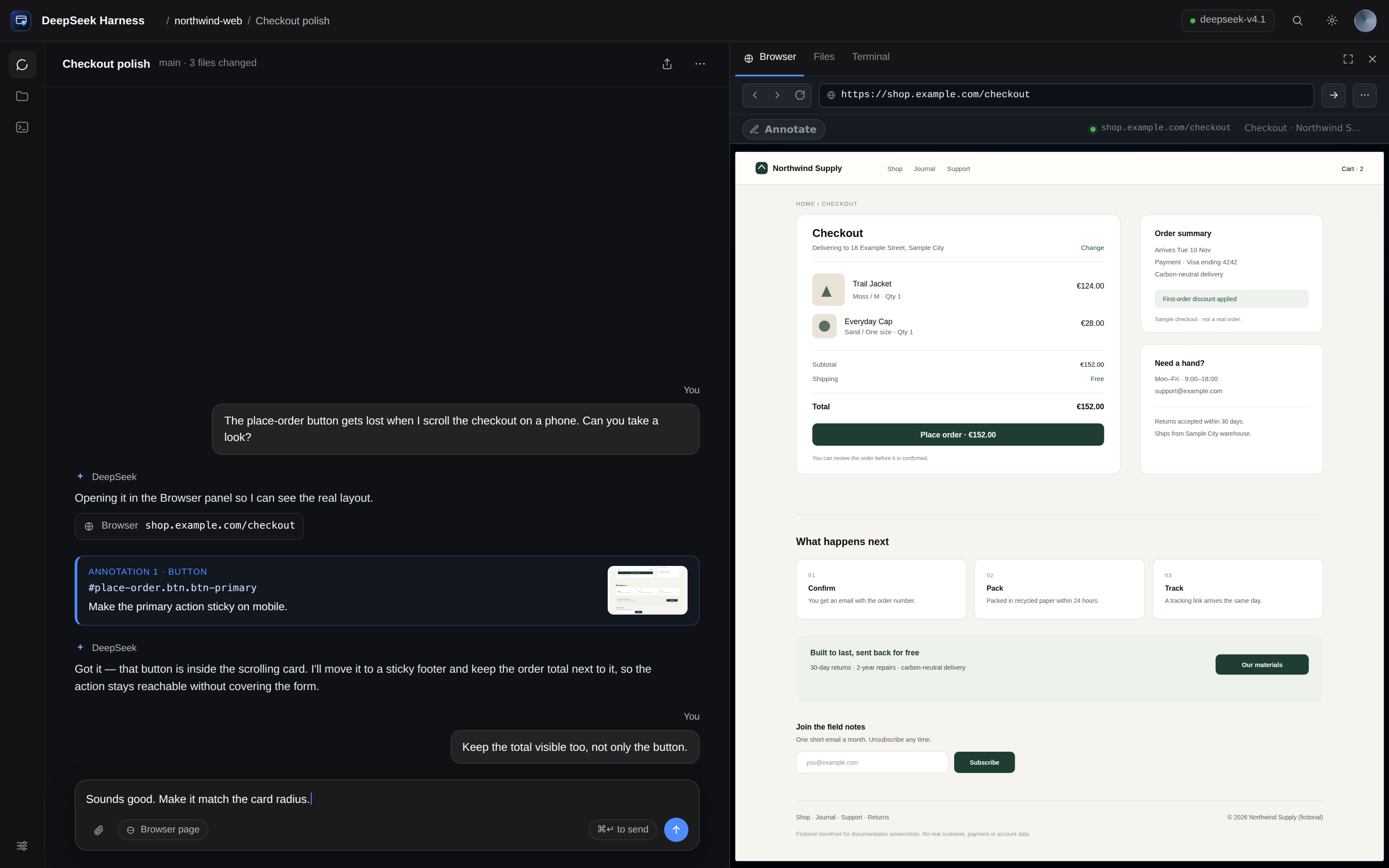
Mockup screenshots: the storefront, conversation and URLs are invented. No real account or customer data is shown.
Table of contents
- Why
- Features
- Quick start
- Screenshots
- Screenshots and privacy
- Usage
- Configuration
- How it works
- FAQ
- Security
- Known limitations
- Development
- Changelog
- Market
- Contributing
- Credits
- License
Why
Talking about a web page with an agent usually means screenshots, coordinates and vague descriptions. This panel keeps the page next to the conversation and turns “this button here” into a precise payload: selector, text, classes, styles, position and a cropped screenshot.
It works in both directions:
- The pages you are building —
localhost,*.local, private IPs, dev servers with self-signed certificates — where the DSH host can reach the page even when your browser cannot. These go through the same-origin proxy and stay fully interactive and annotatable. - Any public page — docs, a competitor, an issue tracker, a staging site behind a login. These are rendered by a real Chromium on the host over CDP;
X-Frame-Optionsand CSP cannot stop them.
Features
Navigation and carriers
- Automatic address-bar scheme. Type
example.comand the panel openshttps://example.com/; typeshop.local:5173,127.0.0.1:5173or192.168.1.20:8080and it useshttp://instead. Non-web schemes (mailto:,file:,javascript:,data:) are refused instead of being turned into a website. - Two carriers, switchable per site. The native view has a Remote view (CDP) button; the CDP view offers Native view (proxy) for local hosts. The choice is remembered per origin.
- Chat links land here. The tab registers
kind: "browser", so the chat's “open link in sidebar” preference opens this annotated browser;params.urlis navigated on arrival. - Bring your own browser. Point
cdpUrl/wsUrlat any Chrome started with--remote-debugging-port, or let the plugin discover one, or let it launch its own with a persistent profile.
The native carrier (local/dev)
- HTML, CSS, JS, images and API requests stay on the DSH origin through a rewriting proxy.
- A small shim keeps
fetch,XMLHttpRequest,history.pushState/replaceStateandwindow.openon the proxy. - Self-signed certificates are accepted for local hosts.
<script type="importmap">URLs (imports and scopes) are rewritten, so ES-module apps keep loading.- Only real URL attributes are rewritten:
data-action="family"-style action names stay untouched. - Cookies are kept in a per-origin host jar; DSH's own session cookie is never forwarded.
The remote carrier (public pages)
- A real Chromium renders the page on the host and streams frames; clicks, wheel, typing and drags are forwarded.
- Works on sites that refuse framing (
X-Frame-Options/frame-ancestors, CSP). - Your logins and cookies come from the browser profile you point it at.
Annotations and devices
- Hover inspector:
tag#id.class 240×44 [role]. - Element pick with selector, text, classes, styles, position, HTML excerpt and page URL.
- Numbered pins, notes, and a crop captured by selector.
- Composer hand-off with
InputActions.insertText, so the draft is not replaced. - Device emulation: responsive (fits the panel), desktop 1280×800, laptop 1440×900, tablet 768×1024 (iPad UA), phone 390×844 (iPhone UA) and Android 412×915 — real touch emulation and matching
devicePixelRatio. - English and Spanish UI through
ctx.locale; other locales fall back to English.
Quick start
Requirements
- DSH 0.2.1-rc.2 or newer, below
0.3.0(Web profile). - Node.js 22.19+.
- A Chromium-based browser on the host. The plugin auto-detects Chrome/Chromium; the Playwright Chromium cache also works.
Install
# from GitHub
dsh plugin --profile web add github:AleixRocal/dsh-sidepanel-web

# or from a local clone, while developing
git clone https://github.com/AleixRocal/dsh-sidepanel-web
dsh plugin --profile web add link:/absolute/path/to/dsh-sidepanel-web
Restart dsh web once and refresh the GUI. The Browser tab appears in the right-sidebar guide.
First page
- Expand the right sidebar and choose Browser.
- Type
example.comand press Enter. The panel openshttps://example.com/; the scheme is added for you. - Click Annotate, hover the page, click an element, write the note and choose Insert.
[!NOTE] If no browser is found on the usual CDP ports, the plugin launches a dedicated headless Chromium with a persistent profile. Set
chromePathonly when auto-detection misses your binary.
Use your own browser
To reuse the browser you already run (same cookies and logins), expose its CDP port and point the plugin at it — no separate install:
google-chrome --remote-debugging-port=9222 --user-data-dir="$HOME/.config/chrome-dsh" &
- id: dsh-sidepanel-web
  config:
    cdpUrl: http://127.0.0.1:9222   # or wsUrl: ws://127.0.0.1:9222/devtools/browser/…
Chrome 136+ refuses /json/version on the default profile, hence the separate --user-data-dir. Without cdpUrl/wsUrl the plugin probes 9222–9225 and 9333, then ~/.local/state/dsh-sidepanel-web/browser.json, then the ego bridge file.
Screenshots
 |
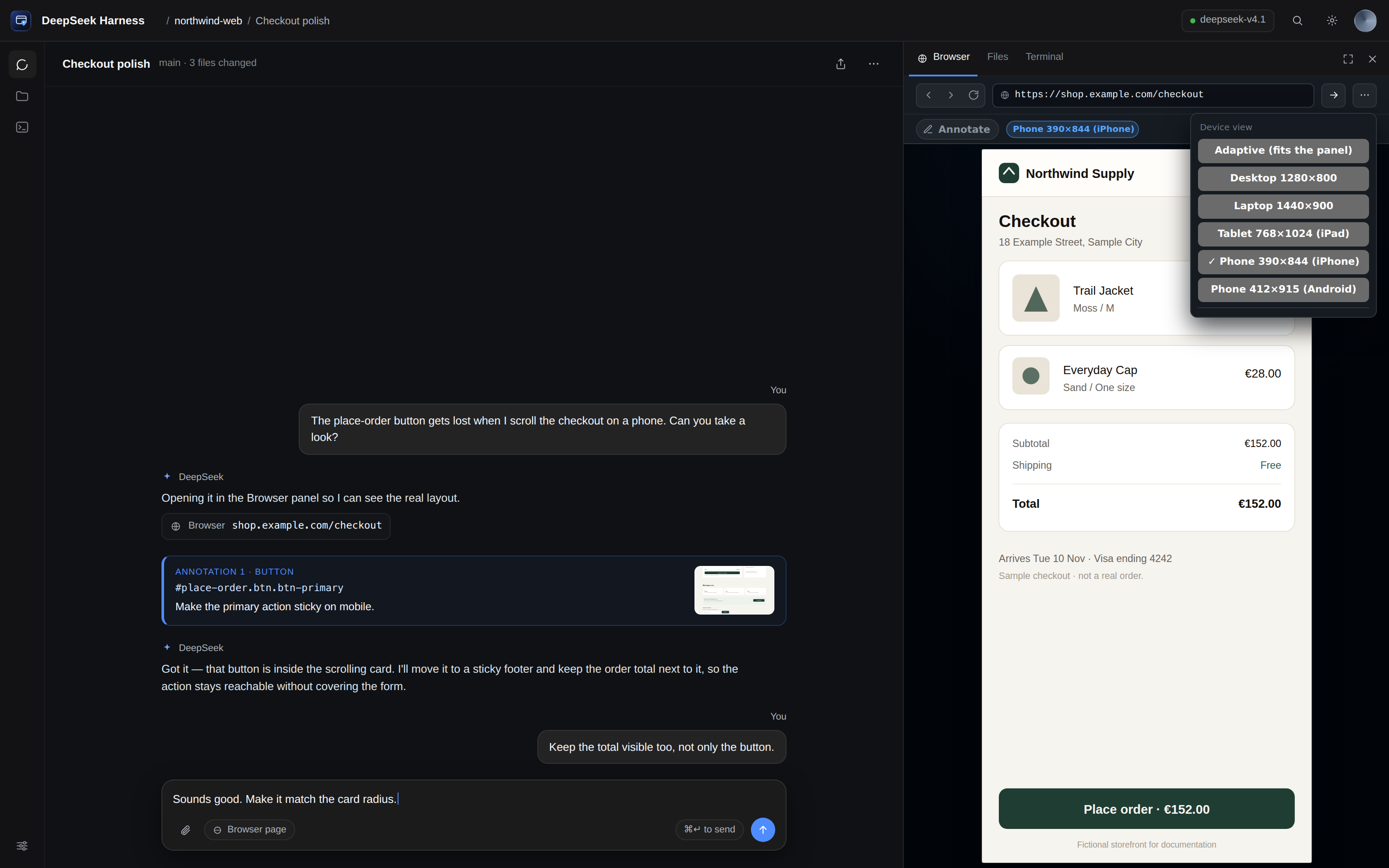 |
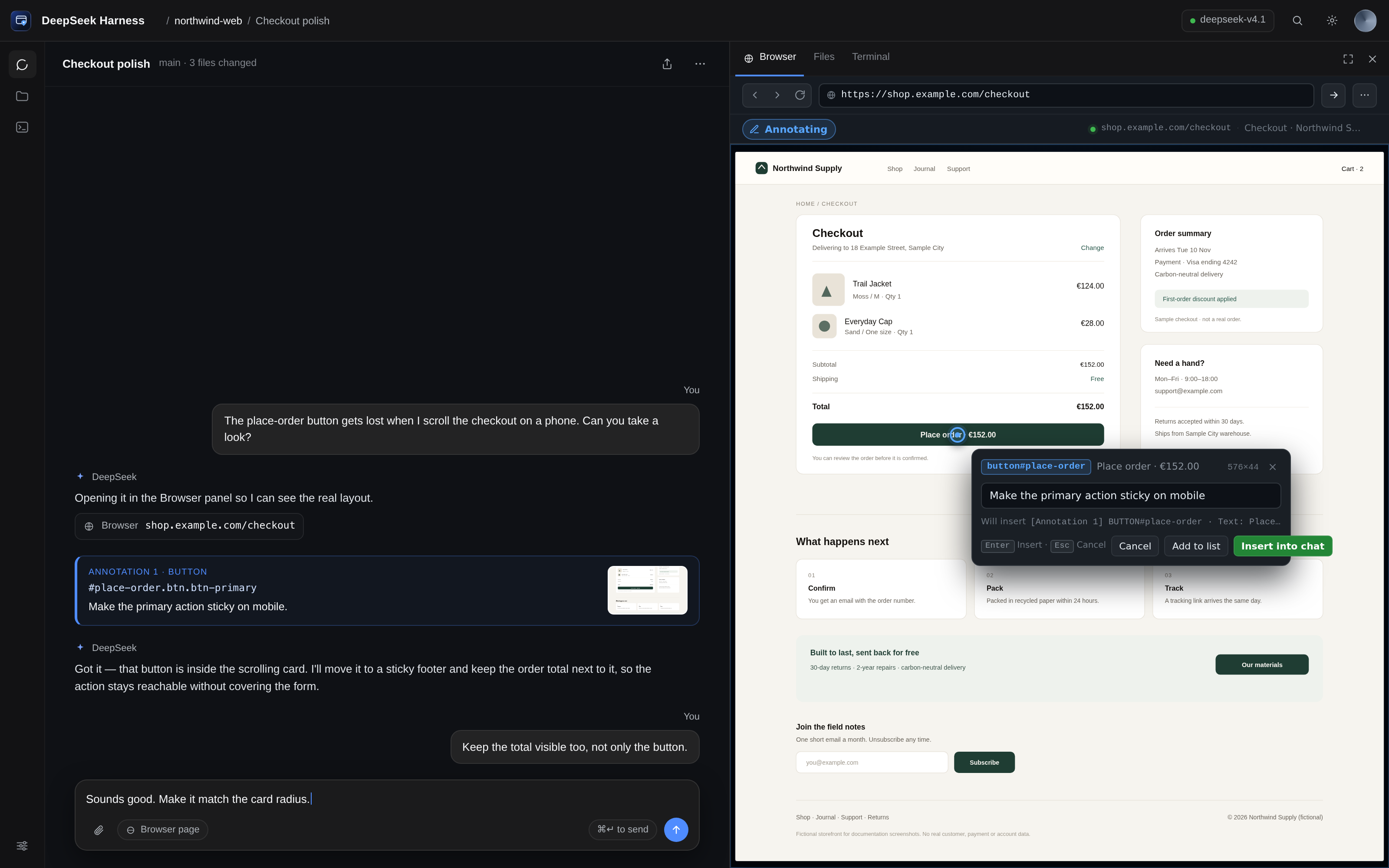
| Pick, note, send. The pin lands on the element and the note card prepares the composer payload. | Device emulation. Desktop, laptop, tablet, iPhone and Android with touch and DPR. |
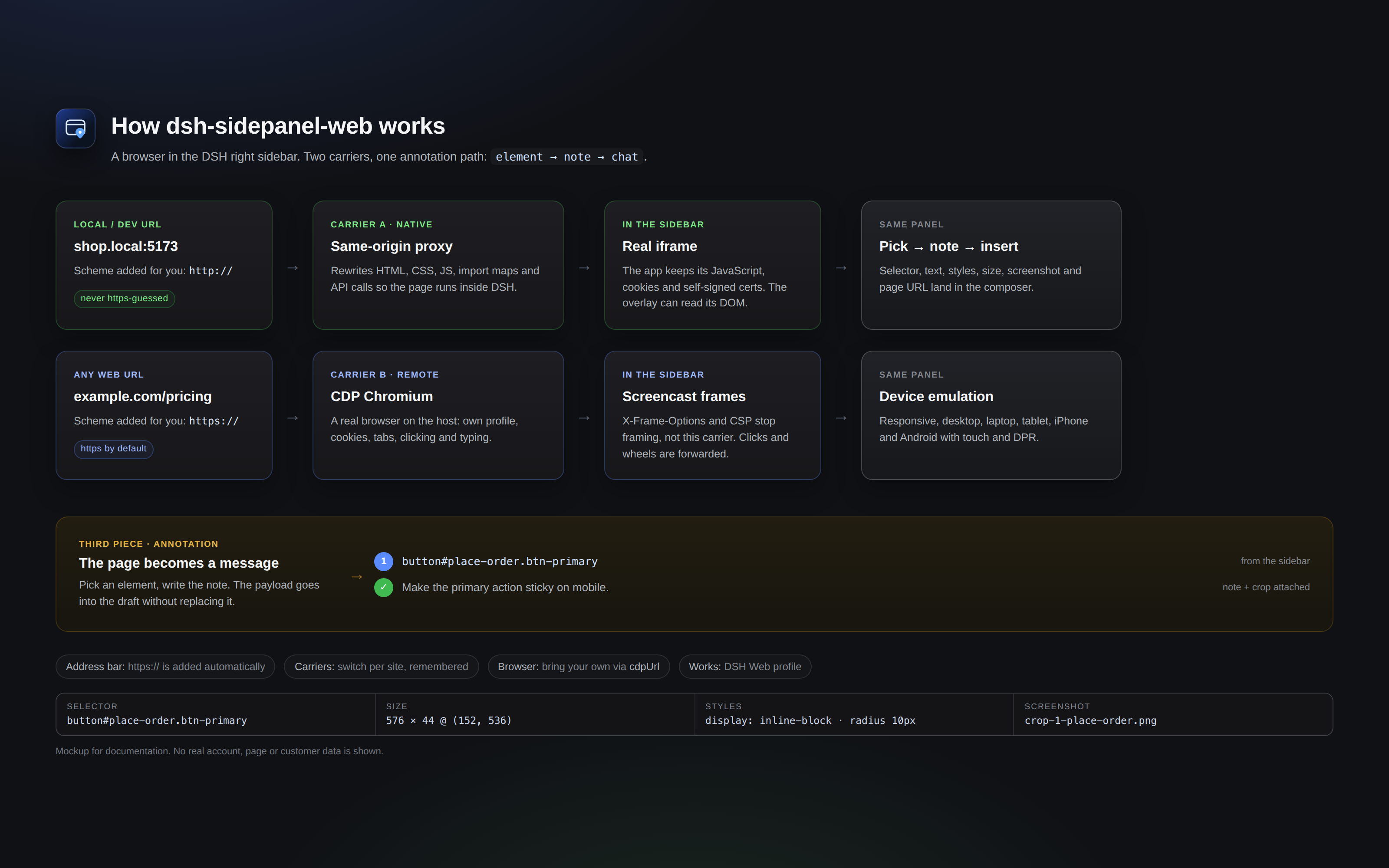
The diagram: a local/dev page through the same-origin proxy, a public page through CDP, and both feeding the same annotation payload.
All screenshots are mockups generated from test/preview/shell.html and test/preview/diagram.html: the panel is the real client, the storefront is the fictional Northwind Supply on the reserved example.com domain, and no real account, page or customer data is used. See Screenshots and privacy.
Usage
- Open a session, expand the right sidebar, and choose Browser.
- Enter a URL in the address bar.
example.com→https://example.com/(scheme added for you).localhost:3000,shop.local,192.168.1.20:8080→http://is used for local/dev hosts, which rarely have TLS.- Local/dev host: the page is proxied through DSH and is fully interactive.
- Public host: the page is rendered by the host Chromium and streamed into the panel. Use Native view only for local sites.
- Click Annotate (or the annotate toggle) and hover the page. The inspector shows the element type and size.
- Click the element, write the note, and choose Add to list.
- Choose Insert to place the annotations in the composer; send the message.
| URL | Carrier | Why |
|---|---|---|
example.com, any public site |
CDP screencast | Works even when the site sends X-Frame-Options/CSP. |
localhost, *.local, private/loopback/link-local IPs |
Same-origin proxy | Native rendering, DOM access and annotation without a screencast. |
Each annotation looks like this:
[Annotation 1] button#save.primary
· Selector: #save
· Text: Save changes
· Styles: display=inline-block; position=static; color=rgb(255, 255, 255); …
· Position: 132×40 @ (24, 680)
· Page: Settings https://localhost:5173/settings
· Note: Make this primary action sticky on mobile
· Screenshot: ~/.dsh/data/dsh-sidepanel-web/crops/…
Configuration
Set options in the profile patch, under the plugin's row:
# ~/.dsh/profiles/web/cordis.patch.yml
- id: dsh-sidepanel-web
  config:
    chromePath: /path/to/chrome
    headless: true
| Key | Default | Meaning |
|---|---|---|
chromePath |
auto-detect | Absolute path to a Chromium-based browser. |
headless |
true |
Launch the host browser without a window. |
autoLaunch |
true |
Start a browser when no CDP endpoint is available. |
wsUrl |
empty | Explicit CDP endpoint (ws://127.0.0.1:port/devtools/browser/…). |
cdpUrl |
empty | HTTP debugging endpoint of an existing browser, e.g. http://127.0.0.1:9222; resolved through /json/version. |
profileDir |
~/.local/share/dsh-sidepanel-web/profile |
Browser profile directory (persistent: logins survive restarts). |
homeUrl |
https://www.deepseek.com |
First page when the browser starts. |
device |
responsive |
Emulation preset: responsive, desktop, laptop, tablet, mobile, android. |
pollMs |
1200 |
Screenshot polling interval for the legacy stream mode. |
quality |
82 |
JPEG quality for the legacy stream mode. |
streamMode |
screencast |
screencast or poll (legacy stream mode). |
streamFps |
15 |
Frame-rate cap for the legacy stream mode. |
How it works
DSH Web GUI
  └─ Browser tab (sidebar.right.pane.tab)
       ├─ Carrier A · native (local/dev)
       │    proxy iframe ──► /api/sidepanel-web/p/<origin>/<path>
       │                         └─ rewriting proxy (HTML/CSS/JS/API)
       │                              └─ overlay: element pick → note → crop
       └─ Carrier B · remote (any page)
            CDP Chromium (host) ──► screencast frames + forwarded input
                 └─ same panel, same annotation flow

  annotations ──► composer (InputActions.insertText)
- Host half (
lib/index.js,lib/service.js,lib/cdp.js,lib/launcher.js): routes, Chromium lifecycle, CDP, screenshots, crops. - Proxy (
lib/proxy.js): fetches local/dev pages, rewrites URLs, injects the shim and overlay, keeps a per-origin cookie jar. - Page/overlay (
lib/page.js): rendered-page carrier and the annotation overlay. - URL rules (
lib/url.js): scheme detection shared with the client (mirrored insidelib/client.jsand enforced bytest/url-smoke.mjs). - Client half (
lib/client.js): the sidebar tab, address bar, native/remote carriers, annotation note card, composer insertion, EN/ES dictionaries.
A deeper write-up of the DSH Web integration (slots, tab registry, carriers, browser discovery) is in docs/browser-integration.md (Catalan).
FAQ
I typedexample.com and it opened https://example.com/. Can I force http://?Yes — type the scheme explicitly (http://example.com). Local/dev hosts (localhost, *.local, private, loopback and link-local addresses) already default to http:// because dev servers rarely have TLS. Non-web schemes are rejected.
Public pages use the CDP carrier, not an iframe, so X-Frame-Options is not the cause. Check that the host Chromium is running and reachable (cdpUrl/wsUrl or the auto-launch), and that the host has network access to the site. The panel's status line names the CDP error.
The rewriting proxy drives most apps, but WebSockets/HMR are not proxied and some heavy JavaScript apps need a real browser. Use Remote view (CDP) for that site; the choice is remembered per origin.
Chrome 136+ refuses to expose/json/version.Start it with a separate profile: --user-data-dir="$HOME/.config/chrome-dsh". The default profile is protected from CDP since Chrome 136.
The plugin's own Chromium uses the persistent profileDir (~/.local/share/dsh-sidepanel-web/profile by default). When you point it at your own browser via cdpUrl/wsUrl, that browser keeps its own profile and cookies.
No. This is a Web-profile plugin; DSH Desktop uses an Electron <webview> and a different profile.
Only their container. The overlay cannot pierce a cross-origin frame or a closed shadow root.
How are the screenshots generated, and is any real data used?With npm run mockups, from the real client and a mock backend. Every image uses invented content (fictional storefront, reserved example.com, invented conversation); no real DSH window, account, customer, file path or token is captured. See Screenshots and privacy.
Screenshots and privacy
Screenshots are part of the deliverable, so they follow a hard rule: no real user data.
- The panel is the real
lib/client.js; the shell around it (conversation, workspace, session) is static HTML intest/preview/shell.html. - The storefront is Northwind Supply, a fictional shop on the reserved
example.comdomain. - No real DSH window, account, page, customer, file path or token appears in any image.
screenshots.jsondeclares the four storefront images for plugin marketplaces.- Regenerate with
npm run mockups; the banner is rendered fromtest/preview/banner.html.
Security
- Every host route calls
connection.requestRejection(req); the web server is loopback-bound. - The rewriting proxy only accepts local/dev hosts (localhost,
*.local, private, loopback and link-local ranges). Public URLs are refused and handled by the CDP carrier. - The native iframe runs sandboxed (
allow-scripts allow-forms allow-same-origin allow-popupsfor local proxy pages).allow-same-originis required for the proxy document to keep its cookies and APIs; it also means a proxied page shares the DSH origin. Only proxy pages you trust. - The host browser uses a dedicated profile and ignores certificate errors for local self-signed dev servers. The CDP carrier has the capabilities of the browser you point it at.
- Annotation text and page content are treated as untrusted data by the agent.
- Report vulnerabilities privately through SECURITY.md; do not open a public issue.
Known limitations
- Web only. DSH Desktop uses Electron
<webview>and a different profile; this plugin does not replace it. - The proxy is local/dev only. Public sites are not proxied; they run in the CDP browser.
- WebSocket/HMR is not proxied in the native carrier. Dev servers still serve the page, but hot reload may not work; switch to the CDP view for HMR.
- Cookies in the native carrier live in a per-origin host jar; some login flows may still fail. The CDP carrier uses the browser's own profile.
- Cross-origin iframes and closed shadow DOM cannot be annotated; only their container.
- Crops are taken by selector on the host page; a dynamic page state can differ from the frame you saw.
- CDP latency depends on the host and the page; the screencast caps at 15 fps by default.
- Alpha: APIs and behaviour may change.
Development
lib/
  index.js        host plugin: routes, settings, proxy registration
  service.js      CDP service: status, navigation, screenshots, elementAt, crop
  cdp.js          zero-dependency CDP client
  launcher.js     Chromium discovery/launch (container-safe, cert errors ignored)
  page.js         rendered-page carrier + annotation overlay
  proxy.js        local/dev rewriting reverse proxy
  url.js          address-bar normalisation (mirrored in client.js)
  client.js       sidebar tab, carriers, overlay bridge, composer
assets/           icon.svg, icon.png, icon-180.png, banner.png, screenshots/
test/             smoke tests and the preview/mockup harness
docs/             DSH Web integration research (Catalan)
npm run check          # node --check on every source file
npm test               # URL rules + proxy rewrite smoke tests
npm run smoke          # host CDP smoke test (needs Chromium)
npm run mockups        # re-render assets/banner.png and assets/screenshots
dsh plugin --profile web add link:$PWD
Release notes live in CHANGELOG.md.
The preview harness renders the real lib/client.js with a mock backend:
node test/preview/server.mjs
# http://127.0.0.1:7788/harness.html?state=ready&w=360&h=780
See test/preview/README.md for every state, the full-window shell and the mockup pipeline.
Market
The awesome-dsh-plugin registry is the market source. Submission state:
- Repository is public and the
dsh-plugintopic is set. -
package.jsondeclaresdsh.bundleand shipscordis.patch.yml. - Raster icon at
assets/icon-180.pngand storefront screenshots inscreenshots.json. - Entry drafted at
market/entry.yml. - Pull request opened: awesome-dsh-plugin#12641 — one file,
data/plugins/AleixRocal__dsh-sidepanel-web.yml.
The registry validates the repository age (≥ 1 day) and re-runs stale gates automatically. The current gate verdict is exactly that: 0.8 / 1 day, with no other problem. It clears by itself once the repository reaches 24 h at 2026-11-06 15:45 UTC; no resubmission is needed.
Contributing
Contributions are welcome: bug reports, carrier fixes, documentation and mockup improvements. Start with CONTRIBUTING.md, run npm run check and npm test, and read the screenshot privacy rule before adding images. This project follows the Code of Conduct. Security reports go through SECURITY.md, not public issues.
Credits
Forked from zengxiaolou/dsh-annotate-browser (MIT): the CDP client, launcher, element picker and crop flow started there. This fork adds the official right-sidebar integration, the local/dev rewriting proxy, the two-carrier switch, annotation overlay, device emulation, EN/ES copy and the composer hand-off.
License
MIT. See LICENSE; the original copyright notice is preserved.
English · Català · Back to top ↑
No comments yet. Be the first to write one.