
Archive hides a conversation. Delete removes it.
COMMUNITY PLUGIN · NOT OFFICIAL · MIT · DSH 0.2.x
Install · Use · How it works · Safety · FAQ
This is a community plugin, not an official DeepSeek product.
Session Delete is an independent project. It is not affiliated with, endorsed by, or supported by DeepSeek AI, and it is not part of DeepSeek Harness. DeepSeek Harness and DeepSeek are names and marks of their respective owners. You are installing code that deletes files on purpose. Read Safety first.
Why this exists
DeepSeek Harness archives sessions. Archiving is useful — the row leaves the
sidebar, the session can come back — but it is not removal. The compressed log
stays under ~/.dsh/sessions/, the projection checkpoint stays under
~/.dsh/storages/session_projcache/, and the workspace keeps accounting for an
id you may never open again.
Session Delete adds the missing verb.
| Archive | Delete | |
|---|---|---|
| Row leaves the sidebar | ✅ | ✅ |
| Conversation log on disk | stays forever | removed |
| Projection cache | stays | removed |
| Workspace accounting / pin / archive entry | kept | removed |
| Can be restored | unarchive | no |
Archive is untouched. Delete is a second, explicit choice at the bottom of the same menu, behind a confirmation — one Session at a time, or several in one pick.
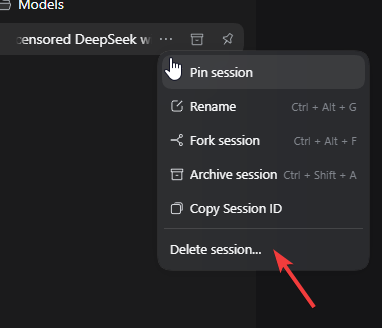
The delete group sits after the shipped actions, behind a hairline. (Screenshot from 0.1.0; 0.2.0 adds Delete multiple sessions….)
Install
Requires DeepSeek Harness
0.2.x (tested on 0.2.1-rc.1). Desktop and the Web UI are both supported.
The repository is the install unit. The npm package inside it is
dsh-plugin-session-delete; the spec you paste is the GitHub address.
1. From the Plugins page (recommended)
Open the sidebar and choose Plugins.
Install a plugin and paste:
github:Adolanium/dsh-session-deleteInstall it. The bundle is enabled by default.
Refresh the DeepSeek Harness window (
Ctrl+R/Cmd+R). The browser half is loaded lazily, so the menu entry appears after a reload.
No build permission is needed: the package ships plain JavaScript, has no
prepare script, and has no runtime dependencies.
2. With the dsh CLI
If you boot profiles yourself (Web, headless, or a stopped Desktop), the same spec installs into a named profile:
dsh plugin --profile desktop add github:Adolanium/dsh-session-delete
dsh appends the bundle to the profile's dsh.profile.bundles because the
package declares dsh.bundle. Start DeepSeek Harness afterwards, then refresh
the window.
Pin the install if you want it frozen to this release:
dsh plugin --profile desktop add github:Adolanium/dsh-session-delete#v0.2.0
Remove it with:
dsh plugin --profile desktop remove dsh-plugin-session-delete
Running the CLI against the
desktopprofile while the Desktop app is running is supported by the profile lock, but the Plugins page is the smoother path there — it owns the same operation and reports activation status.
3. From a checkout (development)
git clone https://github.com/Adolanium/dsh-session-delete.git
cd dsh-session-delete
pwsh -File scripts/install-dev.ps1
That links the checkout into ~/.dsh/profiles/desktop/node_modules and adds the
Loader entry to the profile patch (with a timestamped backup). Undo with
scripts/uninstall-dev.ps1.
The profile reloads configuration live, so a linked package activates without a restart. HMR does not watch module roots, so code edits need a restart.
Use
Open a session row's ⋯ menu and choose Delete session….
The dialog names the conversation and explains that the log and its cached projections will be removed. Delete performs the removal; Cancel leaves everything alone.
What happens next depends on the session:
| Session state | Result |
|---|---|
| Cold — no live Agent owns it | Removed immediately. The row leaves the list; the dialog closes. |
| Live — open in this app, or a running turn owns it | The dialog explains that the log is still in use and offers Delete on next start. |
| Unknown id | Rejected. Nothing is touched. |
Delete on next start
A live session cannot be pulled out from under its Agent, so the second option queues it instead:
- the id is written to
~/.dsh/plugin-session-delete/pending.json; - the session is archived (best effort) so the row disappears from the default list;
- the next DeepSeek Harness start retries the removal, when the write handle is free;
- unarchiving the session cancels its queued removal — the archive is the visible "pending removal" state.
A queued id whose session is already gone is dropped silently. A queued id that is still in use stays queued for the next start.
Delete several at once
Open any row's ⋯ menu and choose Delete multiple sessions….
The picker lists every Session in the catalog, newest first. It preselects the row you opened it from, omits blank provisional rows and subagent-origin Sessions, and offers Select all and Clear. Delete selected (N)… moves to a confirmation that names the Sessions; Delete permanently removes the whole selection in one Host call.
The result view reports one outcome per Session:
| Outcome | Meaning |
|---|---|
| Deleted | The log, projection cache, and accounting are gone. |
| Still open in the app | A live Agent owns it. Delete N on next start queues the whole remainder through the same pending file. |
| Already gone | The id no longer resolved; the request is satisfied. |
| Could not be removed | A real failure (for example a storage root mismatch); its message is shown and the rest of the batch still ran. |
One action removes up to 200 Sessions. The Host de-duplicates ids, keeps the single-Session contract unchanged, and never lets one failed Session abort the rest of the batch.
What Delete removes
For each session id, the Host removes:
- the session directory under
~/.dsh/sessions/<project>/<session-id>/, including every format generation (session.vN.jsonl.zstd) and the lock artifact; - the projection-cache record from the
session_projcachedomain, through the domain itself, so an in-memory row cannot survive the delete; - the workspace accounting slot, the global pin, and the archive entry.
It deliberately leaves:
- attachments — content-addressed under
~/.dsh/attachmentsand possibly shared with other sessions; - subagent child sessions — separate ids, hidden from the sidebar by design; delete them individually;
- the SQLite search index, if your composition uses
dsh-session-query-sqlite— it reconciles deleted sources on the next search; - derived rows in other domains (telemetry, titles) — they are keyed by an id that no longer resolves and are ignored.
Safety model
Deleting a file is easy. Deleting the right file while the app is running is the hard part. The plugin is built around four rules:
- One writer. Before touching anything, the Host takes the persistence write handle for the session and immediately closes it. A live Agent, another DSH process, or a crashed-but-held lock makes that open fail, and the delete is refused. The handle is the proof of "nobody is using this". A batch takes that handle once per Session, so a live member never blocks the cold ones.
- Loopback only. The route is rejected for non-loopback peers. A present
Originmust be the Web client's origin or the Desktop shell'sdsh-app://app; a cross-sitefetchcannot reach it (JSON content type forces a preflight the route does not answer). - Strict identity. The id must match
^[A-Za-z0-9][A-Za-z0-9._-]{0,127}$, the target directory must be named exactly that id, and it must contain a canonicalsession[.vN].jsonl[.zstd]log. A malformed id cannot address another path. - No surprises. If the materialized log is not under the configured root, the Host refuses and says so instead of deleting accounting and leaving the log behind. Cleanup failures are logged; the response reports what happened.
There is no network access, no telemetry, and no background process. The plugin reads and writes local files through the Host's own services.
Configuration
All fields are optional. Defaults match a stock installation.
| Field | Default | Meaning |
|---|---|---|
dshHome |
$DSH_HOME, else ~/.dsh |
Data root used to derive the two roots below. |
sessionsRoot |
<dshHome>/sessions |
Session persistence root — the root of dsh-session-persistence-jsonl. |
storagesRoot |
<dshHome>/storages |
Storage root used only as a fallback when the storageDomain service is absent. |
Set these in the profile entry if you run a non-default persistence root:
- id: session-delete
  name: dsh-plugin-session-delete
  config:
    sessionsRoot: /srv/dsh/sessions
Uninstall
- Plugins page: open the plugin and remove it.
- CLI:
dsh plugin --profile desktop remove dsh-plugin-session-delete. - Dev link:
pwsh -File scripts/uninstall-dev.ps1.
Queued removals stay in ~/.dsh/plugin-session-delete/pending.json; delete that
file if you want to forget them.
How it works
Session row menu
      │  "Delete session…"            "Delete multiple sessions…"
      ▼                                       ▼
Confirmation dialog                    Picker → confirmation dialog
(browser half, shell.overlay)          (browser half, shell.overlay)
      │  POST { sessionId, mode }            │  POST { sessionIds, mode, titles }
      └──────────────┬───────────────────────┘
                     ▼
Host half (one route)
      ├─ write-handle gate ────────► live?  → per-Session: in-use / 409
      ├─ remove session directory
      ├─ drop session_projcache record
      └─ detach / unpin / unarchive
      ▼
Client refreshes the session baseline → the rows disappear
The Host half is one Cordis plugin (lib/index.js) that injects
sessionPersistence and workspaceRegistry and registers one exact route on
webServer. The browser half (lib/client.js) is a hand-written module-loader
bundle: two entries in sidebar.workspaces.session.menu.item, two dialogs in
shell.overlay, and nothing else.
Compatibility
- DeepSeek Harness 0.2.x (tested on
0.2.1-rc.1, Desktop and Web). - Windows, macOS, and Linux.
- No dependencies, no build step, no native modules.
- The plugin uses public Host services (
sessionPersistence,workspaceRegistry,storageDomain) and public client slots. It does not monkey-patch, fork, or modify DeepSeek Harness.
Developer preview means breaking changes. If a release moves one of those seams, the plugin fails soft: a missing service keeps it inactive, and a failed delete returns an error instead of half-cleaning a session.
Development
node --test
Thirty tests, no dependencies:
- Host (
test/host.test.mjs) — the real plugin against a temporary DSH home, a fake persistence seam, a fake workspace registry, and direct HTTP request/response objects. Covers the cold/live/queued paths, batch outcomes and de-duplication, id and origin checks, the location guard, and the unarchive-cancels-removal rule. - Browser (
test/client.test.mjs) — the reallib/client.jsloaded through a stub of the module-loader contract; renders both menu entries and both dialogs and drives the picker, confirmation, batch, and deferred flows with a stubfetch.
The artwork is generated with image models and composed with
sharp; the source banner lives in assets/.
FAQ
Does this replace Archive? No. Archive and its unarchive flow are unchanged. Delete is an additional, explicit action.
Can I delete several sessions at once? Yes. Delete multiple sessions… in any row's menu opens the multi-select picker; one action removes up to 200 sessions and reports each outcome.
Can I undo a delete? Not for an immediate removal. For a queued one, unarchive the session before the next start.
Why does it say the session is still open? The session has a live Agent in this Host. Use Delete on next start; the next launch removes it.
Why can't it find my session?
Your persistence root is not ~/.dsh/sessions. Set sessionsRoot to the root
used by dsh-session-persistence-jsonl.
Does it delete files outside ~/.dsh?
No. Only the session's own directory under the configured root, its
session_projcache record, and its registry entries.
Does it work in the browser-only Web UI? Yes. The browser half calls the same-origin route; the Host enforces loopback and origin checks.
License
MIT.

Session Delete
A community plugin for DeepSeek Harness. Not official. Not reversible.
Community project
Session Delete is an independent community plugin. It is not affiliated with, endorsed by, sponsored by, or officially associated with DeepSeek AI or the DeepSeek Harness project. DeepSeek, DeepSeek Harness, and
dshare names and marks belonging to their respective owners. Use it at your own risk; it deletes data by design.
No comments yet. Be the first to write one.