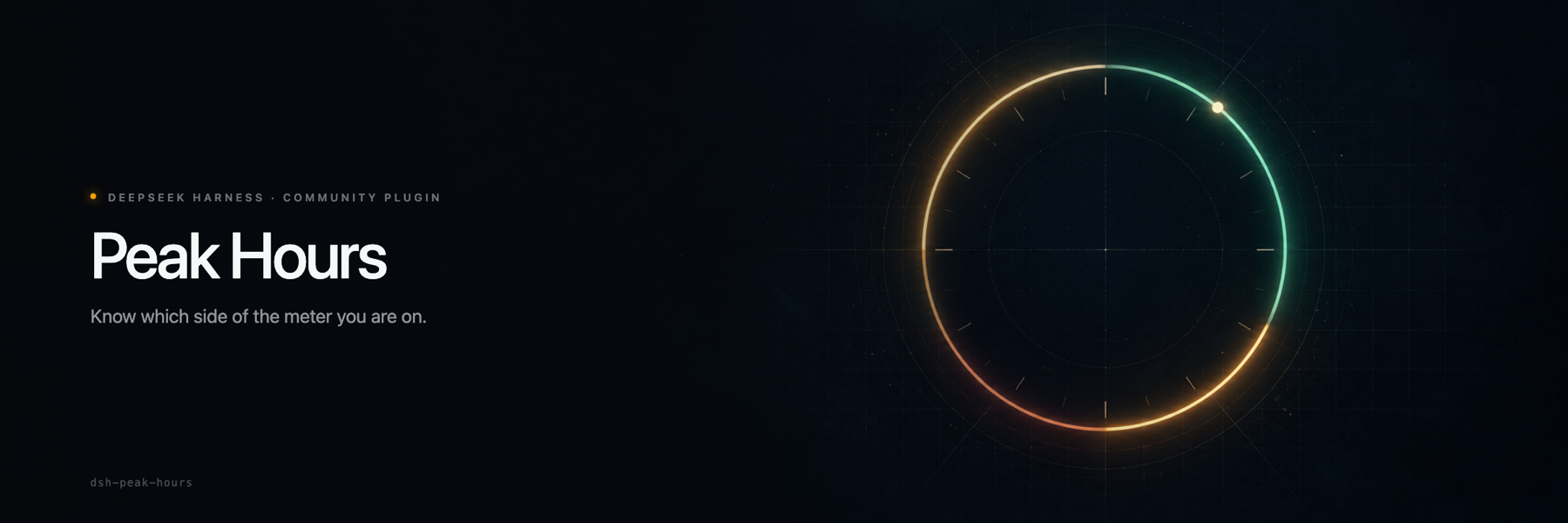
DeepSeek charges half price outside peak hours. This tells you when that is.
COMMUNITY PLUGIN · NOT OFFICIAL · MIT · DSH 0.2.x
Install · Use · How it works · Timezones · FAQ
This is a community plugin, not an official DeepSeek product.
Peak Hours is an independent project. It is not affiliated with, endorsed by, or supported by DeepSeek AI, and it is not part of DeepSeek Harness. DeepSeek Harness and DeepSeek are names and marks of their respective owners.
Why this exists
DeepSeek's API has two prices. Off-peak costs half of the peak rate. The windows are written in UTC, on a Beijing calendar, in a paragraph on the pricing page.
That is the correct way to define the policy and a terrible way to read it from Tel Aviv at 17:35. You do the arithmetic in your head, guess, or notice the difference on the invoice later.
Peak Hours puts one badge in the composer bar. It says Peak or Off-peak and how long the current window has left. Click it and you get the day as a clock face, the schedule in your own timezone, and the exact moment the price changes.
The badge only appears while the session's selected model is served by DeepSeek itself — the DeepSeek and DeepSeek Account provider groups. A model routed through another provider bills on that provider's terms, so the plugin never tells you it is off-peak on DeepSeek's schedule.
| Peak | Off-peak | |
|---|---|---|
| Rate | full price | half price |
| UTC | 01:00–04:00, 06:00–10:00 | every other hour |
| Beijing | 09:00–12:00, 14:00–18:00 | nights, weekends, holidays |
| Days | Monday to Friday, not a Chinese public holiday | weekends and holidays, all day |
The plugin answers one question: which column am I in, and for how much longer.
What it looks like
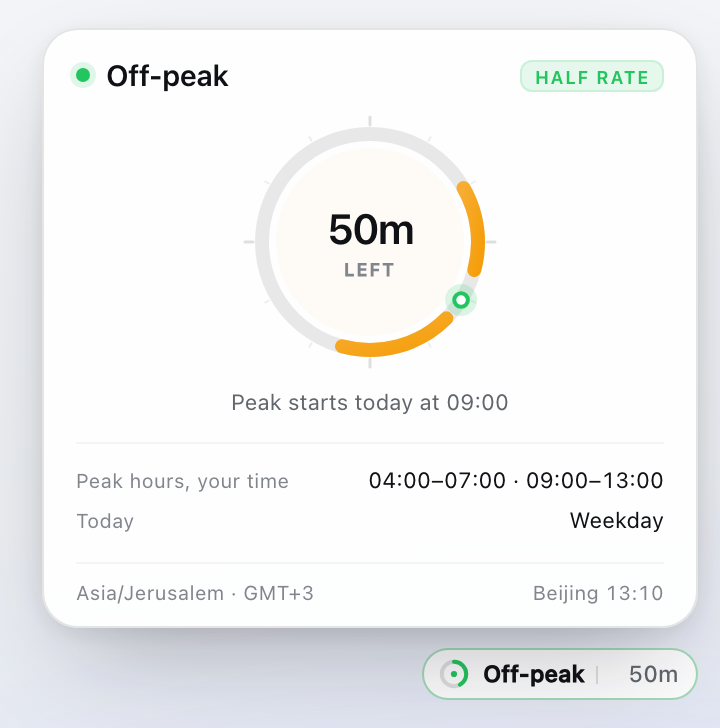
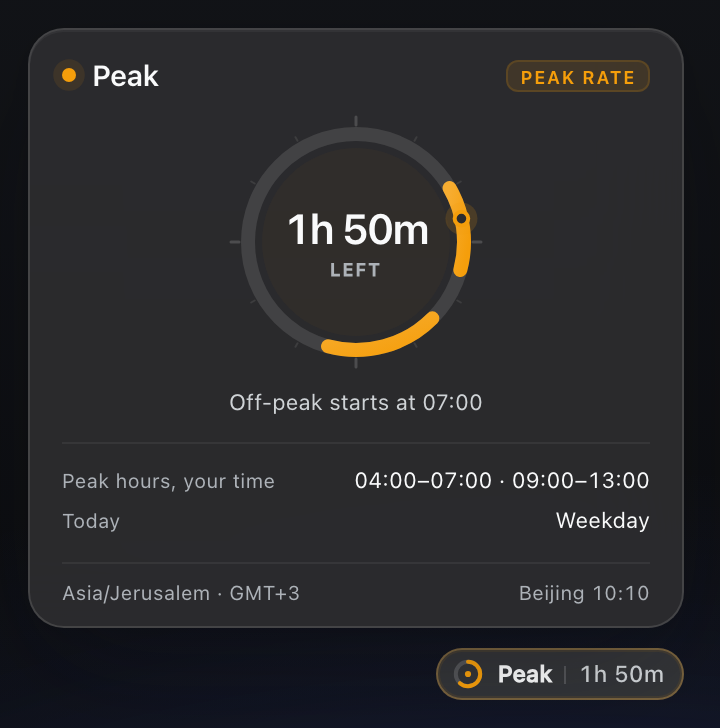
Light and dark. The 24-hour face is your local day, with every peak window in amber and a marker for now.
The badge is small enough to ignore while you type. The ring drains over the current window, so a glance tells you whether you have minutes or hours.
| Off-peak | Peak | |
|---|---|---|
| Badge accent | green | amber |
| Ring | drains over the off-peak stretch | drains over the peak window |
| Panel chip | half rate | peak rate |
Install
Requires DeepSeek Harness
0.2.x (tested on 0.2.1-rc.1). Desktop and the Web UI are both supported.
The repository is the install unit. The package inside it is dsh-peak-hours;
the spec you paste is the GitHub address.
1. From the Plugins page (recommended)
Open the sidebar and choose Plugins.
Install a plugin and paste:
github:Adolanium/dsh-peak-hoursInstall it. The bundle is enabled by default.
Refresh the DeepSeek Harness window (
Ctrl+R/Cmd+R). The browser half loads lazily, so the badge appears after a reload.
No build permission is needed. The package ships plain JavaScript, has no
prepare script, and has no runtime dependencies.
2. With the dsh CLI
dsh plugin --profile desktop add github:Adolanium/dsh-peak-hours
dsh appends the bundle to the profile's dsh.profile.bundles because the
package declares dsh.bundle. Start DeepSeek Harness afterwards, then refresh
the window.
Pin the install to this release:
dsh plugin --profile desktop add github:Adolanium/dsh-peak-hours#v0.1.1
Remove it with:
dsh plugin --profile desktop remove dsh-peak-hours
3. From a checkout (development)
git clone https://github.com/Adolanium/dsh-peak-hours.git
cd dsh-peak-hours
./scripts/install-dev.sh
That links the checkout into ~/.dsh/profiles/desktop/node_modules and adds the
plugin's Loader entry to the profile patch, with a timestamped backup. Undo it
with ./scripts/uninstall-dev.sh.
The profile reloads configuration live, so the Host half activates without a restart. The browser half is loaded lazily: refresh the window for code changes.
Use
Open any session. The badge sits in the composer bar, just left of the model selector.
It follows the model selector: pick a model from DeepSeek or DeepSeek Account and the badge appears; pick a model from any other provider and it stays out of the way. On a fresh session it follows the default model the composer shows.
The badge shows the current window and the time left. It recalculates every second, so it never drifts.
The panel opens on click:
- the countdown, to the second;
- a 24-hour face of your local day, with peak windows in amber and a marker for now;
- the next change, for example
Peak starts today at 09:00; - the full schedule converted into your timezone, and the reason for today
(
Weekday,Weekend, or a holiday name); - your timezone with its current offset, and the same moment in Beijing.
Esc or a click outside closes it. The badge keeps ticking while the panel is
closed.
Below one hour the panel counts seconds. Above one hour it counts minutes, which is what you want when the answer is "two days".
How it works
your clock
    │
    ├─ Beijing calendar: weekday? public holiday?
    ├─ UTC windows: 01:00–04:00, 06:00–10:00
    ▼
countdown  +  local-day arcs
Three rules keep it honest:
- The policy is evaluated where it is written. Peak windows are UTC
instants. Whether a day is a peak day is a Beijing calendar question, so the
plugin asks the Beijing calendar, not your
Dateobject. A Friday 23:00 in Los Angeles is a Saturday in Beijing, and the badge says so. - The rendering is yours. Those instants are formatted with
Intlin your own zone. Daylight saving time is handled by the platform, not by fixed offsets, and a 23 or 25 hour local day still draws correctly on the face. - No zone, no pretending. If the runtime cannot resolve a timezone, the
plugin falls back to Beijing time and labels the panel
Beijing time · fallback. It never presents a guess as your local time.
The badge is one registration in conversation.input.right. It reads the
composer's own model directory — the same store the model selector renders
from, including the catalog default before a session has picked a model — and
renders only when that selection is a DeepSeek direct route
(deepseek-official or deepseek-account). A session that remembers a direct
selection still counts when the model catalog cannot be read. It uses the
Harness theme tokens for every surface and text color, so it follows your
theme, including custom ones. There is no Host route, no network request, and
no state written to disk.
Timezones
Peak windows are the same instants everywhere. The clock times are not:
| Your zone | Peak hours, local time |
|---|---|
| Beijing (UTC+8) | 09:00–12:00 · 14:00–18:00 |
| Jerusalem (UTC+3) | 04:00–07:00 · 09:00–13:00 |
| Kolkata (UTC+5:30) | 06:30–09:30 · 11:30–15:30 |
| Los Angeles (UTC-7) | 18:00–21:00 · 23:00–03:00 |
The second Los Angeles window crosses local midnight. The panel prints it as
23:00–03:00 and the day face shows the part that falls inside today, because
that is what your clock does.
The timezone comes from the operating system or browser. It is read when the badge appears, so after a flight or a manual timezone change, refresh the window.
The holiday calendar
Chinese public holidays are off-peak all day. The plugin ships the official 2026 schedule from 国办发明电〔2025〕7号:
| Holiday | Dates |
|---|---|
| New Year's Day | 1 to 3 January |
| Spring Festival | 15 to 23 February |
| Qingming | 4 to 6 April |
| Labour Day | 1 to 5 May |
| Dragon Boat | 19 to 21 June |
| Mid-Autumn | 25 to 27 September |
| National Day | 1 to 7 October |
China designates 14 February, 28 February, 9 May, 20 September, and 10 October in 2026 as make-up workdays. They fall on a Saturday or Sunday, so the Monday to Friday policy leaves them off-peak. The plugin does not treat them as working days.
The State Council publishes the next year's schedule each November. When it
does, add the spans to HOLIDAYS in lib/client.js and update
the count in the test. Until then, a date outside the table follows the weekday
rule.
What it does not do
- It does not change what you pay or which model you use.
- It does not claim DeepSeek's window for another provider: with a non-DeepSeek model selected, the badge is absent.
- It cannot see where a DeepSeek route points. If
deepseek-officialis configured with a custombaseURL, the browser still sees the DeepSeek provider and the badge follows DeepSeek's published schedule. - It does not call the DeepSeek API, and it does not store your usage.
- It does not add a route, an event, or a background process.
- It does not need a build step, a bundler, or a dependency.
Compatibility
- DeepSeek Harness 0.2.x (tested on
0.2.1-rc.1, Desktop and Web). - macOS, Windows, and Linux.
- Chromium 111 or newer, for
color-mix()in the theme surfaces. - One public slot:
conversation.input.right. Theme tokens only; no Harness primitives, no monkey-patching, no DOM outside the component. - Reads the composer's model directory (
modelDirectories) and the session'smodelSelectionprojection. If neither resolves a model, the badge stays absent rather than guessing.
Developer preview means breaking changes. If a release moves the slot, the plugin fails soft: the registration disappears and the rest of the composer keeps working.
Development
node --test
The suite runs with node --test and has no dependencies:
- Engine and wiring (
test/engine.test.mjs) cover window boundaries, the Friday to Monday carry, holidays, timezone conversion, the fallback, 25-hour DST days, duration formatting, the locale dictionaries, the slot registration, and the provider gate (direct routes render, third-party and unknown selections do not). Every case uses a fixed instant, so the suite is deterministic. - Packaging (
test/manifest.test.mjs) checks the manifest, the bundle patch, the client registration id, and every image path in this README.
The preview images in this README are rendered from the shipped component with the Harness theme tokens. The banner art is generated with an image model and composed with the wordmark.
FAQ
Does this change my bill? No. It reads the clock and the published policy. Billing stays with DeepSeek.
Why did the badge disappear when I switched models? It only appears for models DeepSeek serves directly — the DeepSeek and DeepSeek Account groups. Another provider invoices on its own terms, so a DeepSeek off-peak claim would describe a bill you are not paying.
Why is peak at 04:00 for me? Because the policy is written in UTC. 01:00 UTC is 04:00 in Jerusalem. The panel shows the schedule in your zone and the current time in Beijing next to it.
Why did the countdown jump by an hour? Daylight saving time ended or started in your zone. The windows are fixed instants; your wall clock is not.
I'm travelling. Will it follow me? It follows the timezone your operating system reports when the badge appears. Refresh after the change.
Why does it say Beijing time? The runtime did not expose a usable timezone. The plugin falls back to Beijing rather than showing you the wrong local time.
What about 2027? The official schedule is not published yet. The weekday rule still applies. Add the new spans when the notice lands, or open an issue and I will.
Can I turn it off?
Remove the plugin from the Plugins page, or run scripts/uninstall-dev.sh for a
linked checkout. The composer returns to its stock layout.
Does it work in the browser-only Web UI? Yes. It computes everything locally, so there is no Host route to reach.
License
MIT.
Peak Hours
A community plugin for DeepSeek Harness. Not official.
Community project
Peak Hours is an independent community plugin. It is not affiliated with, endorsed by, sponsored by, or officially associated with DeepSeek AI or the DeepSeek Harness project. DeepSeek, DeepSeek Harness, and
dshare names and marks belonging to their respective owners.
No comments yet. Be the first to write one.