dsh-plugin-selection-comments
A DeepSeek Harness Web GUI plugin that brings ChatGPT-desktop-style selection comments and an independent side conversation window to the Harness chat.
一个把 ChatGPT 桌面端的划词评论 和 独立悬浮会话窗口 带到 DeepSeek Harness Web GUI 的插件。
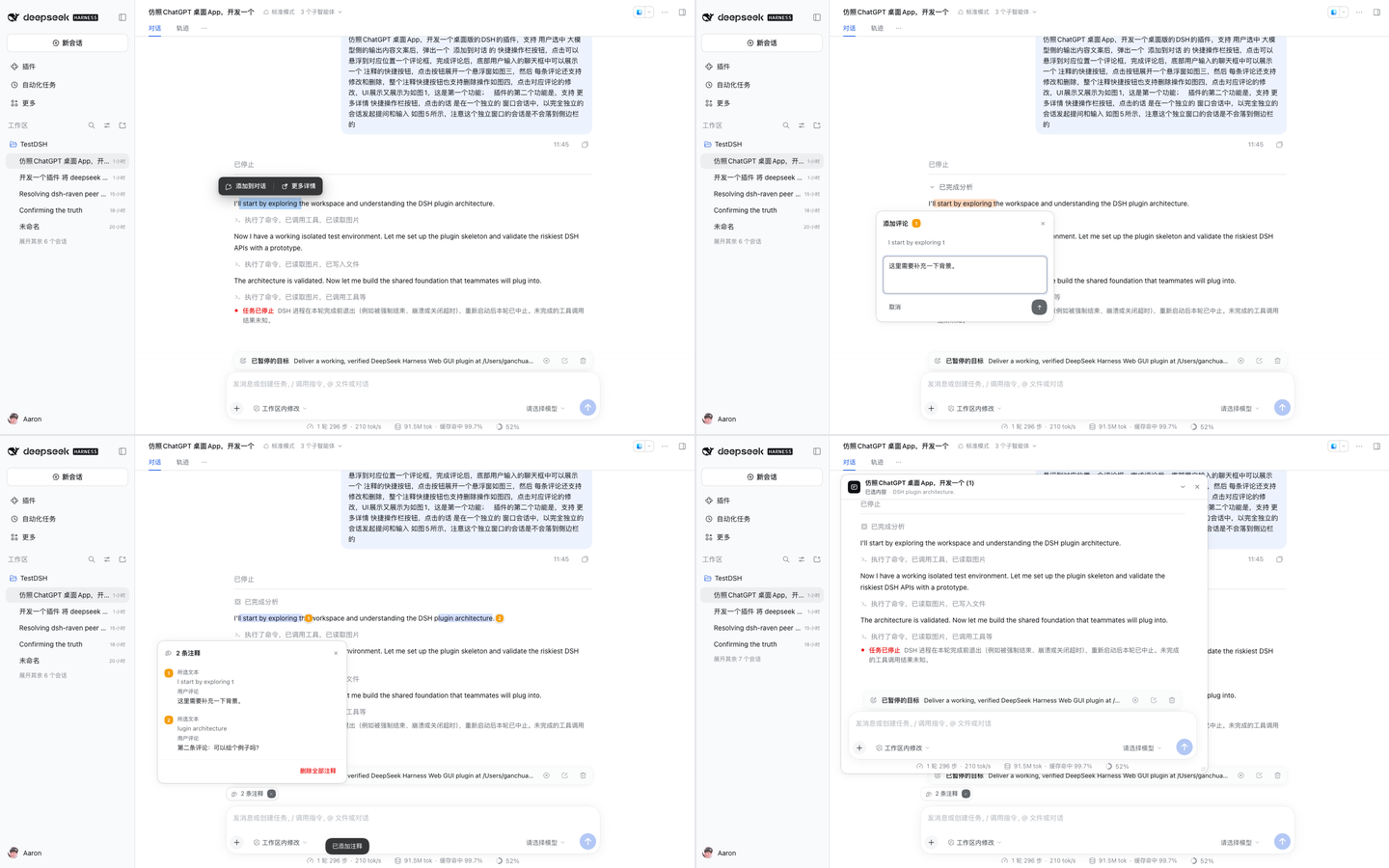
Screenshots / 界面
 |
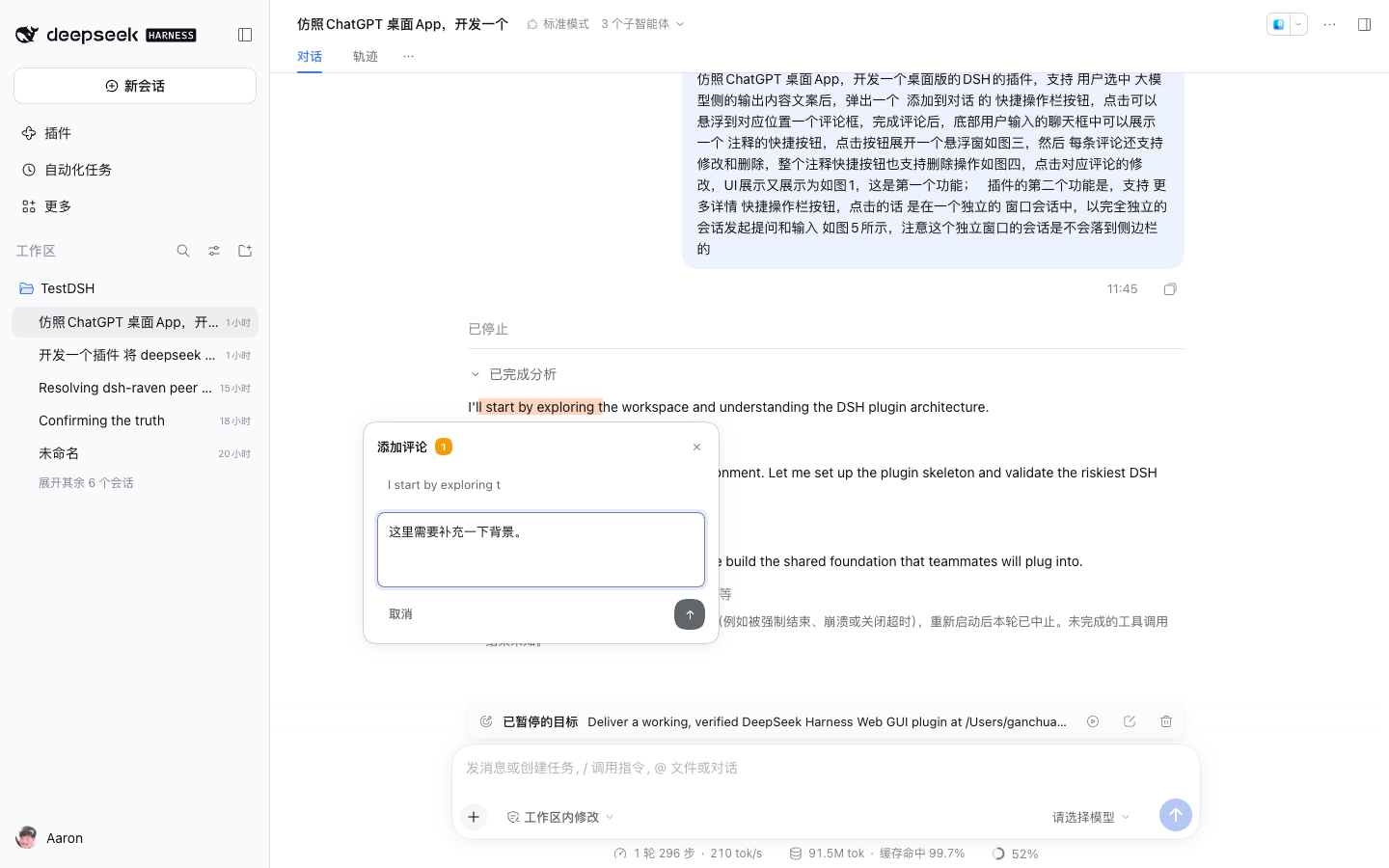 |
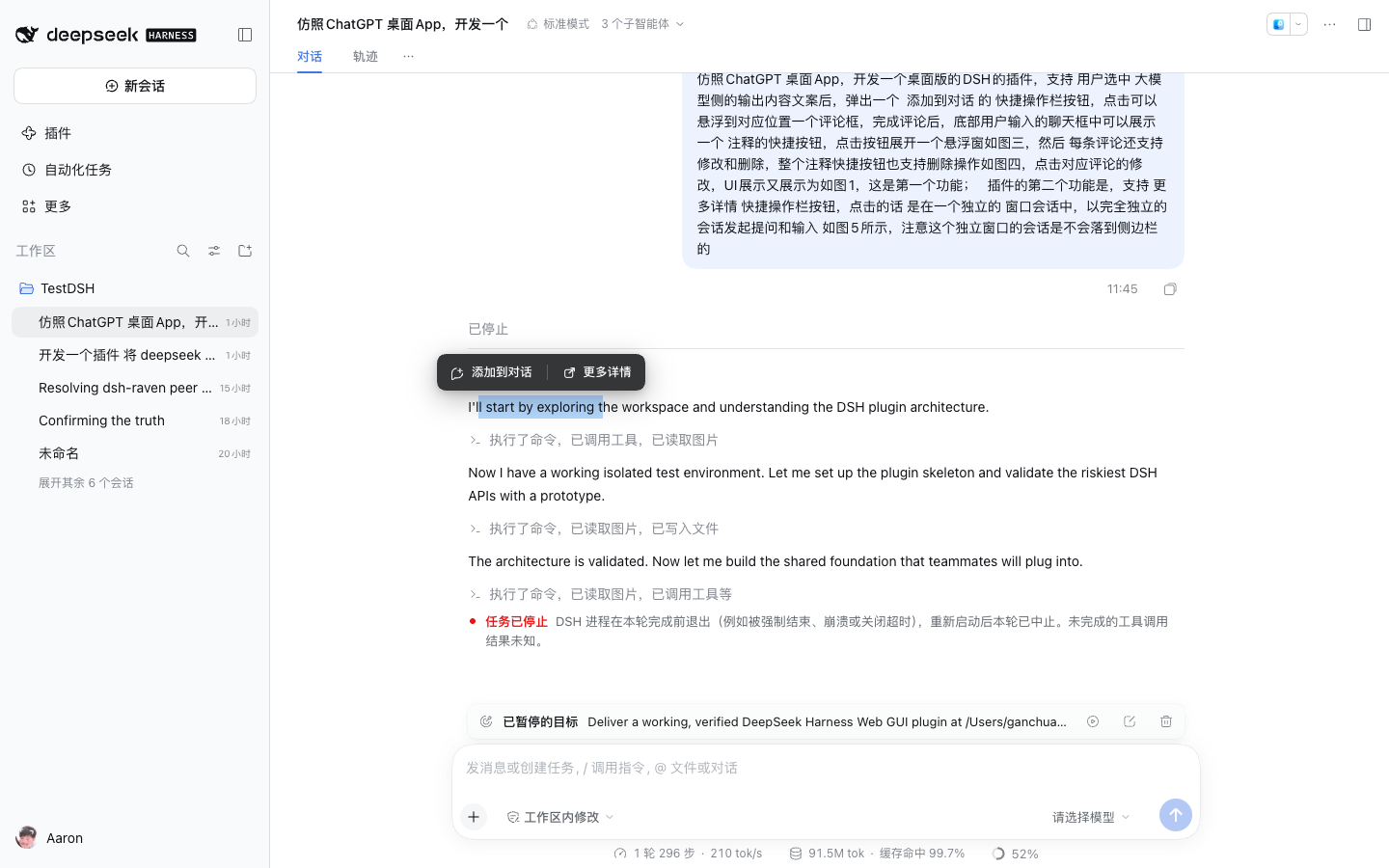
| 选中模型输出后的快捷操作栏 / quick-action toolbar | 悬浮评论框 / anchored comment editor |
 |
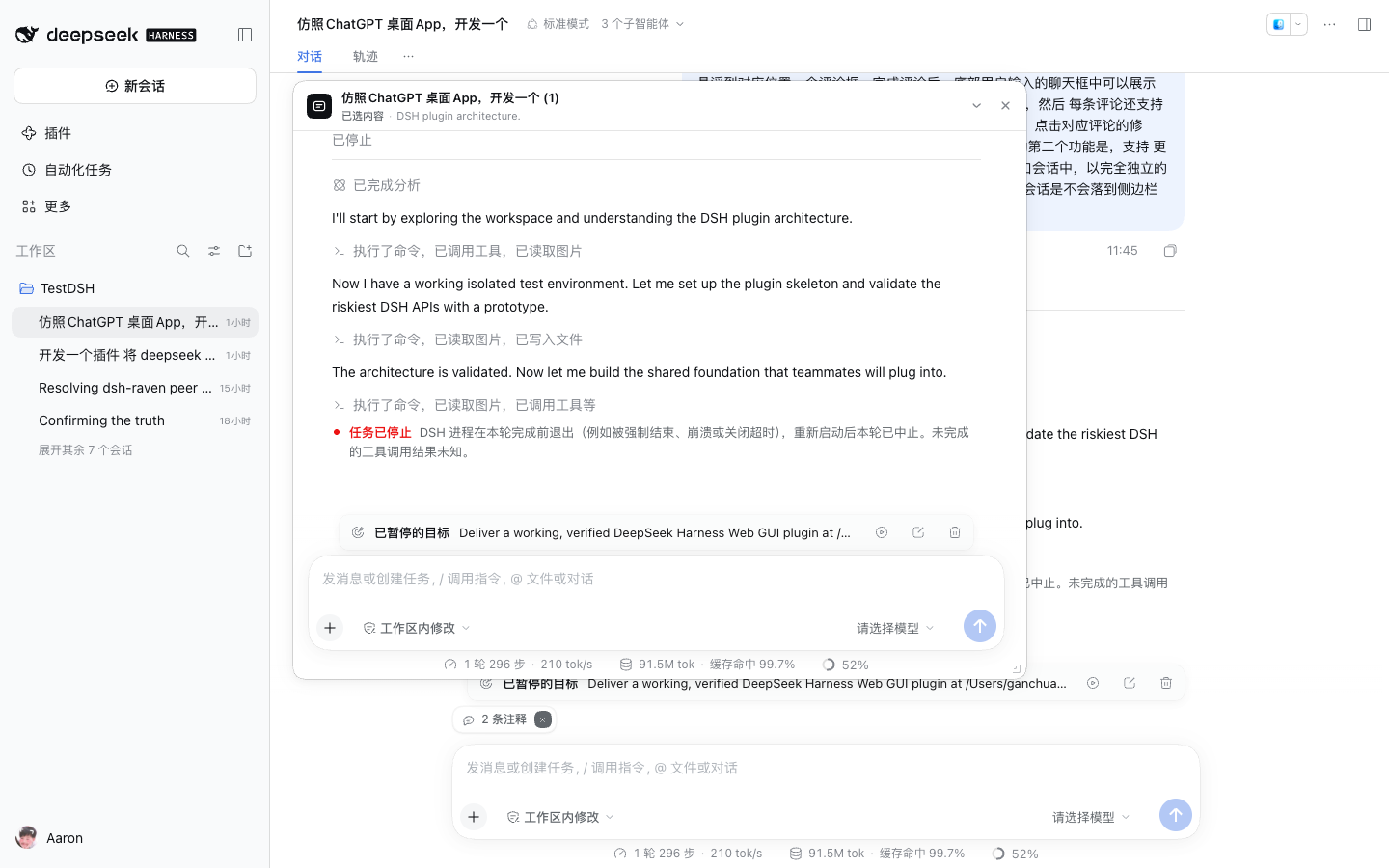 |
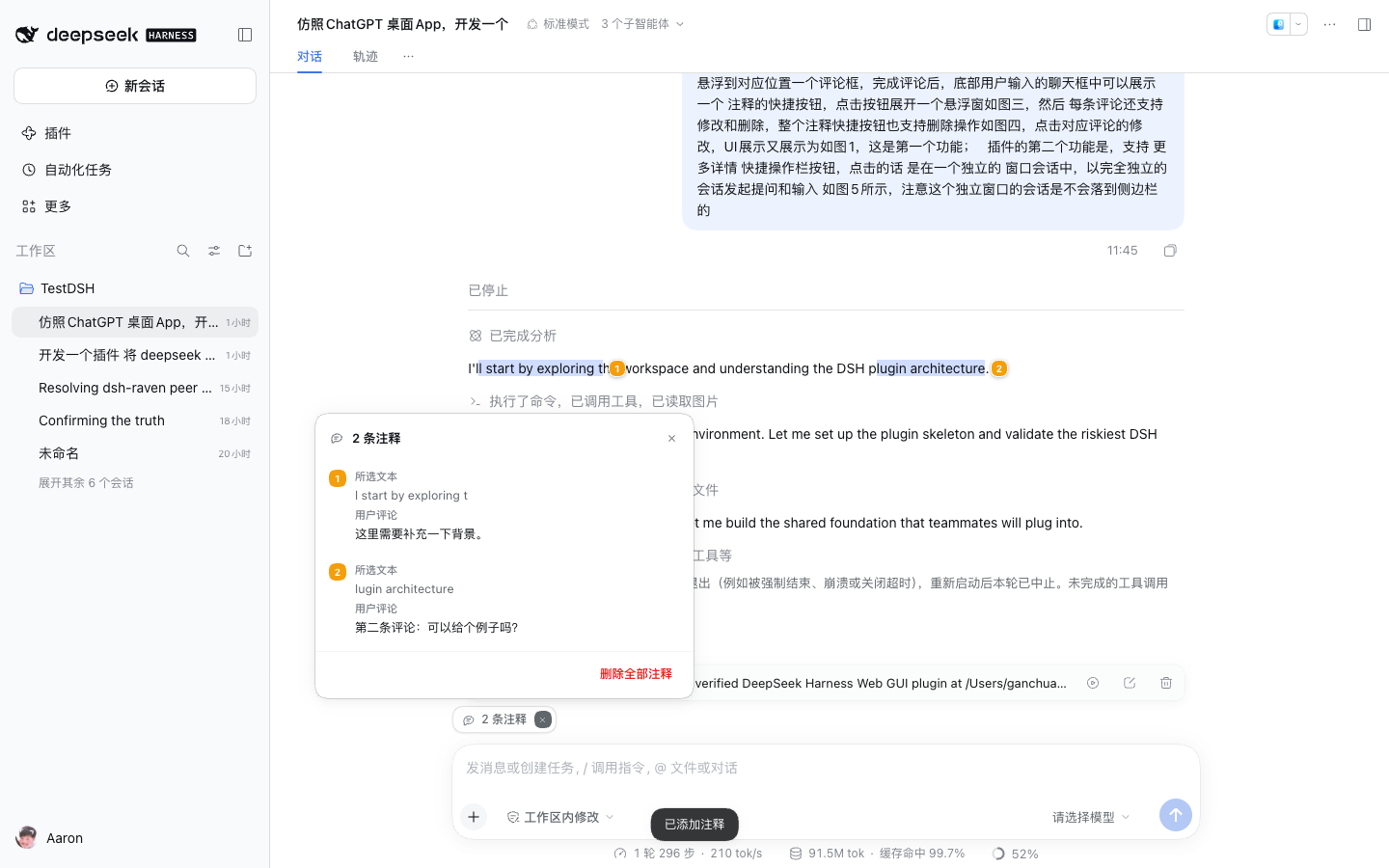
| 注释列表(编辑 / 删除 / 全部删除)/ annotation list | 独立会话窗口 / independent conversation window |
More: saved highlights + chip, list row actions, dark window, dark chip, plugin settings row, annotations pending above the composer, annotations sent as message content.


Features / 功能
1. 划词评论(Selection comments)
- 选中模型输出(assistant 输出)里的任意文字,浮出快捷操作栏:添加到对话 / 更多详情。
- 点击「添加到对话」在选区旁浮出评论框:引用所选文字,可写可选评论(可空),
Cmd/Ctrl + Enter或发送按钮确认。 - 确认后:
- 所选文字被持久高亮为蓝色,并在范围末尾显示带编号的橙色标记;
- 底部输入框上方出现
N 条注释胶囊按钮。
- 点击胶囊 → 悬浮注释列表(编号 + 所选文本 + 用户评论 + 编辑 / 删除),列表可滚动。
- 每条注释支持修改(回到评论框并预填)与删除;胶囊上的
×一次删除本会话全部注释。 - 注释按会话保存在浏览器本地(localStorage),刷新页面后高亮、编号、胶囊都会恢复。
- 注释会随下一条用户消息一起发给模型:发送时会把「所选文本 + 用户评论」作为引用块放进该条消息(会话里可见),发送成功后注释自动清空(高亮、编号、胶囊一起消失),文字已经进入对话历史。
- 只有注释、输入框为空时也能发送:输入框为空且有注释时,右侧 ↑ 会恢复为正常的蓝色可点击样式(宿主原本把它禁用成半透明),点 ↑、点「发送注释」、或直接按
Enter都能把注释作为单独一条消息发出。
2. 更多详情(Independent conversation window)
- 在选中文字后点击「更多详情」,打开一个悬浮的独立会话窗口(
更多详情)。 - 该窗口里的会话是当前会话在最近一个已完成轮次上的 fork:上下文完整,但和主会话完全独立,主会话不会被它改动。
- 窗口有自己的输入框与发送/停止按钮,可拖动标题栏移动、拖动右下角缩放、收起/展开、关闭。
- 该独立会话不会出现在侧边栏:插件按会话 id 隐藏其侧边栏行(
[data-row-key="session:<id>"]),并记住隐藏列表。 - 用同一段选中的文字再次点「更多详情」会复用同一个独立会话,不会重复 fork。
3. 细节
- 主题跟随 Harness(浅色 / 深色),只使用
--dsw-*主题 token。 - 支持
prefers-reduced-motion,键盘可达(Esc关闭浮层,Cmd/Ctrl+Enter保存评论)。 - 所有 UI 通过 Harness 的 Slot 注册(
shell.overlay、conversation.input.dock)与 React 渲染,不注入 iframe、不替换应用根节点。
Install / 安装
The plugin is a standard DSH bundle: a package manifest with a bundle patch plus a browser Client half.
# from a workspace checkout
dsh plugin --profile desktop add link:/absolute/path/to/dsh-plugin-selection-comments
# or publish/install by package name
dsh plugin --profile desktop add dsh-plugin-selection-comments
Or install straight from GitHub:
dsh plugin --profile desktop add AaronOhO/dsh-plugin-selection-comments
Or install the directory from Settings → Plugins → 添加插件 / install bundle in the Harness Plugin Manager (point it at this directory). Enable the 「划词评论与独立会话」 row, then reload the page once so the Client bundle is loaded.
To install into the Desktop application's desktop profile from a checkout
(the same operation as Plugin Manager's local-directory install), link the
checkout and register it as a profile bundle:
node scripts/install-desktop.mjs            # defaults to ~/.dsh/profiles/desktop
# then restart DeepSeek Harness so the profile bundle layers recompose
The script backs up package.json next to itself and only appends the linked
dependency + bundle selection; removing either (or toggling the bundle off in
Plugin Manager after a restart) uninstalls the plugin.
本插件是标准 DSH bundle(dsh.bundle.patch + dsh.client)。可通过
dsh plugin --profile desktop add link:<本目录>,或在 设置 → 插件 → 安装 bundle
中选择本目录;启用「划词评论与独立会话」后刷新一次页面。
The plugin needs no Host configuration and no model/API changes. Removing it removes both floating surfaces and the sidebar-row hiding rule; the comments stay in browser storage unless cleared.
How it works / 实现
| Part | File | Role |
|---|---|---|
| Host half | index.js |
Inert loader row; all behaviour is browser-side. |
| Bundle patch | cordis.patch.yml |
Inserts the selection-comments row. |
| Client module | client.js |
The built browser bundle (window.__ModuleLoader__.load), generated from src/ by build.mjs. |
| Source modules | src/*.js |
Store, persistence, annotation data, text anchoring + CSS highlights, comment surfaces, side-chat window, slot registrations. |
| Shared contract | docs/CONTRACT.md |
State shape, data/action APIs, integration points, verification checklist. |
| Styles | src/styles/*.css |
Base surfaces plus comment/side-chat refinements, built into the single client bundle. |
| Display metadata | locale/zh.json, locale/en.json, icon.svg |
Titles, descriptions and icon shown by the Plugin Manager. |
Key mechanics:
- Selection is captured from the rendered transcript with the exact quote,
row anchor key (
data-chat-anchor-key), text offsets, and surrounding context. Only assistant output rows are eligible. - Highlights use the CSS Custom Highlight API (
::highlight(...)), so React re-renders never erase them; ranges are re-anchored by quote + context after streaming settlement or history reload. - Comments live in
localStorage(dsh-selection-comments:v1:*) per session and never touch the session log. - The independent window hosts a real embedded Conversation occurrence for a
forked session through the shared
conversation.contentFactory andSessionProvider, so it reuses the host's chat/composer exactly. - Sidebar hiding keeps the fork out of navigation without touching session data; the persisted hidden list re-applies the rule on every page load.
Verify / 验证
Independent end-to-end verification report (43/43 checks, light + dark, reload
persistence): docs/verification/REPORT.md
(machine-readable report.json).
Automated verification uses the bundled isolated Harness runtime and Playwright:
node build.mjs
node scripts/e2e.mjs http://127.0.0.1:12447 "<token>" .devhome-verifier/shots
scripts/e2e.mjs runs against any running DSH instance (pass its base URL and
?token= value). It needs playwright resolvable locally, or
DSH_PLAYWRIGHT=/path/to/playwright. scripts/dev.mjs is a maintainer
convenience that boots an isolated runtime: set DSH_BIN to the runtime entry
(a .js bin or a dsh executable) and DSH_HOME_TEMPLATE to a template home;
see docs/CONTRACT.md.
The suite covers the checklist in docs/CONTRACT.md:
toolbar placement, comment create/edit/delete/delete-all, highlights and markers,
list popover, independent window + composer, drag/resize/minimize, sidebar-row
hiding, reload persistence, light/dark themes, and console cleanliness.
Known limitations / 已知限制
- The comment marks themselves are browser-local until they are sent: they are not synchronized across devices or Harness instances, and clearing site data removes them. Once a message carries them, that text is part of the durable conversation like any other user message.
- If a send fails, the annotations stay pending so the next attempt carries them again.
- Side-chat sessions are real forked sessions in the local session store; the plugin hides their sidebar rows. If browser storage is cleared, previously created side sessions become visible again (they remain ordinary sessions).
- One side-chat window at a time; it reuses the fork created for the same selected quote. Minimizing collapses the conversation body, so an unsent side-composer draft is not preserved across minimize/restore.
- Window geometry is remembered per page, not across reloads.
- Annotations anchor to the rendered text. If a message is edited or a fork changes the quoted text, the highlight falls back to a context-based search and is skipped when the quote no longer exists.
- Only assistant output rows accept annotations (by design); user messages, tool cards, and the side window's own transcript are not annotatable.
License / 许可
MIT. See LICENSE. The plugin code, icon, and styles are original work.
Development / 开发
src/                 shared source modules (concatenated, one factory scope)
src/styles/          stylesheets embedded in the bundle
build.mjs            generates client.js
scripts/dev.mjs      build + isolated Harness instance for manual/e2e testing
scripts/e2e.mjs      Playwright checklist
docs/CONTRACT.md     implementation contract and verification checklist
Edit src/ (never client.js directly), run node build.mjs, restart the dev
instance, then run the e2e suite. client.js is committed so the directory can
be installed without a build step.
No comments yet. Be the first to write one.