⚡ dsh-codex-sync
Two-way Codex↔DSH bridge: skills from ~/.codex/skills, session import with workspace attach, live MCP mirroring of mcp_servers, and a Codex-side reverse MCP installer.
2-way project chat sync · Live Skills mount · Auto MCP mirroring · Native modern UI




This repository is our own build of the plugin, adapted to our DSH runtime. It is based on / forked from Walvez/dsh-codex-sync (MIT © 2026 Walvez) — see Credits & upstream attribution. What we changed and why: docs/LOCAL-ADAPTATION.md. Upstream npm package
dsh-codex-syncbelongs to the original author and is not this build.
🎛️ Native Sync Settings Modal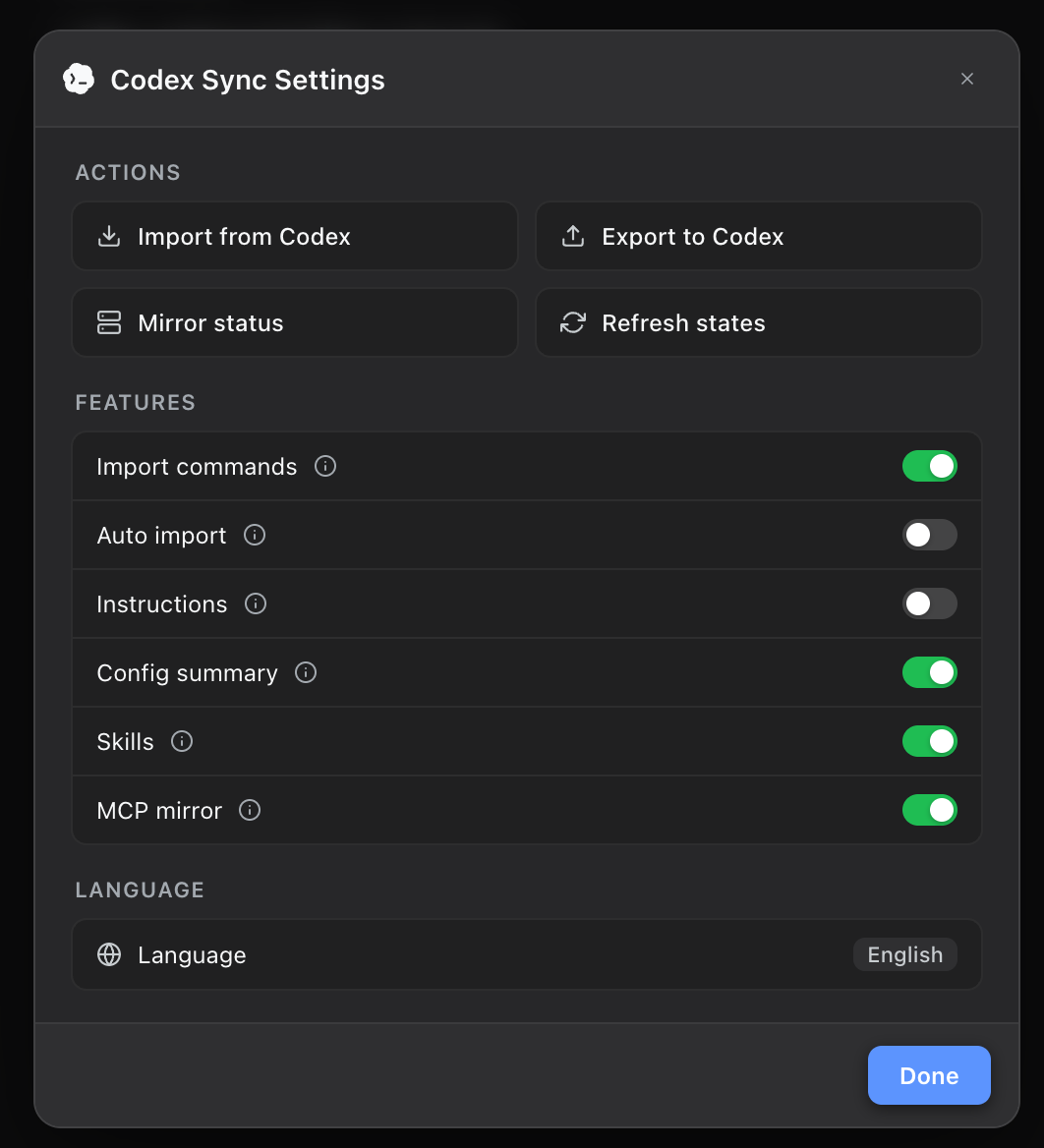
|
📍 Sidebar Workspace Trigger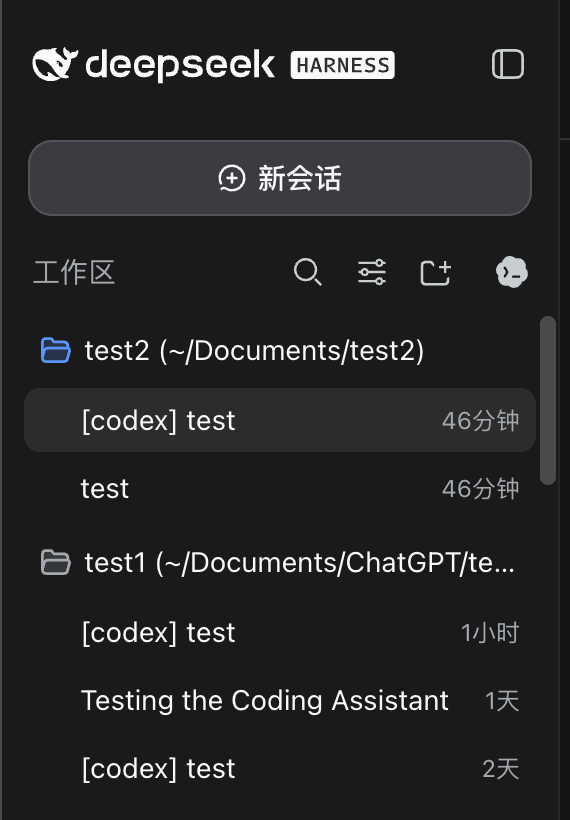
|
📥 Import from Codex by Project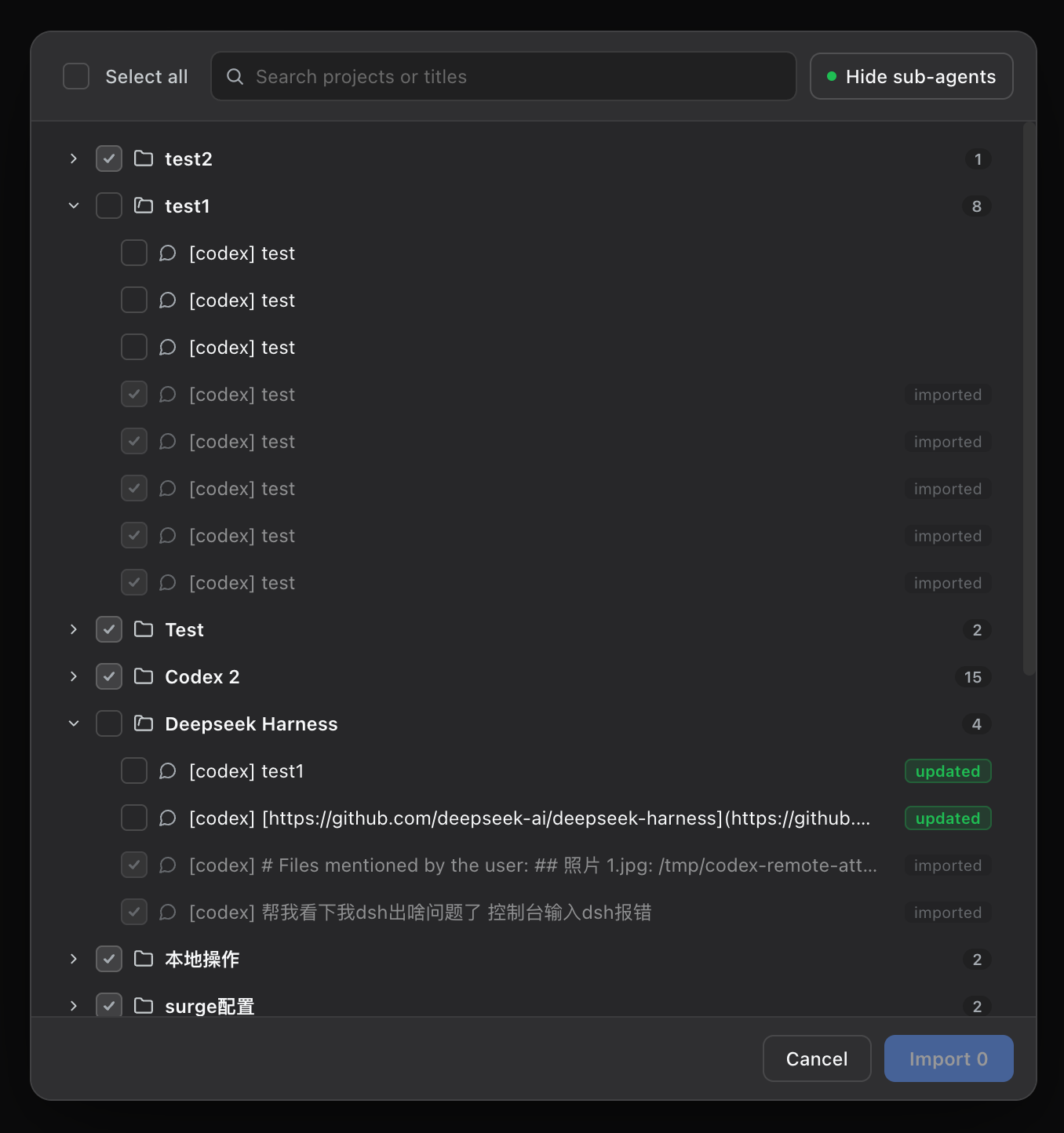
|
📤 Export DSH Chats to Codex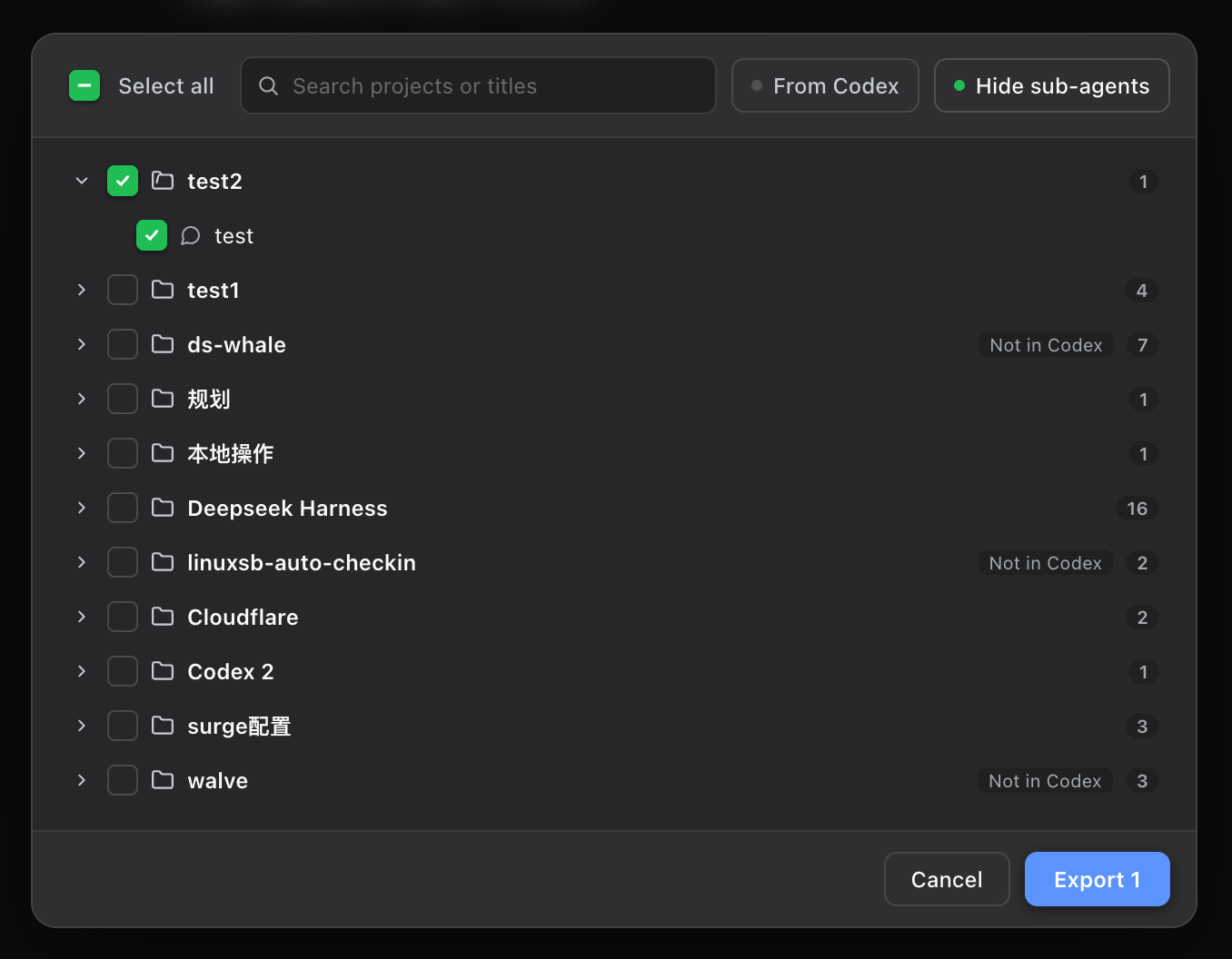
|
🤔 Why dsh-codex-sync?
When using OpenAI Codex, developers build up significant workflow assets:
- Rich project chat histories with complete code contexts, architecture decisions, and debugging steps;
- Custom Skills libraries under
~/.codex/skillswith tailored instructions and scripts; - Configured MCP toolchains for databases, web searches, and browser automation.
When adopting or exploring DeepSeek Harness (DSH), developers typically face major friction:
- Lost conversation history: Incompatible session formats prevent resuming past Codex tasks in DSH;
- Configuration duplication and drift: Skills and MCP servers must be manually recreated and maintained in two separate tools;
- One-way dead ends: Most migration scripts are one-time destructive copies that offer no clean way to safely bring DSH continuations back to Codex.
dsh-codex-sync eliminates this friction completely. It is not a throwaway migrator, but a production-grade, continuous two-way bridge between Codex and DSH.
✨ Key Highlights
1. 💬 Two-Way Safe Project Chat Portability (Codex ⇄ DSH)
- Import from Codex:
- Browse conversations grouped by workspace folder in an intuitive project tree;
- Preserves user prompts, assistant outputs, reasoning traces, and tool-call trajectories;
- Automatically attaches imported sessions to matching workspaces for seamless continuation;
- Incremental re-import: Codex conversations continued after the initial import are marked as
updatedand append only new turns without creating duplicate sessions.
- Export to Codex:
- Export DSH native conversations or continuations back into Codex;
- Automatically matches Codex's workspace catalog, gracefully locking unknown directories to prevent orphan threads;
- Creates clean, standalone Codex rollouts (
history_mode: legacy) and SQLite index entries without modifying or overwriting original Codex histories; - View and continue chats in Codex immediately after restarting the Codex app.
- Sub-Agent Thread Filtering:
- Hides internal sub-agent threads by default to keep the conversation list focused;
- Easily expand and nest sub-agents under parent threads for selective, independent export.
2. ⚡ Live First-Class Skills Mounting
- Mounts
~/.codex/skills/*/SKILL.mddirectly into DSH's native skill catalog; - Full support for nested directory resources and multi-file skill bundles;
- Zero-restart updates: Edit a skill file on disk, and DSH recognizes the change on the next turn.
3. 🔌 Automated Bidirectional MCP Mirroring
- Codex → DSH: Watches
~/.codex/config.tomllive, dynamically mirroring[mcp_servers.*]to DSH with conflict avoidance and stderr silencing; - DSH → Codex (Reverse Bridge): Single-command setup (
npx dsh-codex-sync codex-install) equips your Codex agent with tools to search, inspect, and install DSH plugins.
4. 🎨 Native Modern UI Experience
- Adaptive Sidebar Trigger: Sits right beside the workspace header when expanded, and aligns below the search button when collapsed;
- Centered Modal Panel: High-contrast, backdrop-blurred settings card with intuitive action cards, real-time switch feedback, and zero UI cutoff;
- Polished Design Integration: Uses native DSH design tokens (
--dsw-alias-*), pure CSS transitions with zero hover artifacts, and responsive text truncation.
🧭 Supported DSH versions
Version pinning lives in package.json → peerDependencies["@deepseek-ai/dsh-mcp-client"] = "^0.0.1-rc.1 || ^0.2.0-rc.2",
which is what the DSH install gate (evaluatePluginCompatibility() in @deepseek-ai/dsh-app-boot) checks.
| DSH runtime | Status | Evidence |
|---|---|---|
0.2.1-rc.2 |
✅ Verified on our machine (Linux, web profile) |
61/61 tests; cold boot on an isolated DSH_HOME; client bundle served; 5 mirrored Codex MCP servers; 123-session import dry-run |
0.2.0-rc.2 |
✅ Verified by upstream v1.6.2 | upstream CI host-boot smoke |
other 0.2.x |
⚠️ Allowed by the peer range, not re-verified here | — |
0.0.1-rc.1 … 0.0.x |
⚠️ Legacy MCP-client peer, unmaintained path | upstream 1.x legacy peer |
- Node.js:
>=20. Node 20 needs thezstdCLI for checksummed compression; Node 22+/24 uses native Zstandard. - If a future DSH release is rejected by the install gate, update the peer range (or pin) here and re-run
npm test. - Nuance:
engines.dshis not set, so the gate evaluates the peer range above; upstream used an exact0.2.0-rc.2pin, which is exactly why0.2.1-rc.2refused to install before this build.
📦 Quick Start
1. Install in DSH
From this repository (packed tarball — recommended, it is what scripts/install-local.sh does):
git clone https://github.com/AI8888-SHOP/dsh-codex-sync.git && cd dsh-codex-sync
npm test                                  # release gate: must be 61/61 green
npm pack                                  # → dsh-codex-sync-<version>.tgz
dsh plugin --profile web add ./dsh-codex-sync-<version>.tgz
Or straight from GitHub, or one-shot from the script:
dsh plugin --profile web add github:AI8888-SHOP/dsh-codex-sync
scripts/install-local.sh                  # pack + install + config row + self-check
Then override the row's config in your profile's cordis.patch.yml.
dsh plugin add already lists the package in dsh.profile.bundles, so target the row by id
(do not add an insert row for the same id — that collides with the bundle patch:
duplicate loader entry id):
- id: codex-sync
  config:
    maxSkills: 30
    mcpMirrorDeny:
      - node_repl
    mcpMirrorSilent:
      - exa
2. Configure Codex Reverse MCP Bridge (Optional)
# Register [mcp_servers.dsh-plugins] in ~/.codex/config.toml
npx dsh-codex-sync codex-install

# Run diagnostic health check
dsh-codex-sync doctor
🎛️ Sync Settings & Toggles
Click the Codex Icon in the sidebar to open the centered control modal:
| Section | Item | Command / Config Key | Description |
|---|---|---|---|
| Actions | Import from Codex | /import-all |
Open project picker to import chats into DSH |
| Export to Codex | /export-codex |
Export DSH chats into new Codex conversation copies | |
| Repair sessions¹ | /repair-sessions [--fix] |
Scan stored session logs for replay damage and heal them in place (see below) | |
| Mirror status | /mcp-status |
Modal overview of MCP servers, health, and statuses | |
| Refresh states | /codex-settings |
Re-sync all switch states from the host | |
| Features | Import commands | enableImport |
Enable /import-codex slash command family |
| Auto import | autoImport |
Automatically import new Codex chats on startup | |
| Instructions | enableInstructions |
Inject instructions.md / AGENTS.md into prompt |
|
| Config summary | enableConfig |
Inject config.toml model settings summary into prompt |
|
| Skills | enableSkills |
Register ~/.codex/skills as live DSH skills |
|
| MCP mirror | mcpMirror |
Auto-mirror [mcp_servers.*] (applies immediately) |
|
| Language | Language Switcher | Language |
Toggle between 简体中文 / English |
¹ A subtle hint at the bottom-left of the settings modal links imported-chat errors to this command.
🩺 Troubleshooting: token meter / replay errors on imported chats
Symptom — switching the model or running compaction on an (imported) conversation fails with:
command.execute failed: internal: token meter: assistant/message at seq N has no matching step/start event
corrupt session log: seq gap in committed region at line L
Why — DSH's token meter validates the whole event log via cold replay when the model changes (provider usage anchors become invalid). Logs written before v1.6.0 lacked paired step/start…step/end markers, and mixed logs can carry stale seq citations — both fail loud only during that replay.
Fix — run this in any DSH chat (or dsh-codex-sync repair-sessions --fix in a terminal):
/repair-sessions --fix
The repair merges seams, inserts missing step markers, remaps citations, renumbers sequences, validates every candidate with the real @deepseek-ai/dsh-token-meter, and keeps a .bak next to each repaired log. Imports created by v1.6.0+ are replay-safe by construction, so this should never trigger again.
🤖 Built-in Agent Skill (codex-sync)
This package bundles a first-class codex-sync skill. Your DSH AI Agent can operate synchronization tasks on your behalf:
- "Dry-run importing my Codex conversations" → runs
/import-codex --dry-run - "Check current MCP mirror status" → runs
/mcp-status - "Turn on auto-import" → runs
/auto-import on
🙏 Credits & upstream attribution
This build would not exist without the upstream work it is derived from. Credit where it is due:
- Walvez/dsh-codex-sync — the original project
(MIT © 2026 Walvez). Our repository is a derivative build: the entire host plugin, client bundle,
CLI, skills and tests come from upstream v1.6.2 (commit
75bbca8). We only adapted the package metadata — DSH version compatibility,dsh.client.injectnames, and the test runner's DSH lookup — plus the docs/scripts you see underdocs/LOCAL-ADAPTATION.mdandscripts/install-local.sh. Upstream npm package: npmjs.com/package/dsh-codex-sync. - YYTbit/dsh-plugin-codex-bridge (MIT © YYTbit) —
basis for
lib/bridge.jsand the boot-fix notes. - Chang-Tong/dsh-import-agents (MIT © Chang-Tong / dongzhangust) —
basis for
lib/codex-reader.mjs,lib/convert.mjs,lib/dsh-writer.mjs,lib/attach-workspaces.mjs, the slash-command grammar, andlib/client.js. - bobleer/deepseek-harness-plugin-mcp (MIT © bobleer) —
the reverse MCP server installed by
codex-install. - DeepSeek Harness (dsh) — the host runtime this plugin plugs into.
The full third-party notice list is kept in NOTICE; adapted source files retain their original module headers. If you are the upstream author and want any attribution text changed, open an issue here and we will fix it.
📄 License
MIT License © 2026 Walvez (upstream) · adapted build © 2026 AI8888-SHOP, released under the same MIT terms.
No comments yet. Be the first to write one.