
dsh-pixel-skin
8-bit / CRT skin for the DeepSeek Harness web GUI.
An out-of-tree web client plugin for DeepSeek Harness. It keeps the host untouched and layers a full pixel-art treatment over the built-in light and dark themes.
Screenshots
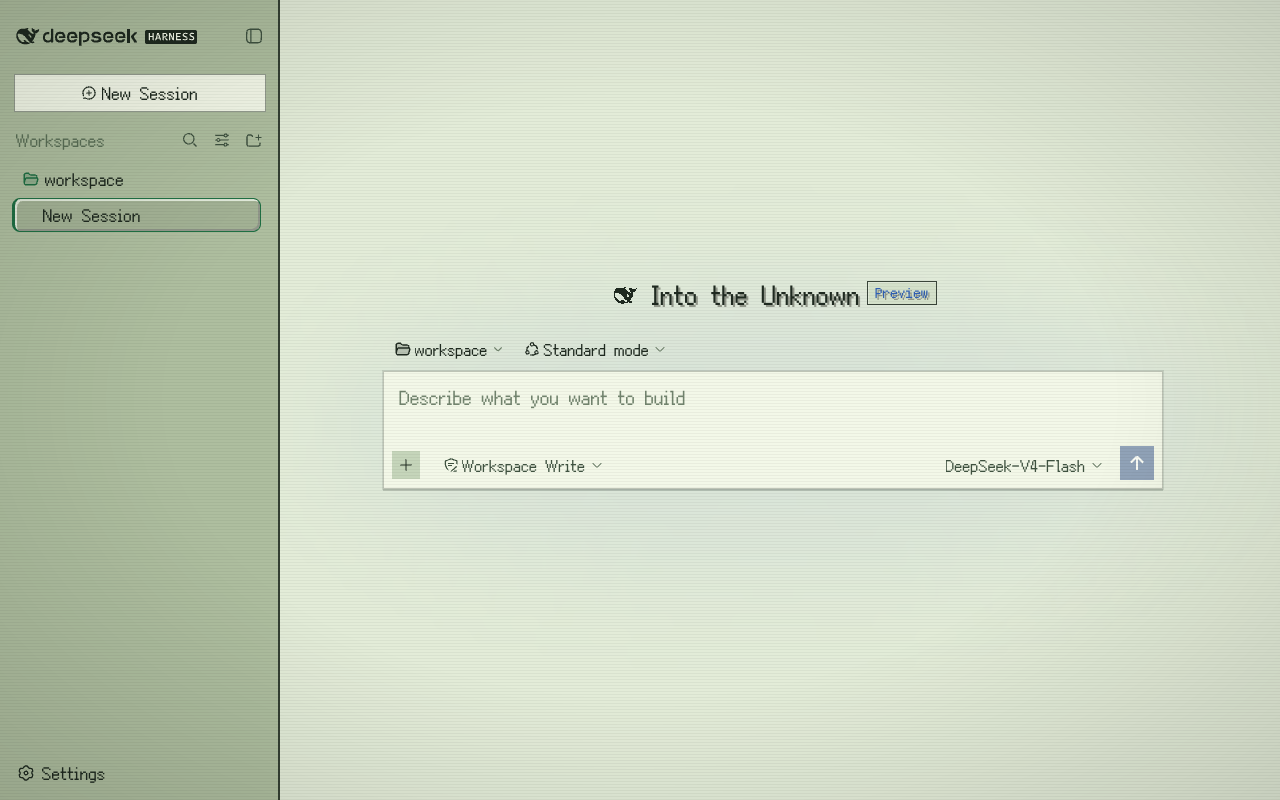
New session
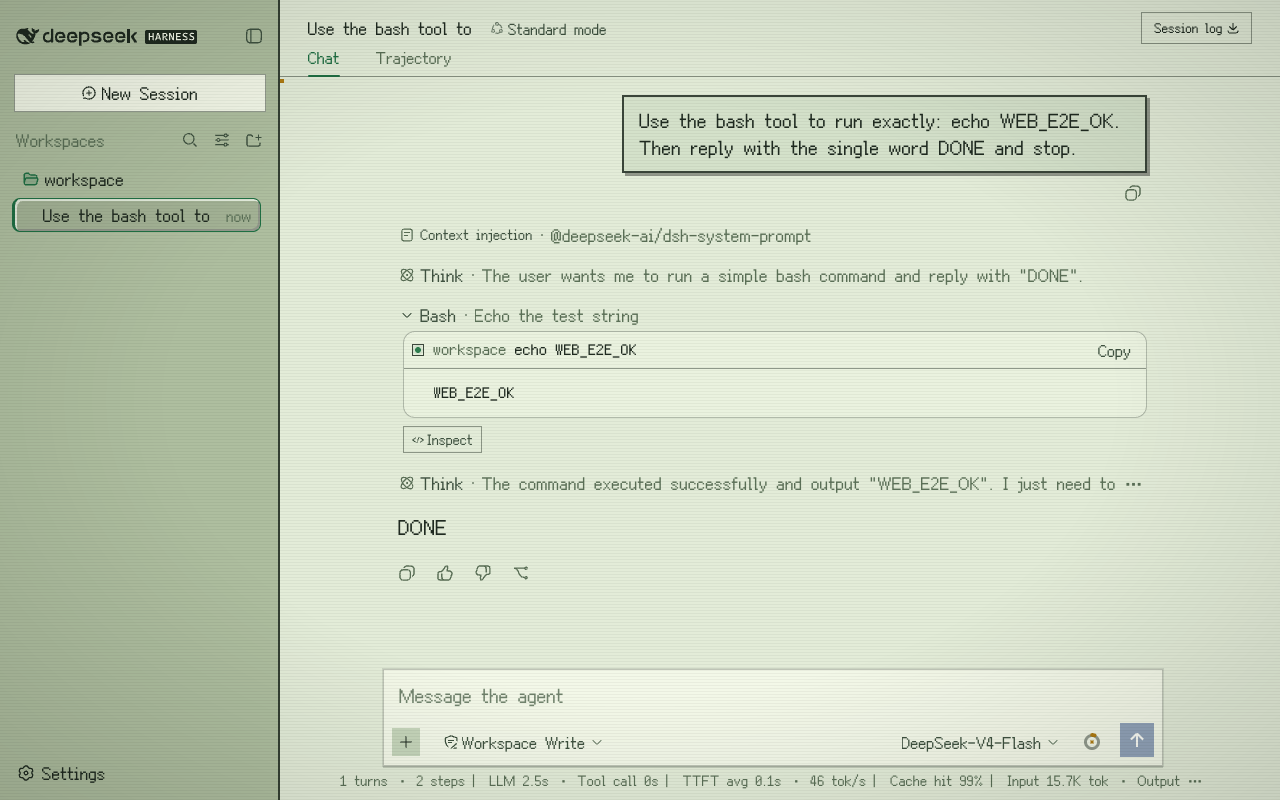
In conversation, mid-work
Switchable palettes
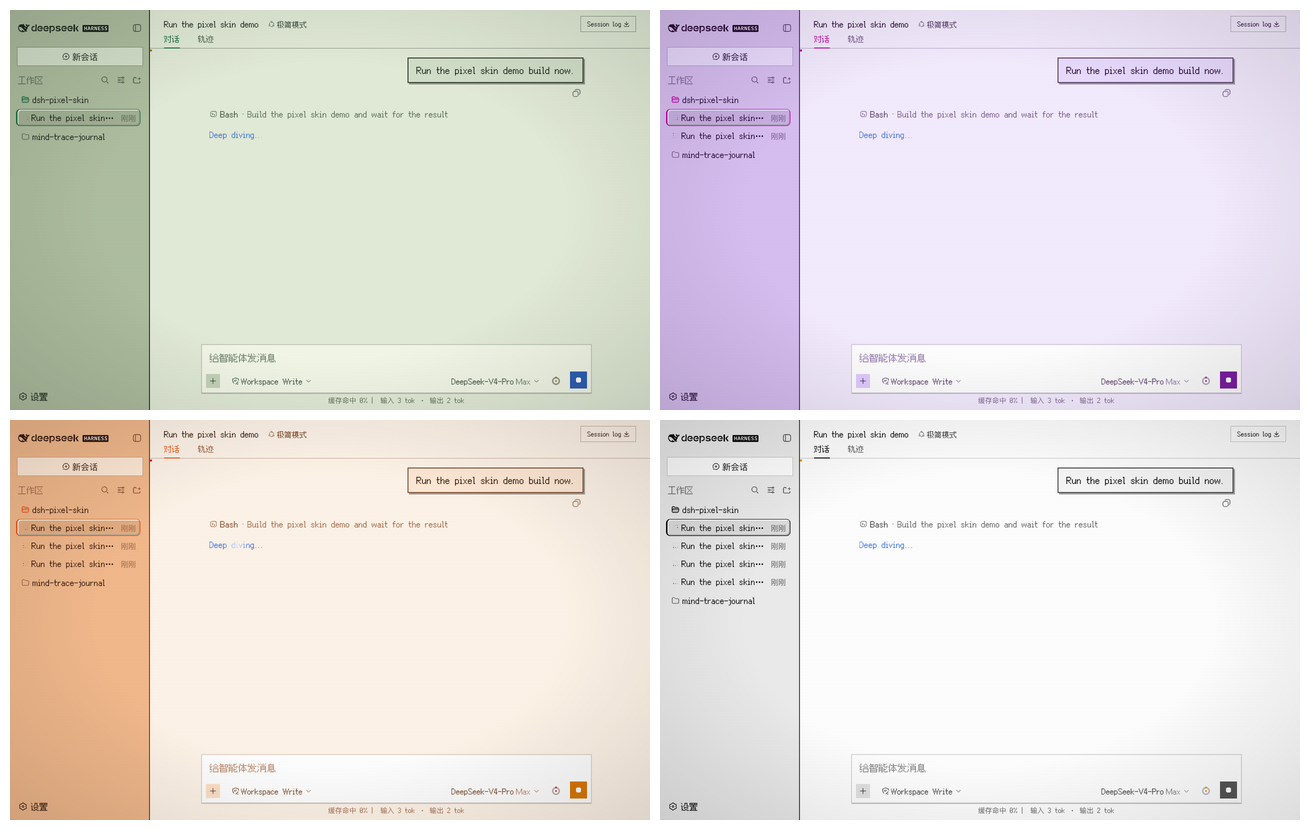
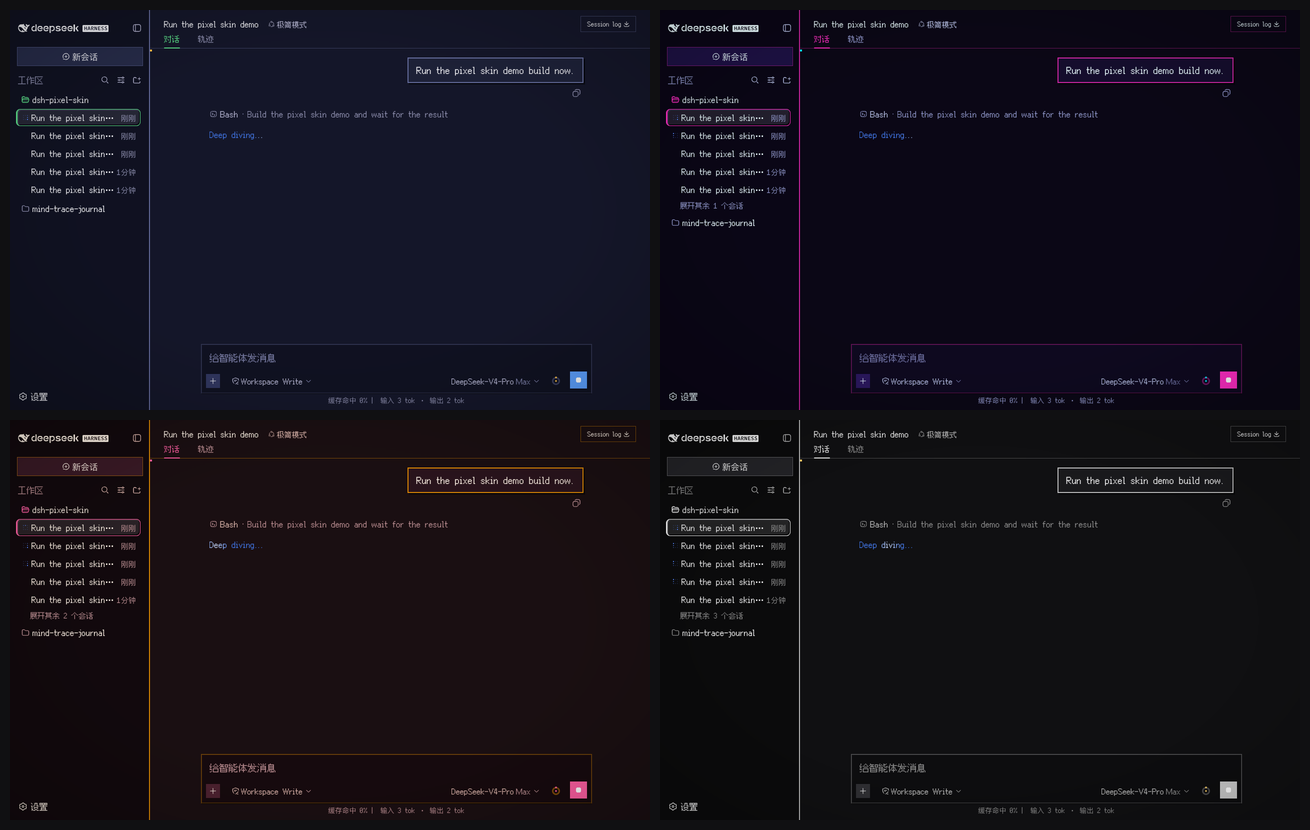
Order: retro green · cyberpunk · sunset arcade · mono terminal.
Screenshots use the pixel skin with Font mode → Pure pixel enabled.
The working screenshot shows the conversation flow with Think and Bash tool rows.
Features
- Complete pixel palette for light and dark mode, layered through the official
ctx.theme.overrideTokensAPI. - Readable hybrid typography
- short UI chrome:
Fusion Pixel 12px Proportional SC - long-form prose: Latin-only
Fusion Pixel Latinsubset + modern CJK fallbacks (PingFang SC/Microsoft YaHei) - code and terminals:
Fusion Pixel 12px Monospaced SC
- short UI chrome:
- Generated font-size patch layer — scans the adjacent harness checkout and fixes every component rule that still hard-codes 10–16px text, using the exact CSS-Module hashes from the same
lightningcssoptions as the harness build. - Pixel document details
- hard-bordered markdown tables, blockquotes, pixel dividers and checkboxes
- square code-language badges (
bash,json,ts, …) - stepped skeleton shimmer
- session-list tree markers
- Switchable color palettes
retro— green Game Boy / CRT (default)cyberpunk— neon magenta + cyansunset— warm sunset arcademono— monochrome terminal
- CRT atmosphere
- adjustable scanlines: off / light / standard
- optional subtle vignette
- optional 16×16 pixel cursor
- Official favicon pixelated at 32×32 by a small sharp-based rasterizer; black whale in light mode, white in dark mode, just like the source.
- Settings panel under Settings → General → Pixel skin, persisted in
localStorage; controls master on/off, palette swatches, scanlines, cursor, vignette, and font mode. - Dispose-safe — the plugin removes its stylesheet, favicon, token overrides and body attributes when unmounted.
prefers-reduced-motionaware — animations are disabled when the OS requests reduced motion.
Typography modes
| Mode | UI chrome | Long-form body | Code |
|---|---|---|---|
hybrid (default) |
Pixel proportional SC | Pixel Latin + modern CJK | Pixel monospaced SC |
pure |
Pixel proportional SC | Pixel proportional SC | Pixel monospaced SC |
Switch between them in Settings → General → Pixel skin → Font mode.
Requirements
- A checkout of
deepseek-harnessreachable at../deepseek-harnessfrom this repository, or setDSH_REPOwhen building. - The harness checkout must have its client packages built (
lib/client.jsartifacts) before the skin build scans their CSS Modules. In practice, a normalpnpm run buildin the harness repo is enough. - Node.js 22+.
Build
cd dsh-pixel-skin
npm run build

# If the harness checkout lives somewhere else:
DSH_REPO=/path/to/deepseek-harness npm run build
The build generates:
src/client/font-data.ts— base64-embedded Fusion Pixel fontssrc/client/literal-font-patches.ts— hash-scoped readability patches for the current harness checkoutsrc/client/pixel-favicon.ts— official favicon rasterized to a 32×32 gridsrc/client/structural-patches.ts— hash-scoped selectors for composer, stats line, and context ringlib/index.js— empty host plugin halflib/client.js— browser skin bundle
Rebuild the skin after pulling a new harness version or rebuilding its web packages.
After rebuilding, refresh the local web profile copy:
npm run refresh
This is required because pnpm installs file: profile dependencies as a copy,
not a symlink.
Install into a dsh web profile
The package is a plain plugin, not a bundle.
dsh plugin --profile web add /absolute/path/to/dsh-pixel-skin
Then add to $DSH_HOME/profiles/web/cordis.patch.yml:
- insert:
    - id: dsh-pixel-skin
      name: dsh-pixel-skin
Restart and refresh:
dsh --profile web
Uninstall
Remove the insert block from cordis.patch.yml, then:
dsh plugin --profile web remove dsh-pixel-skin
Project layout
dsh-pixel-skin/
├── assets/
│   ├── dsh-pixel-icon.svg          # GitHub / favicon source
│   ├── fonts/                      # OFL-1.1 Fusion Pixel woff2 files
│   └── screenshots/                # README screenshots
├── scripts/
│   ├── build.mjs                   # font embedding + CSS-module patch generator
│   └── pixelate-favicon.mjs        # official favicon → 32×32 grid rasterizer
├── src/
│   ├── index.ts                    # empty host half
│   └── client/
│       ├── index.ts                # plugin entry
│       ├── palette.ts              # token overrides + font scale
│       ├── skin-style.ts           # global skin CSS
│       ├── pixel-details.ts        # pixel surface/details CSS
│       ├── settings.ts             # localStorage settings
│       ├── settings-row.ts         # Settings → General row
│       └── settings-row.module.css
└── lib/                            # built artifacts
Fonts and licenses
The skin embeds the Fusion Pixel font family by TakWolf:
Fusion Pixel 12px Proportional SCFusion Pixel 12px Monospaced SC- a generated Latin-only subset
All font files are licensed under the SIL Open Font License 1.1. See THIRD_PARTY_NOTICES.md and assets/fonts/LICENSE.fusion-pixel.txt.
The plugin code is licensed under MIT.
Development notes
- The skin does not modify the
deepseek-harnesssource tree. - Colors ride the harness
--dsw-*theme tokens; the skin never hard-codes a palette that bypasses light/dark resolution. - CSS-Module selectors in the generated patch sheet are hash-scoped, not guessed from readable class names.
- The settings row is written against the harness slot and locale services, the same seam used by the built-in Appearance row.
Known limitations
- The build must be run against an adjacent
deepseek-harnesscheckout (DSH_REPOcan override the location). - Pulling or rebuilding the harness can change CSS-Module hashes; run
npm run buildandnpm run refreshagain. - A running
dsh webprocess keeps its old plugin copy in memory; restart it afternpm run refresh. - Fonts are embedded as base64 in
lib/client.js. They perform no network requests and are decoded by the browser only when a glyph is rendered; splitting them further is possible but not currently necessary.
No comments yet. Be the first to write one.