
dsh-web-tools
Empower DeepSeek Harness with unified search and deep content extraction across the open web and social platforms.
Native-Capability Adaptation Across 8 Web Providers · SearchHints Semantic Compilation · Multi-Source Resilience · Xiaohongshu & Twitter / X Retrieval




English | 简体中文
What problem does it solve?
When web access depends on a single provider, exhausted quota, rate limits, or timeouts can interrupt retrieval. Wrapping multiple APIs with a naive proxy often flattens them to a lowest common denominator, failing to leverage each provider's specialized search modes, categories, freshness, domain rules, and extraction capabilities.
dsh-web-tools connects Exa, Tavily, Firecrawl, Parallel, Brave, You.com, Jina, SearXNG, Xiaohongshu, and Twitter / X to DSH’s standard web_search / web_fetch interface.
While keeping the tool interface unified, dsh-web-tools normalizes search intents through SearchHints and compiles queries into native provider-specific parameters. This leverages each engine's native categories, freshness filters, domain policies, regional targeting, and content extraction, while maximizing uptime through multi-key allocation, automated failover, and dedicated browser profiles.
Key Highlights:
- Native-Capability Adaptation Across 8 Web Providers: Keeps the standard
web_search/web_fetchcontracts while compiling unified search intent into provider-specific native parameters instead of reducing every backend to the same lowest-common-denominator feature set. - SearchHints → Provider-Specific Parameter Compilation: Normalizes technical, research, news, date, region, and domain constraints from queries, compiling them into provider-native parameters through deterministic code without additional LLM latency.
- Xiaohongshu & Twitter / X Platform Sources: Both platforms support signed-in native search, detail extraction, and returned comments or replies through dedicated local browser profiles.
- Multi-Source Scheduling & Resilience: Features multi-API-key pooling, 401 failover, 429 cooldown windows, configurable Ordered / Round-Robin / Random routing, and failover chains.
- Native DSH Tool Integration: Plugs directly into standard
web_search/web_fetchwithout requiring new tool declarations, and includes a session-level "Search Mode" toggle.
                         DSH Agent
                            │
                 web_search / web_fetch
                            │
                            ▼
                       SearchHints
            topic / freshness / domains
               locale / cleanQuery ...
                            │
                 Provider-specific
                    compilation
                            │
      ┌────────┬─────────┬───────────┬──────────┐
      │  Exa   │ Tavily  │ Firecrawl │ Parallel │ ...
      │        │         │           │          │
      │category│ topic   │ github    │objective │
      │ date   │ chunks  │ research  │ policy   │
      │domains │ time    │ tbs       │ queries  │
      └────────┴─────────┴───────────┴──────────┘
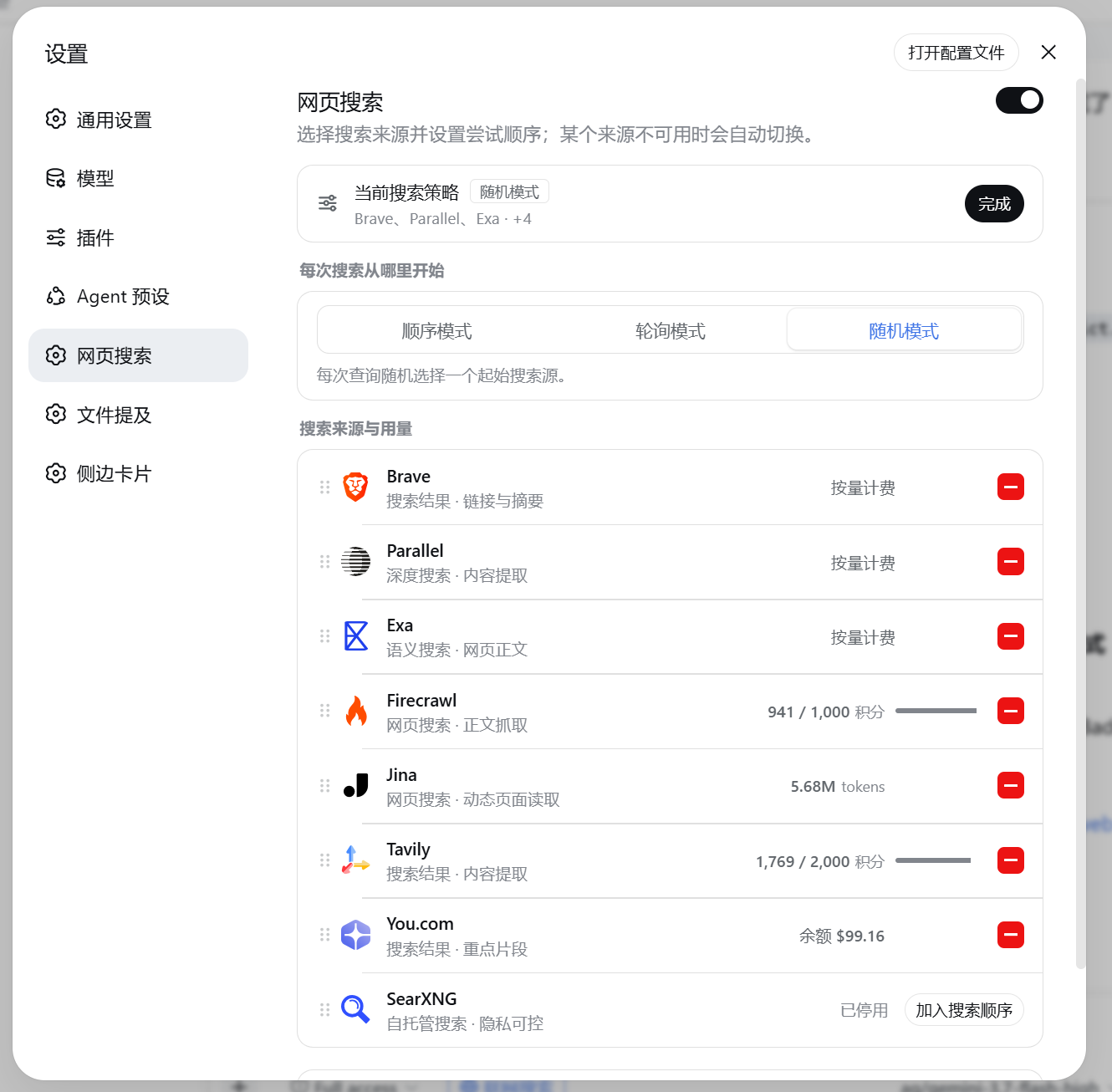
Native-Capability Adaptation Across 8 Web Providers
The tool interface and search semantics are unified for the DSH agent, but underlying provider capabilities are not.
dsh-web-tools expresses query intent through SearchHints and crafts dedicated requests for each provider, rather than compressing all backends into a single set of lowest-common-denominator parameters.
For example, when searching for "AI coding references from the past week":
- Exa: Maps category filters, ISO date ranges, and domain constraints;
- Firecrawl: Maps technical queries to the native
githubcategory, research queries toresearch, and appliestbsfreshness filters; - Parallel: Deconstructs the query into
objective, cleansearch_queries, andsource_policy; - Brave Search: Maps freshness, country, and language parameters with priority LLM Context endpoint;
- You.com: Leverages
boost_domainsfor soft domain preference.
All adaptations run through deterministic code without invoking an extra LLM call.
- Exa: Category mapping (
publication/news/financial report), ISO-8601 date ranges, and domain constraints. - Firecrawl: Maps coding and technical queries to the
githubcategory, academic queries toresearch, and supportstbs, domain constraints, and clean Markdown extraction. - Parallel: Dual-layer semantics (
objectivesoft-steering + cleansearch_queries) andsource_policydomain/freshness filters. - Tavily: Supports
basic/advanced/fast/ultra-fastsearch depths;basic,advanced, andfastsupportchunks_per_source, with nativenews/financetopics, date ranges, country, and domain constraints. - Brave Search: LLM Context endpoint with
pd/pw/pm/pyfreshness filters, country, and search language. - You.com: Native
boost_domainssoft-weighting, freshness presets, and geo/language targeting. - Jina: Query noise reduction and ReaderLM-v2 high-precision markdown extraction.
- SearXNG: Self-hosted metasearch with
categories(it/science/news) andtime_range. - Native Page Extraction (
web_fetch): Transparently routes to provider-native scraping backends (Exa/contents, Tavily/extract, Firecrawl/scrape, Parallel/v1/extract, You.com/v1/contents, Jina Reader).
Social Platform Sources
Unlike general search engines, the plugin connects directly to native social platform sessions:
Native Isolated Browser Architecture:
- Directly controls local Edge / Chrome instances using dedicated profiles over CDP.
- 0 browser extensions and 0 Playwright / Chromium bundles. Cookies remain managed by the dedicated browser profile and are not written to plugin configuration, logs, or relays; the browser still sends them to the platform during normal authenticated requests.
Xiaohongshu:
- Note Detail & Comment Fetch (
web_fetch): Uses the dedicated browser profile to extract structured__INITIAL_STATE__data with DOM fallback while preserving signedxsec_tokenURLs. When the page loads comment data, top-level comments and returned nested replies are extracted individually. - Native Search Discovery (
web_search): Uses the signed-in browser and the real search controls on/explore, entering only the cleaned topic query rather than platform names orsite:operators. It distinguishes login walls, security verification, and a genuinely signed-out session. Operators can temporarily disable this path withXHS_NATIVE_SEARCH=0while diagnosing browser issues.
- Note Detail & Comment Fetch (
Twitter / X:
- Native Search, Tweet Detail & Replies: Captures the X web client's GraphQL data streams (SearchTimeline / TweetDetail) over CDP, parses the target tweet and its reply tree structurally, and uses DOM extraction as a supplement and fallback. Supports
from:,since:, anduntil:operators.
- Native Search, Tweet Detail & Replies: Captures the X web client's GraphQL data streams (SearchTimeline / TweetDetail) over CDP, parses the target tweet and its reply tree structurally, and uses DOM extraction as a supplement and fallback. Supports
Each detail fetch includes at most 30 comments or replies, with up to 800 characters per entry. Additional pages or nested replies are explicitly marked as truncated to keep model context bounded.
Capability Boundary: For Xiaohongshu notes where the primary content resides in images, the fetcher returns the title, text description, engagement metrics, image count, and loaded comments; it does not perform optical character recognition (OCR) on image text or automatically paginate through all comments.
Agents use 小红书: or X: as a platform-routing prefix. The prefix selects the platform and is removed before the native search runs; for example, 小红书: DeepSeek Harness enters only DeepSeek Harness into Xiaohongshu's search box.
- General-Web Fallback: Uses configured general search or fetch providers when a platform source is disabled, temporarily unavailable, or reports a retryable failure. Non-retryable sign-in, access-control, search-restriction, and invalid-detail errors are returned directly so indexed content is not presented as native platform results, details, or comments.
- Automated Session Verification: Cookies are only the first gate. Xiaohongshu requires both
a1andweb_session, then performs a stabilized live/explorecheck in the interactive browser. A visible login wall invalidates the old session and restores the sign-in action; a wall appearing only after search submission is reported directly assearch-restrictedrather than being hidden behind indexed web results.
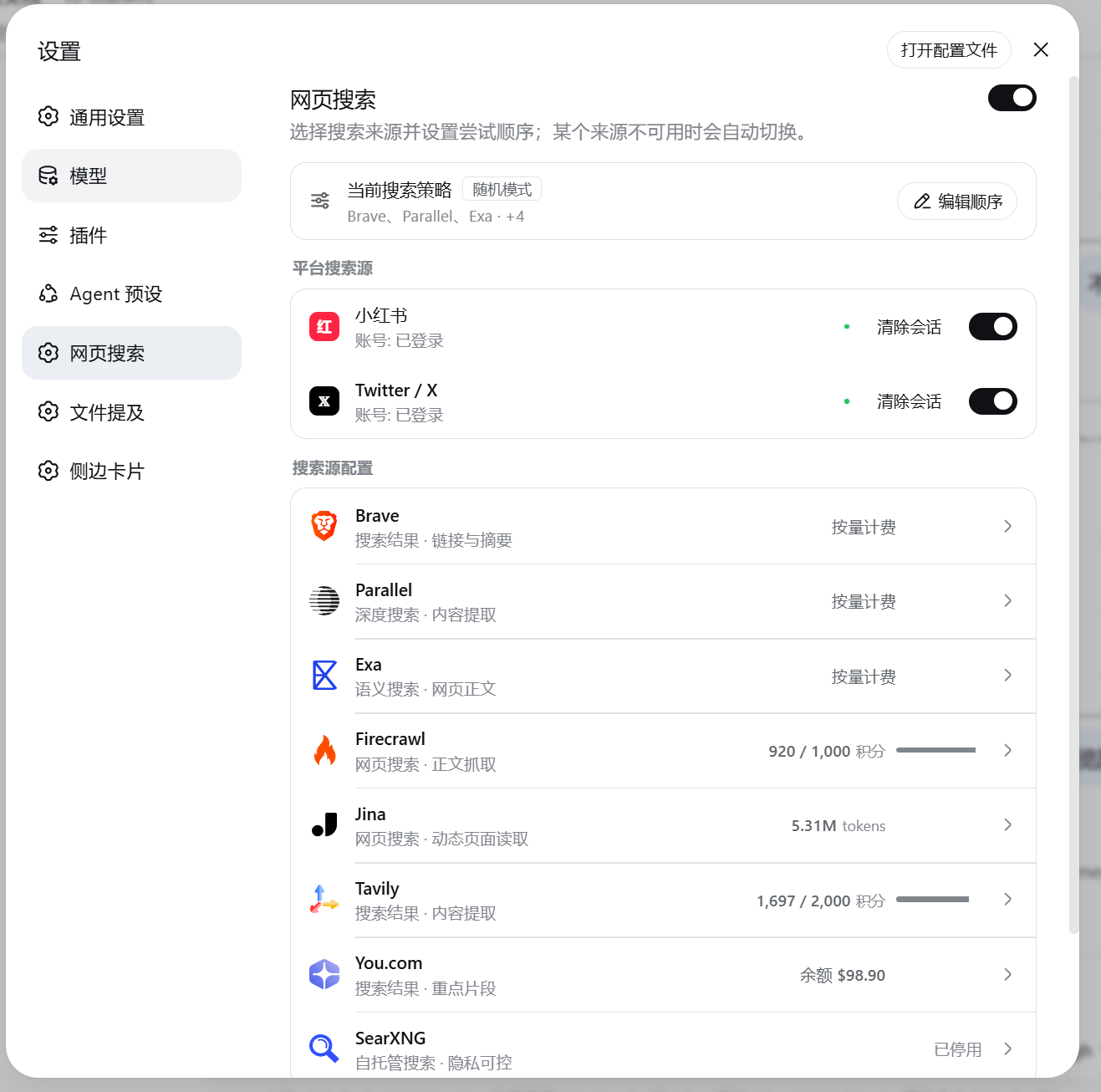
Fallback & Resilience
- Multi-API-Key Pooling: Assigns keys per provider, balances concurrent requests by lowest in-flight count, and fails over across keys on authentication errors.
- Deterministic Provider Fallback: Automatically cascades through the fallback chain on network failures, timeouts, 5xx server errors, 429 rate limits, or exhausted quotas.
- 429 Retry-After Cooldown: Enforces zero-request cooldown windows when servers return
Retry-Afterheaders, skipping rate-limited providers immediately. - Configurable Routing Policies:
web_searchsupports Ordered, Round-Robin, and Random starting-provider selection.web_fetchalways follows the deterministic fetch-capable chain. - Session-Level Search Mode: Requires at least one completed
web_searchorweb_fetchcall before an answer. A failed call still counts as an attempt, and the agent is instructed to disclose what could not be verified. - Proxy Support: Supports the Windows system proxy,
HTTP_PROXY,HTTPS_PROXY, andNO_PROXY, with automatic loopback bypass.
Installation & Updates
# Install
dsh plugin --profile web add github:A3Boy/dsh-web-tools

# Update
dsh plugin --profile web update dsh-web-tools

# Remove
dsh plugin --profile web remove dsh-web-tools
Restart dsh web and navigate to Settings → Web Search.
Provider Capabilities
| Provider | Search | Fetch / Extract | Key Integrations & Adaptations | Quota Inspection |
|---|---|---|---|---|
| Exa | Yes | Yes, /contents |
Semantic retrieval (auto / fast / deep), category mappings, query-aware highlights, ISO-8601 date ranges |
Dashboard only |
| Tavily | Yes | Yes, /extract |
Search depths (basic / advanced / fast / ultra-fast); the first three support chunking, plus news / finance, date, country, and domain parameters |
Official API |
| Firecrawl | Yes | Yes, /scrape |
Technical queries map to github, academic queries to research; supports tbs, domain constraints, and clean Markdown extraction |
Official API |
| Parallel | Yes | Yes, /v1/extract |
Agent dual-layer semantic search (advanced / basic / turbo), objective soft-steering, source_policy |
Dashboard only |
| Brave Search | Yes | — | Preferred LLM Context pre-extraction with pd/pw/pm/py freshness, country/lang filters, auto fallback to Classic Search |
Response headers |
| You.com | Yes | Yes, /v1/contents |
Snippet highlights, native boost_domains soft-weighting, freshness and country/lang filters, markdown endpoint |
Official API |
| Jina | Yes | Yes, Reader | Search query noise filtering, ReaderLM-v2 high-precision markdown, token budget and truncation control | Best-effort |
| SearXNG | Yes | — | Open-source self-hosted metasearch with categories and supported time_range values; the adapter requires no API key |
Instance-defined |
Quick Recommendation Guide
New installations default to Exa; existing installations keep their saved provider configuration.
| Scenario | Recommended Provider | Notes |
|---|---|---|
| Social Discovery & Content Detail | Xiaohongshu / Twitter / X | Both platforms provide signed-in native search, detail retrieval, and returned comments or replies |
| Semantic Search / Technical Documentation | Exa | Semantic modes plus category, date, domain, and highlight parameters |
| Pre-Extracted Search Context | Brave Search | Prefers LLM Context with Classic Search fallback |
| Configurable Search Depth and Extraction | Tavily / Parallel | Provider-native depth modes and content extraction endpoints |
| Content-to-Markdown Extraction | Firecrawl / Jina | Main-content filtering, scraping, and Reader conversion |
| Freshness, Region, and Domain Preference | You.com | Freshness, locale, and boost_domains parameters |
| Self-Hosted Metasearch | SearXNG | Uses your SearXNG endpoint; the adapter requires no API key |
Local Development
pnpm install          # Install dependencies
pnpm test             # Run test suite
pnpm run typecheck    # Type checking
pnpm run build        # Build bundle into lib/
Frequently Asked Questions
If cache issues occur after upgrading via local path or symlinks, reinstall from the profile directory:
cd ~/.dsh/profiles/web && pnpm install
Exa and Parallel balances are checked in their provider dashboards; Brave quota information comes from actual search response headers. Quota display is informational and does not affect routing or fallback.
Xiaohongshu and Twitter / X each use a dedicated local browser profile. The plugin does not export raw cookies to configuration, logs, or third-party relays; the browser sends them through normal authenticated requests to the corresponding platform domains.
License
MIT © A3Boy
还没有评论,来写第一条。