Blobby — VS Code Pet for DSH
English | 简体中文
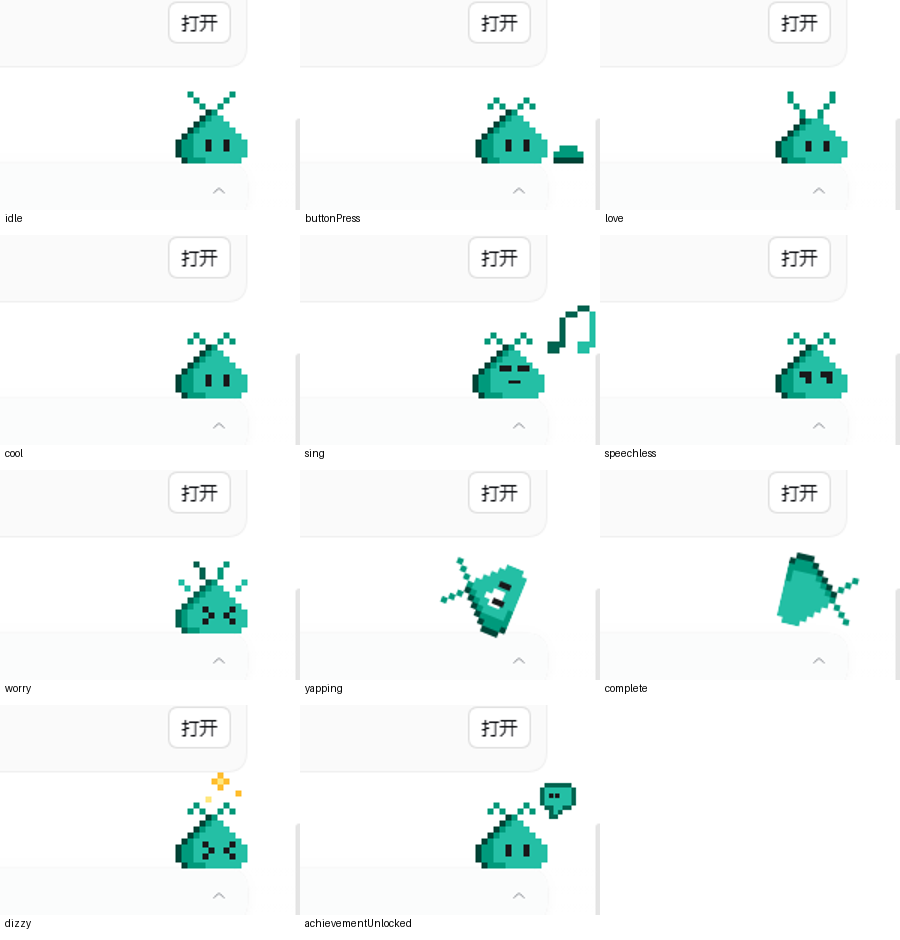
Blobby is the official VS Code chat pet, ported to the DeepSeek Harness Web composer. It uses the
official sprite sheets, accessories, frame timings, physics and interaction rules from
microsoft/vscode, not a look-alike.
Attribution
This is an independent DSH port, not a Microsoft product. All Blobby sprite art, accessory atlases, animation timing, physics constants, achievement catalog, color palette and jump-game rules are derived from the official VS Code implementation and are used under the MIT license.
- Upstream documentation: https://code.visualstudio.com/docs/agents/reference/chat-pet
- Upstream sprite assets and runtime: https://github.com/microsoft/vscode/tree/main/src/vs/workbench/contrib/chat/browser/widget/media/chatPet
- Pinned upstream commit:
ce233327f26ef7791b7fff0143c24e81a8126bd2 - The plugin icon is a composite of the official idle body and wizard-hat atlas with the official
thinking bubble, recolored to a white body. The master is 144×144 (4× the 36px plugin-card
artwork);
icons/icon-{144,72,48,36,30}.pngkeeps native variants, andicon.svgembeds the 144px master. - See NOTICE.md for the complete source-file list and Microsoft's MIT license text.
Thanks to the VS Code team and the original Blobby authors for the character and artwork.
What it does
- Sits on top of the composer and reacts to chat: pointer gaze, typing, thinking, clapping when the agent needs input, sleeping after 20 seconds, and the red-button celebration when a turn finishes.
- Drag it, flick it, throw it with
Shift+←/→, hop with←/→, catch it while it falls, and watch the despawn/respawn portal sequence. - Right-click for Achievements, Play Jump Game, Go on the Run / Come Back, Grow / Shrink / Reset Size and Change Color.
- 14 achievements and 13 hats from the official catalog. Event-driven achievement tracking is
intentionally not implemented: 13 achievements are unlocked by default and True Name is
unlocked by
/blobby, which opens the color tab. - Stable/Insiders colors plus the eight official solid presets and a custom hex color (unlocked by
/blobby). Hats and colors are applied immediately and persist. - Blobby's jump game: Space to charge, release to jump, Left/Right to aim or hop, Escape to exit, with moving/crumbling platforms, wall bank shots, hop score and a persisted high score.
- Reduced-motion support, keyboard access, and a live status region for screen readers.
Install in a DSH profile
From the public npm package (after release):
dsh plugin --profile web add vscode-pet
Source install from the public repository (always available):
dsh plugin --profile web add github:96274zxc/vscode-pet
For the Electron desktop app, use Plugins → Add plugin → vscode-pet, or the same CLI with
--profile desktop where the CLI is allowed to manage that profile.
For development from this checkout, link the package into a profile:
$node = "$env:USERPROFILE\.dsh\dsh-runtimes\dsh-primary-runtime\dependencies\node\bin\node.exe"
$pnpm = "$env:USERPROFILE\.dsh\dsh-runtimes\dsh-primary-runtime\dependencies\pnpm\bin\pnpm.mjs"
$profile = "$env:USERPROFILE\.dsh\profiles\desktop"
& $node $pnpm --dir $profile add "vscode-pet@link:C:/path/to/vscode-pet"
Then add vscode-pet to the profile's dsh.profile.bundles (or enable it in Plugins). Reload the
page; if the Electron app does not recompose the loader live, restart it. To uninstall, remove the
dependency and the bundle selection.
Build and test
node scripts/fetch-assets.mjs   # re-download the pinned VS Code assets
node scripts/build.mjs          # validate dimensions and build client.js
node --test test/*.test.mjs
client.js is generated. Edit files under src/ and rebuild; do not edit client.js directly.
Assets are embedded as PNG data URLs so the plugin works under both http:// and the desktop
dsh-app:// scheme without cross-origin canvas issues.
Controls
| Input | Action |
|---|---|
| Click / Enter / Space | Random reaction; wakes Blobby; opens achievements while the star is visible |
← / → |
Hop along the composer |
Shift+← / Shift+→ |
Throw toward a wall |
Right-click / Shift+F10 / ContextMenu |
Context menu |
| Drag | Move Blobby; release with speed to throw |
| Bounce while falling / Enter / Space | Bounce |
/blobby |
Unlock True Name and open the color tab |
/vscode-pet |
Show/hide Blobby (keeps the plugin installed) |
Source and license
Sprite art, animation timing and interaction logic are derived from
Microsoft VS Code commit
ce233327f26ef7791b7fff0143c24e81a8126bd2, MIT licensed. See NOTICE.md for the exact
paths. The plugin code is MIT licensed (see LICENSE).
Verification
The plugin was exercised in a temporary DSH web profile with headless Chrome: idle/typing/thinking/
clapping/sleep/reactions, drag and throw, despawn/respawn, the context menu, both customization
tabs, hat and color selection, True Name unlock, and the jump game. docs/states.png is the
state matrix and docs/achievements.png / docs/color.png are the customization panels from that
run.
No comments yet. Be the first to write one.