dsh-shell-progress
English | 中文


A DeepSeek Harness plugin that shows where a multi-step shell command is right now, as a segmented progress bar inside the tool-call card.
One call, one card — photographed mid-run, not drawn by hand:
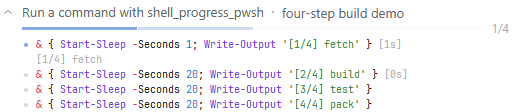
The real card, expanded, with 1/4 done and step 2 in flight.
The question it answers is "is this command still working, or is it stuck?" — so the live position is the feature, not a bonus. The bar lives in the collapsed card: a glance at the transcript is the whole point, and hiding it behind a disclosure would make it a two-step interaction.
Install
dsh plugin --profile web add dsh-shell-progress
Or mount it by hand in the profile's cordis.patch.yml:
- insert:
    - id: shell-progress
      name: dsh-shell-progress
Then restart dsh web (the host loads the plugin once, at start-up).
What the model sees
Nothing new. shell_progress registers a tool whose model-visible text is
byte-identical to what the pwsh tool returns for the same command — same
stdout, same [stderr] section, same [exit code: N] markers. Step data never
enters the conversation; it travels in the tool result's presentationMeta,
which the harness persists on the tool/result event.
There is no nonce, no marker and no reordering anywhere the model can read.
Configuration
- insert:
    - id: shell-progress
      name: dsh-shell-progress
      config:
        enabled: true
        pollIntervalMs: 120
        maxStepOutputChars: 8192
        maxSteps: 400
        liveRetentionMs: 300000
| Field | Default | Meaning |
|---|---|---|
enabled |
true |
Register the shell_progress tool. |
pollIntervalMs |
120 |
How often the host reads the running process's output. |
maxStepOutputChars |
8192 |
Per-step output kept in the persisted progress. |
maxSteps |
400 |
A command split into more steps than this runs unmodified. |
liveRetentionMs |
300000 |
How long a settled call's live record is kept for a late poll. |
When a step's output passes maxStepOutputChars, the lines that do not fit are dropped from
the CARD's copy, and that step's output is followed by the number of characters that are
missing — in the step list and in the segment's hover card alike. Without it a truncated
step reads exactly like a quiet one. The budget is the card's memory, not the tool result:
the model-visible stdout comes from the shell seam and is unaffected by it (the seam's own
truncated / spillPath reporting applies as it always does).
How it works
- Split. The command is cut into top-level steps: non-empty lines that
start at column 0, do not start with
}, and sit at brace depth 0. Brace counting skips single-quoted strings, double-quoted strings (with the backtick escape) and#comments. Loop bodies are never steps, so one iteration cannot produce a marker. - Instrument. Each step's own line gets an inlined marker prefixed to it — never a new line, so the line count and every other line stay untouched.
- Run. The instrumented text goes through
ctx.shell, exactly as thepwshtool runs a command, with the same timeout, sandbox policy, managed environment and cancellation. - Follow. While the process runs, the host reads its incremental output and turns each marker into "the current step", stamping a monotonic timestamp.
- Persist. The final per-step timings and output ride
output.presentationMeta, so a reloaded session rebuilds the whole card from the session log alone.
The marker must stay inlined
src/instrument.ts carries the long version; the short one is that a PowerShell
function call is itself a command, and running it overwrites $?. A marker
written as a helper therefore clobbers the automatic variable it was asked to
preserve — and the caller's $? afterwards reports the helper's success, so
even a helper that captures and restores the value internally cannot fix it.
Measured on this host (Windows PowerShell 5.1, which is what the shell seam
resolves to when PowerShell 7 is not installed):
| Marker shape | $? after a failed command |
|---|---|
| none (control) | False ✅ |
| helper function, capture + restore inside | True ❌ |
| inlined capture + restore | False ✅ |
tests/powershell.spec.ts runs both shapes against a real shell and asserts the
difference, so a future refactor into a helper fails the suite.
When it does not track
The command runs unmodified — and no marker is written — when any of these hold:
- the splitter meets something it cannot decide (unterminated quote, block comment, here-string, line continuation, unbalanced braces or parentheses);
- the command already contains a step-marker shape, or already uses
$__ok; - the resolved sandbox mode is
read-only; - the command splits into more than
maxStepssteps.
A refused call's card is the plain one: the command and everything it printed, with no bar,
no counter and no step rows. There is nothing to draw — no marker was written, so no step has
a time or an output of its own, and the planner's best-effort step list is dropped rather than
rendered as rows that could only ever read "pending". The reason for the refusal goes to the
host log (shell-progress: running the command unmodified — …), not onto the card.
A command with one step is uninstrumented too — there is no order to keep, so there is nothing to mark — but its card is not degraded: the host stamps that step's own start and end, so the bar draws its single segment and it goes pending → running → done with the command's clock beside it.
None of these is an error: the model gets exactly what pwsh would have given.
Layout
| Half | Source | Runs in |
|---|---|---|
| Host | src/index.ts (+ the pure modules beside it) |
the DSH host process (Node) |
| Client | src/client/* (React) |
the browser |
The two halves share src/types.ts and src/split.ts and nothing else.
The live channel is a poll, not a push. A plugin installed outside the DSH
tree cannot receive host events — the forwarded-event allowlist is a static
array inside the DSH build — so the browser polls /shell-progress (an
authenticated request/response channel this plugin owns) every 250ms — the
store's default cadence — while a call is in flight. The settled state never
needs the poll: it is already in the session log.
Development
pnpm install
pnpm run typecheck
pnpm test
pnpm run build
The three workflow badges at the top are these:
| Workflow | What it does |
|---|---|
ci.yml |
Typechecks, builds and runs the unit suite against the harness versions pinned in devDependencies — ONE host version, the one this repository declares. |
harness-matrix.yml |
Re-runs the three suites that cross the plugin/host seam (the registered tool driven through apply, the pwsh planner, the bash planner) once per published harness version — the only real answer to "will this still work after the host upgrades". A version inside the declared peer range blocks the build; the newest published version rides along as a non-blocking probe. |
release.yml |
On a v* tag: the same gate, then npm publish --provenance through Trusted Publishing (OIDC — no token anywhere), then a GitHub Release. |
See DEVELOP.md and PUBLISH.md.
License
MIT
No comments yet. Be the first to write one.