DSH Team Bots
dsh-team-bots is a DSH plugin that turns one workspace into a team: project group chats, a task board, write-scope parallel scheduling, shared memory and skills, approval cards, usage and cost, and a personal WeChat channel. Every run keeps its trajectory, duration, token count and cost.
Requirements
- Node.js ≥ 22.19
- the DSH CLI (
dsh)
The plugin runs inside the DSH Web process. It has no standalone service and no port of its own.
Install
dsh plugin --profile <name> add dsh-team-bots
From a checkout (packs the working tree and installs it into the profile):
npm run profile:install -- --profile <name>
Plugin files inside a profile are a snapshot. After changing code, reinstall — otherwise the page keeps serving the old build.
Open the workspace
http://<host>:<port>/                     DSH web, auto-login into the team workspace
http://<host>:<port>/api/dsh-team/ui      the team workspace itself
The first visit exchanges the current startup token for a 30-day login cookie. Auto-login means anyone who can reach the port becomes owner, so listen on the local machine or a trusted network; for public use put an HTTPS reverse proxy in front that forwards Host and WebSocket correctly.
What the workspace does
Group chats and dispatch
Every project is a group chat. A bot can also be addressed one-to-one in a dispatch view. All traffic for one bot — task dispatch, group chat, direct message, one-to-one chat — lands on a single control-plane session, and that bot runs one task at a time; different bots still run in parallel.
Task board
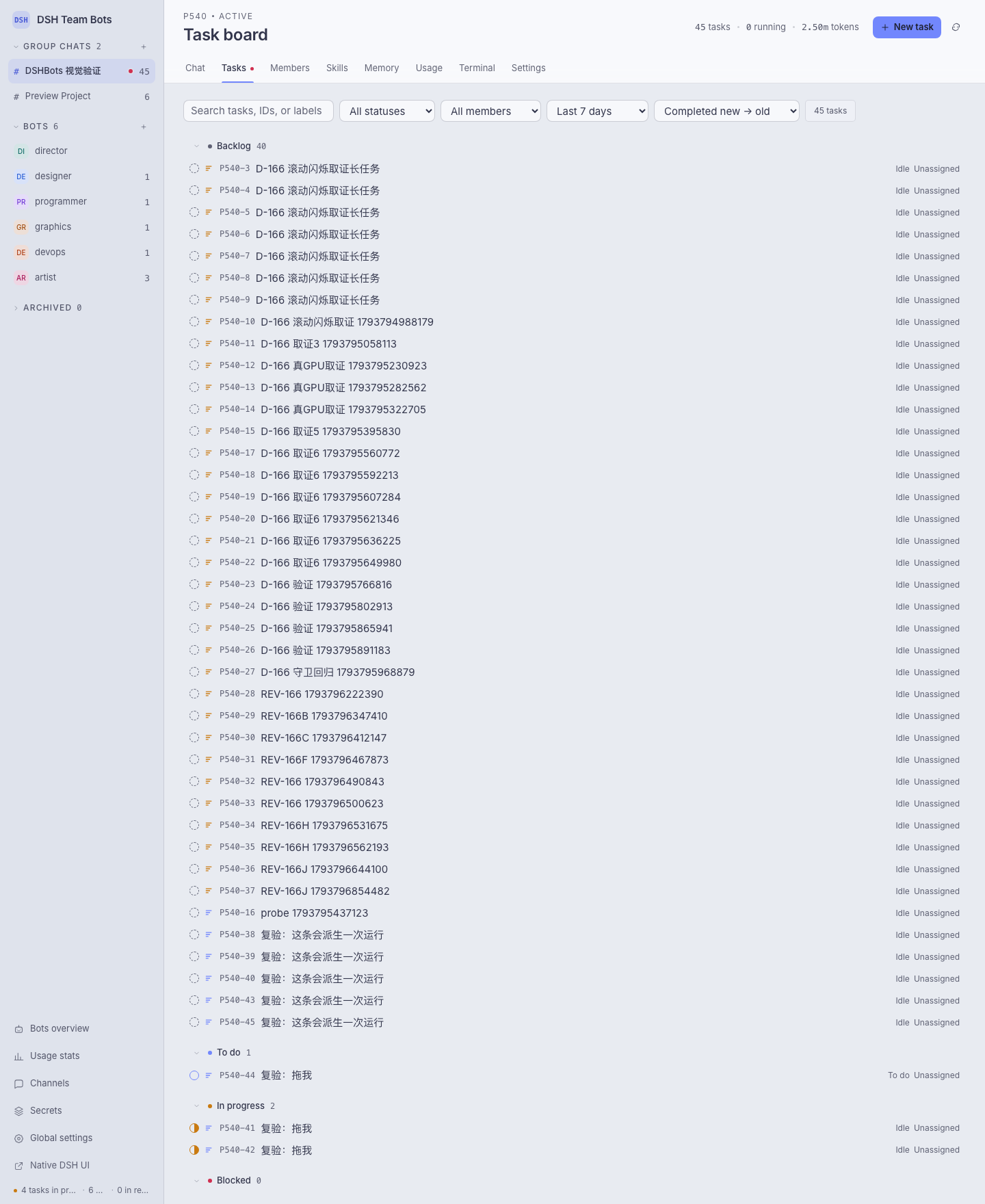
States: backlog, todo, in progress, blocked, in review, done, canceled. A card carries assignee, priority, parent/child links, tags, write scopes, an optional time budget (a hard limit that aborts the run), comments, and its own usage. Rows are grouped by state and can be dragged onto another group to change status.
Write scopes and parallel scheduling
A card declares the paths it will write, relative to the project working directory. Two runs of the same project run in parallel only when both declare scopes and the path prefixes do not overlap; a card with no declared scope is treated as serial. An urgent card may be exempted from the queue — the exemption is written into the card's creation message rather than applied silently.
Memory, skills, evolution proposals
Memory entries are written, reviewed, frozen and archived by the owner, and are readable by every bot in the project. Skills come from a shared skill root plus per-project skills; changing them goes through a proposal, an approval and an apply, with a canary stage before promotion to full effect. The same path can change a bot's role instructions.
Approval and question cards
When a bot asks for a tool approval, a secret, or an answer, the workspace shows a card in the chat. The owner approves, denies or answers in place, and the decision is recorded on the card.
Usage and cost
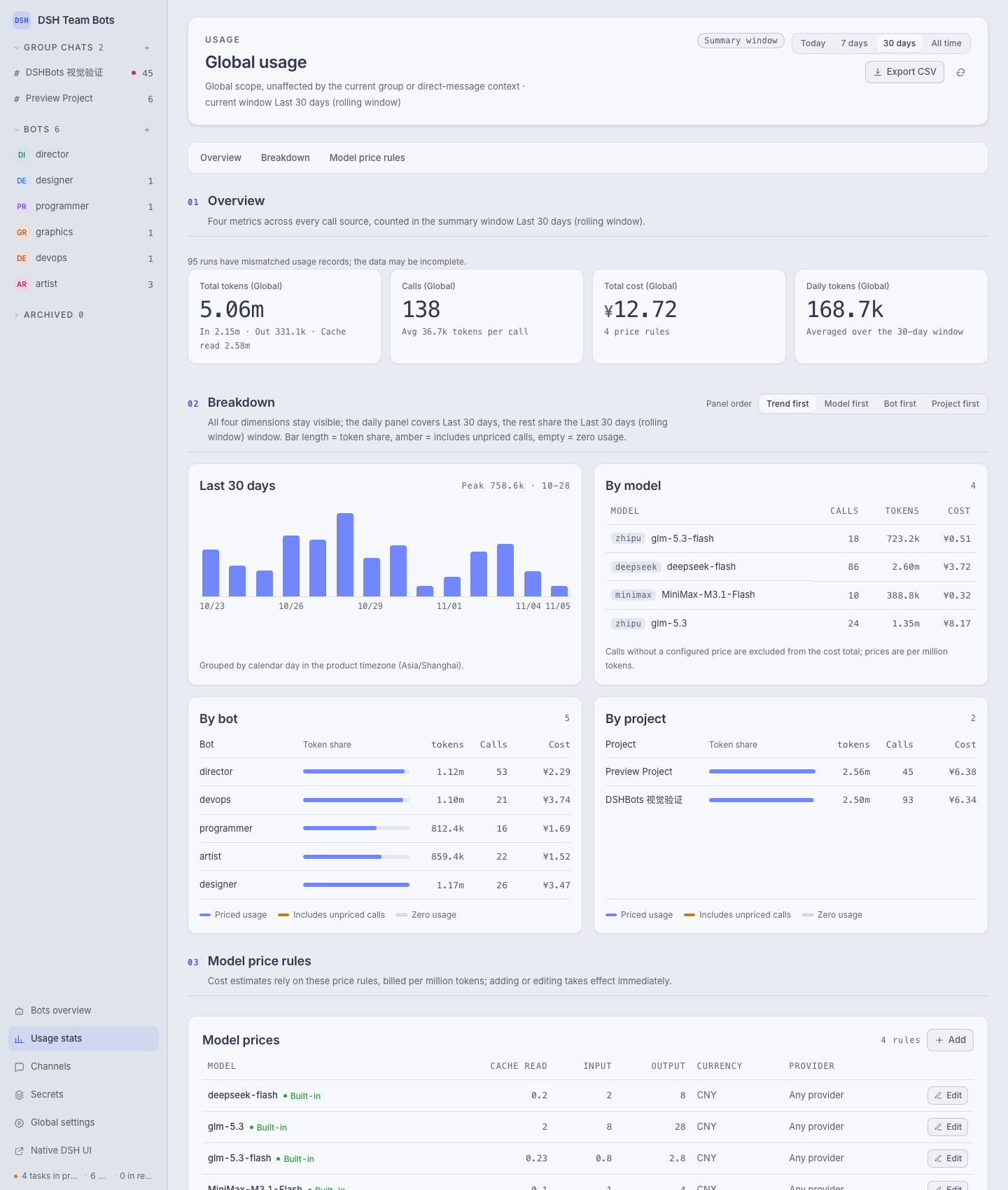
The usage page breaks the numbers down by model, bot and project, exports CSV, and reads model prices from configuration.
Workspace settings
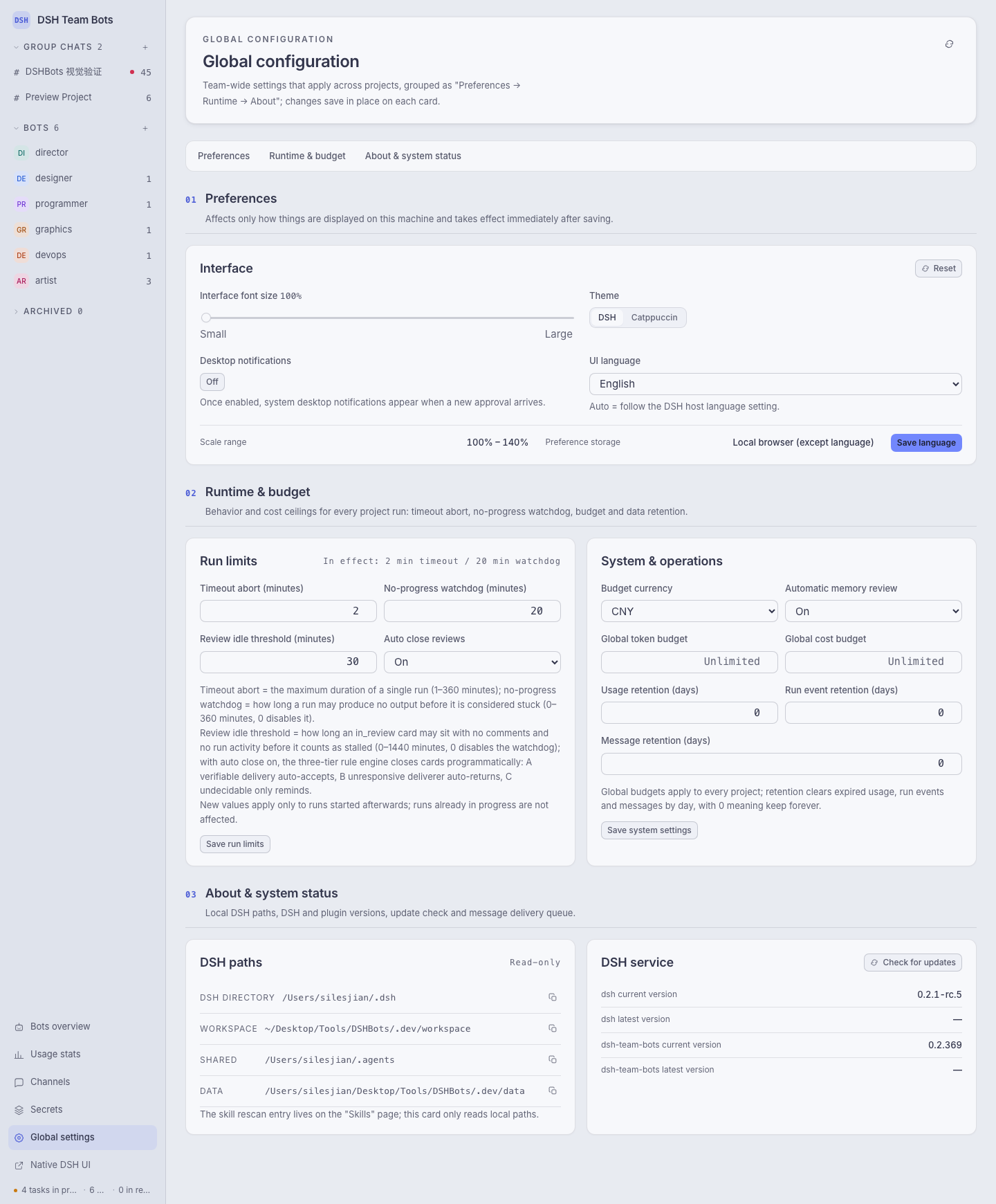
Run limits (timeout abort, no-progress watchdog, review idle threshold), budgets and retention windows are set per workspace, together with the interface preferences and the local DSH paths.
Terminal, channels, secrets
A per-project terminal runs commands in the project directory. The WeChat channel binds by QR code and pushes task activity to the owner's WeChat. Secrets are scoped to the team or to one project; values are only ever shown as a fingerprint and are handed out as one-time runtime copies that expire.
Configuration
| Variable | Default | Meaning |
|---|---|---|
DSH_TEAM_WORKSPACE |
~/.dsh/workspace/team-bots |
team workspace root |
DSH_TEAM_DATA |
<workspace>/.data |
database and run records |
Every other variable, its default, and its resolution order (explicit env > value saved in the workspace > code default) live in src/config.ts; .env.example lists the common ones. Do not put a .env file in the repository root — it would leak DSH_* into npm test and npm run dev.
DSH_TEAM_DATA holds team.sqlite, wechat-channel.sqlite, secret.key, memory/, messages/ and secrets-runtime/. Back up secret.key together with the data: without it the stored ciphertext cannot be decrypted.
Develop
npm install
npm run build       # compile TypeScript into the shipped .js files
npm run typecheck
npm test            # build, then node --test over tests/ and scripts/
npm run dev         # local dev server on http://127.0.0.1:4317
npm run doctor      # check node, dsh, paths and profile references
Additional harnesses: npm run backup / npm run restore-check for data, npm run verify:agent-team for the agent-team capability, npm run load-test and npm run fault-test for the runtime.
Repository layout:
ui/            the browser workspace (modules, styles, zh/en copy)
src/           HTTP API, database, runtime and domain services
src/services/  domain logic: chat, tasks, scheduler, memory, skills, approvals, usage
src/tools.ts   the tool surface bots see (team_* tools)
scripts/       build, dev server, doctor, release, backup, test harnesses
tests/         node:test suites
Release
npm run release # add --dry-run to print the plan without touching anything
The tool pushes dev, lands it on main (fast-forward when possible, otherwise a content snapshot), pushes main and the tag, then syncs dev back. Publishing uses npm OIDC trusted publishing — no NPM_TOKEN — and the workflow installs npm ≥ 11.5.1 before publishing.
License
Apache-2.0, see LICENSE and NOTICE.
No comments yet. Be the first to write one.