dsh-quota-pill
A quota pill for the DeepSeek Harness web GUI: how much is left on every LLM subscription you have, in one collapsible pill next to the composer.
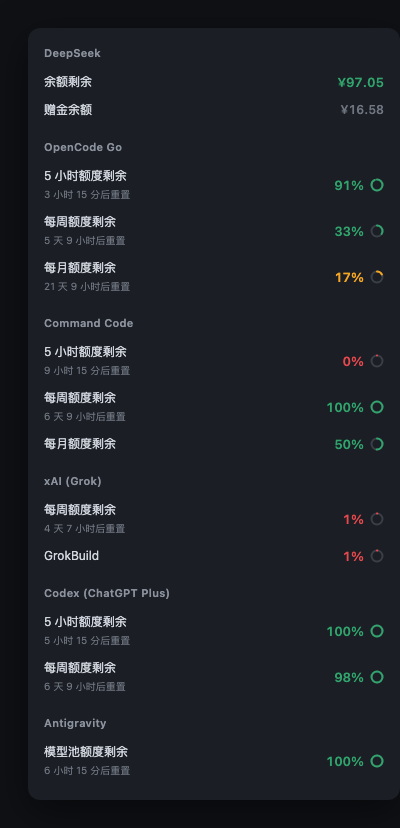
It sits in the composer toolbar, shows the tightest window at a glance, and opens into a per-provider breakdown with reset times. Switch sessions and it follows the model — showing that provider's last reading while it refreshes, then easing into the live number.
What it reads
| Provider | Credential |
|---|---|
| DeepSeek (official) | the Platform sign-in DSH already holds — nothing to add |
| Kimi Coding | refs.KIMI_CODING_API_KEY in ~/.dsh/.credentials.yaml |
| OpenCode Go | refs.OPENCODE_GO_API_KEY |
| Command Code | refs.COMMANDCODE_API_KEY or refs.COMMANDCODE_GOAT_API_KEY (DSH names it after its apiKeyEnv) |
| xAI (Grok) | OAuth token from CLIProxyAPI |
| Codex (ChatGPT Plus) | same — and CLIProxyAPI must be running |
| Antigravity | same |
| Open Design (optional) | refs.OPENDESIGN_CONTROL_KEY (vela_ctrl_…) + refs.OPENDESIGN_WORKSPACE_ID; a console session cookie (OPENDESIGN_SESSION_COOKIE) also works as a fallback |
DeepSeek works with no setup at all if you are signed in to DeepSeek Platform in DSH — that is the official account, and it is the one most users care about.
The three API-key providers need nothing but the key. The three OAuth providers need CLIProxyAPI installed and logged in, because that is what holds the tokens; this plugin only reads them and never runs an OAuth flow itself.
Every provider is optional, and only the ones you actually have are listed:
the pill reads DSH's session/modelCatalog to learn which providers the app can
route to, so removing a provider from DSH removes it from the pill too. A provider
that is present but has no credential is skipped rather than shown as an empty row.
What "auto-detect" means
- A new key for a supported provider (e.g. adding
OPENCODE_GO_API_KEY) appears on the next All refresh — no DSH restart, no sidecar restart. - A provider newly added to DSH's catalog appears within the 2-minute catalog TTL, or immediately when you press Refresh / reopen the All page (a forced read drops the catalog cache). The All page also re-reads when DSH regains focus.
- A brand-new provider type that is not one of the eight adapters needs a
user adapter in
~/.dsh/quota-pill/adapters/(see below); a catalog entry alone cannot invent its quota API.
Unknown providers and user adapters
If the Current page cannot read the session's provider, it shows a short hint and a 复制提示词 / Copy prompt button. The copied prompt contains the whole adaptation flow; paste it into a new session and an agent can add the provider without touching package files.
User adapters live in:
~/.dsh/quota-pill/adapters/<provider>.mjs
They are outside the npm package, so updating the plugin never overwrites
them. The sidecar discovers a new/changed file on the next Refresh (no restart).
/setup?fresh=1 reports unadaptedCatalog and userAdapters, and after a
plugin update the same check tells the agent which providers still need an
adapter. The module contract (exports, read(ctx), standard kinds) is documented
in src/user-adapters.js and in AGENTS.md §2b.
Install
DSH Desktop (recommended). Open Plugins → Install, paste a spec, enable the bundle. Pin the version: an unpinned install can resolve 0.2.2, which breaks web boot. 0.2.12 is the first version with every provider, Open Design Control Keys, sidecar auto-start, and user-defined adapters for providers the package does not ship.
@hystudio/dsh-quota-pill@0.2.12
0.2.12 is published on npm. If pnpm's minimumReleaseAge rejects this fresh release, install the branch until it ages:
github:598934321/dsh-quota-pill#master
CLI. If dsh is not on PATH, open DSH Desktop → Settings → Manage dsh
Command first. Then:
dsh plugin add @hystudio/dsh-quota-pill@0.2.12
The npm package is
@hystudio/...while the repo lives at598934321/...— they are the same author under two account names.
The sidecar now starts automatically with the plugin (the host half spawns it
when nothing is listening on :8319), so there is no second command for a normal
desktop install. If you prefer to manage it yourself, run
npx @hystudio/dsh-quota-pill or a service unit — see
Running it as a service.
The pill says "quota service is not running" only if :8319 is still closed a
few seconds after DSH starts.
Then add whichever keys you have:
# ~/.dsh/.credentials.yaml
refs:
  KIMI_CODING_API_KEY: sk-...
  OPENCODE_GO_API_KEY: sk-...
  COMMANDCODE_API_KEY: sk-...
Reload the DSH window. Done.
Let an agent do it
The repo ships AGENTS.md — a step-by-step guide written for an AI
agent. Ask your agent to set the plugin up and it will detect what you already
have, ask only for what it cannot know (your keys), write them safely, and verify
each provider end to end.
Read AGENTS.md in this repo and set up dsh-quota-pill for me.
Running it as a service
The host plugin already starts the sidecar; this section is only for users who
want it independent of DSH (server, headless, multiple app profiles). Set
QUOTA_PILL_NO_AUTOSTART=1 so the plugin does not race the service.
npx in a terminal dies with the terminal. Pick one:
macOS (launchd) — ~/Library/LaunchAgents/dev.quota-pill.plist
<?xml version="1.0" encoding="UTF-8"?>
<!DOCTYPE plist PUBLIC "-//Apple//DTD PLIST 1.0//EN"
  "http://www.apple.com/DTDs/PropertyList-1.0.dtd">
<plist version="1.0"><dict>
  <key>Label</key><string>dev.quota-pill</string>
  <key>ProgramArguments</key>
  <array>
    <string>/usr/bin/env</string><string>node</string>
    <string>/absolute/path/to/bin/quota-pill-server.js</string>
  </array>
  <key>RunAtLoad</key><true/>
  <key>KeepAlive</key><true/>
</dict></plist>
launchctl load ~/Library/LaunchAgents/dev.quota-pill.plist
Linux (systemd) — ~/.config/systemd/user/quota-pill.service
[Unit]
Description=dsh-quota-pill sidecar

[Service]
ExecStart=/usr/bin/env node /absolute/path/to/bin/quota-pill-server.js
Restart=always

[Install]
WantedBy=default.target
systemctl --user enable --now quota-pill
How it works
DSH web GUI
   └─ client.js          renders the pill; never sees a credential
        │  HTTP (localhost)
        ▼
      sidecar           reads ~/.dsh/.credentials.yaml and ~/.cli-proxy-api/*.json,
                        calls each provider's quota endpoint, caches 60s
Two processes because credentials must never reach the browser, and because
upstream calls need real timeouts and a TLS stack Node's fetch does not have
for some hosts.
Endpoints
| Path | Purpose |
|---|---|
GET /health |
liveness + provider list |
GET /quota?model=<id> |
one provider's reading, selected by model prefix |
GET /quota/all |
every provider, concurrently |
GET /setup |
what each provider still needs |
?fresh=1 bypasses the 60-second cache.
Response
{
  "kind": "subscription-quota",   // subscription-quota | payg | none | probe-failed
  "provider": "opencode",
  "displayName": "OpenCode Go",
  "remainingPct": 17,             // remaining, never used
  "window": "monthly",            // the binding window
  "resetAt": "2026-11-12T00:00:00.000Z",
  "products": { "rolling": 9, "weekly": 67, "monthly": 83 },  // per-window used%
  "windows": [                    // one row each in the UI
    { "key": "monthly", "remainPct": 17, "resetAt": "..." }
  ],
  "cached": false,
  "at": 1792500000000
}
kind is meant to be exhaustive so the UI never has to guess:
subscription-quota— a real percentage existspayg— metered billing, no ceiling (shows spend, not a percentage)none— not configured;errornames the missing credentialprobe-failed— configured but the upstream call failed
Notes on specific providers
Codex is read through CLIProxyAPI's management API, which reports the
X-Codex-* headers CLIProxyAPI observed while proxying real traffic. The direct
chatgpt.com/backend-api/codex/usage endpoint sits behind Cloudflare and rejects
non-browser TLS fingerprints, so it only works as a fallback. CLIProxyAPI must be
running, not merely installed.
xAI has three account generations: grandfathered plans report a percentage
directly, current plans only reveal allowance in x-ratelimit-* response headers
of a one-token completion, and unified-billing accounts have no ceiling at all
(reported as payg).
Antigravity shares one quota pool across all Gemini models, so it reports a single aggregate row — per-model rows would all be the same number and the label would flicker between models you do not even have configured.
Command Code does not expose a monthly ceiling. The adapter derives it from
monthlyCap = weekly.cap × 2, an identity verified against two different plans
(31.6 + 38.4 = 70 with weekly.cap 35; 0.225 + 9.775 = 10 with weekly.cap 6).
Open Design keeps its allowance in the cloud control plane, not in the
sk-amr-… inference key. The preferred credential is a Control Key
(vela_ctrl_…), which is accepted by the Bearer-only
/billing/preflight and /wallet/balance endpoints alongside
x-vela-workspace-id. Get one with the bundled device sign-in (the same flow
as the official vela login):
npx -p @hystudio/dsh-quota-pill dsh-quota-pill-opendesign-login --write
It prints an activation URL, waits for you to approve it in a signed-in browser,
then writes OPENDESIGN_CONTROL_KEY and OPENDESIGN_WORKSPACE_ID into
~/.dsh/.credentials.yaml. The workspace id is optional when using a Control
Key — it is otherwise resolved from /workspaces/current.
The older console-session route (__Secure-better-auth.session_token cookie,
browser-session-only /billing/coding-plan-usage) is still supported as a
fallback; that cookie is HttpOnly, so copy it from devtools → Application →
Cookies. Both routes go through system curl because Cloudflare rejects Node's
TLS fingerprint on amr-api with error code: 1010.
DeepSeek is a prepaid CNY wallet, so there is no percentage to show — the pill
shows the balance and, separately, any bonus credit. Two traps worth recording:
the stored credential is a Platform login grant, not an api.deepseek.com API
key (sending it there returns 401), and calling platform.deepseek.com directly
returns 429 from Cloudflare. The balance is therefore read through DSH's own
account/getBalance RPC, which already holds the grant and projects the response
down to wallet currency and balance. We never handle the Platform token ourselves.
Privacy
- Credentials are read from disk, used for the upstream call, and never logged.
- The sidecar binds
127.0.0.1only. - Nothing is sent anywhere except the provider's own quota endpoint.
- The client shows no credential, and the sidecar's JSON carries no token.
Development
git clone https://github.com/598934321/dsh-quota-pill
cd dsh-quota-pill
npm test              # 70 tests, offline
npm start             # sidecar on :8319
Tests are offline by design: they point the credential layer at a nonexistent
directory so they never touch a live account. Fixtures in test/fixtures.js are
synthetic — no real emails, account ids, or balances.
License
MIT
No comments yet. Be the first to write one.