dsh-sw-cad


Two MCP servers and two skills that let a DeepSeek Harness or Codex agent drive real CAD software. They wire up two existing open-source projects — U-C4N/Autocad-MCP and wzyn20051216/solidworks-automation-skill — so an agent can draw in AutoCAD, model in SolidWorks, and export the results. This repository is the configuration layer: isolated environments, launch parameters, on-demand loading and client registration. It does not fork, patch or repackage either server. Where upstream lacks a capability — SolidWorks has no way to hide its 66-tool catalog — this repository adds a small shim in front of it instead of touching it.
English | 中文
What it does, and when you want it
A CLI agent that can read a drawing is useful. One that can produce one is a different tool. With this kit installed, dsh or Codex can take a sentence like "draw an M6 threaded-hole bracket on an ISO A3 sheet and export PDF" and actually do it — create layers, draw geometry, dimension it, stamp a title block, run a validator, and hand back a file.
The catch is the same as every COM automation: the CAD application must be running, and the agent must
run as the same Windows user and integrity level as the CAD app. This is not a cloud service and there
is no headless substitute for native .dwg / .sldprt output.
Two skills are the entry points. They load lazily — the SKILL.md is read only when a request matches its description, so an idle session pays nothing for them:
| Skill | How it works |
|---|---|
solidworks-automation |
Script-driven: 66 Python modules (30 sw_*.py COM wrappers plus OCCT/FEA/DFM tooling), with preflight, capability gating and evidence chains |
autocad-mcp-pro |
Authored here (upstream ships no AutoCAD skill). Drives the AutoCAD MCP through its two meta-tools |
Two MCP servers are the muscle, registered in the client config:
| Server | Tools advertised | Idle cost | Mode |
|---|---|---|---|
autocad |
2 | ~356 tokens | Upstream DISCOVERY_MODE=search: only search_tools + call_tool; the 242-tool catalog is searched by keyword |
solidworks |
2 | 256 tokens | mcp-shim/ from this repository in front of upstream's 66-tool server (50 solidworks_* + 14 cadstudio_* + 2 design_*), which would otherwise cost 23,404 |
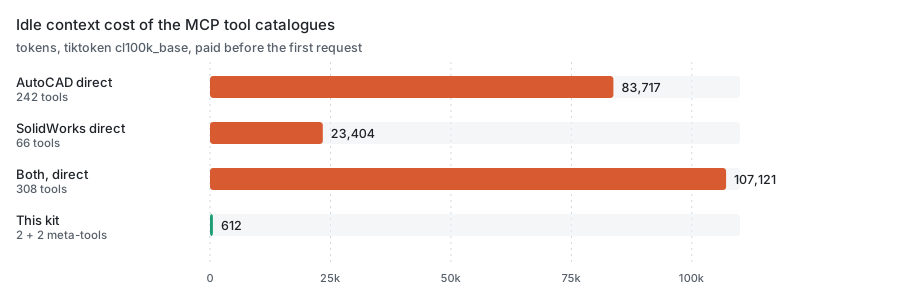
Tool schemas are paid for before the first request. Connected directly the two servers cost 107,121
tokens; through this kit they cost 612, a 99.4% cut. Reproduce with mcp-shim/verify_shim.py.
you speak natural language
   │
   ├─ dsh / Codex lazily loads a skill by its SKILL.md description
   │      ├─ solidworks-automation  → sw_*.py scripts → COM → SolidWorks
   │      └─ autocad-mcp-pro        → search_tools / call_tool → MCP → AutoCAD
   │
   └─ MCP servers (cordis.patch.yml / codex config.toml)
          ├─ autocad    upstream discovery mode, 242 tools on demand
          └─ solidworks our shim, 2 meta-tools, 66 tools on demand
                          └─ spawns upstream server.py lazily
What is upstream, what is ours
This matters more than usual here, because the two servers are other people's work. The split is:
| Part | Origin | License |
|---|---|---|
AutoCAD MCP server (autocad-mcp-pro) |
U-C4N/Autocad-MCP, installed from PyPI | MIT |
| SolidWorks skill + MCP server | wzyn20051216/solidworks-automation-skill, cloned at install time | MIT |
skills/autocad-mcp-pro/SKILL.md |
Authored here — upstream has no AutoCAD skill | MIT |
mcp-shim/ (SolidWorks discovery shim + lexicon) |
Authored here — upstream has no equivalent | MIT |
bin/, lib/, package.json, cordis.patch.yml, install.ps1, bootstrap.ps1, codex-config.snippet.toml, assets/, READMEs |
Authored here | MIT |
Nothing upstream is vendored. The installer fetches the PyPI package and clones (or zip-downloads) the SolidWorks repository at install time, so you always get upstream's current code and upstream keeps ownership of it. The value this repository adds is the part that was missing: verified launch parameters, the discovery-mode configuration, a discovery shim for the server that lacks one, the on-demand skill wiring, the junction trick that keeps gigabytes off C:, and an installer that survives a blocked git protocol.
Install
Three ways in. Pick one, then check the prerequisites at the end of this section.
1. npm, global (recommended)
npm install -g dsh-sw-cad
dsh-sw-cad install
Two commands: the first puts the binary on PATH, the second installs the two upstream servers (the
AutoCAD MCP and the SolidWorks skill) and writes the client entries. install is idempotent and only
touches what is missing.
2. As a dsh plugin
dsh plugin --profile web add dsh-sw-cad
dsh-sw-cad install
The package declares dsh.bundle.patch, so dsh plugin add picks up its cordis.patch.yml and inserts
two MCP client rows. Both rows call the dsh-sw-cad binary, which resolves every path it needs at runtime
(its own location plus ~/.dsh/sw-cad.json) — that is why the patch contains no absolute path and the
same bundle works on any machine.
[!WARNING] The binary has to be on PATH for those two rows to start.
dsh plugin addinstalls into the profile, and dsh does not put that profile'snode_modules/.binon PATH. Either also run step 1, or pointcommandat the absolute path thatdsh-sw-cad whereprints.
3. Without npm: bootstrap.ps1
git clone https://github.com/27painter/dsh-sw-cad.git
cd dsh-sw-cad
.\bootstrap.ps1 -Check     # report only, changes nothing; exits 1 if something is missing
.\bootstrap.ps1            # install whatever is missing
It inspects ten things and repairs only what is absent or stale:
| Check | Fixed by |
|---|---|
| Python ≥ 3.11 | nothing — it reports the problem and stops |
venv-autocad + autocad-mcp-pro |
install.ps1 |
venv-solidworks + mcp / pymupdf / ezdxf / pywin32 |
install.ps1 |
| SolidWorks skill clone | install.ps1 |
| discovery shim | copied from this repository |
| shim catalogue | rebuilt with --build-catalog, also when older than server.py |
~/.dsh/skills junction |
created |
~/.dsh/cordis.patch.yml entries |
install.ps1 (backs the file up first) |
~/.codex/skills junctions |
created |
~/.codex/config.toml entries |
appended, with a backup |
Running it twice is a no-op. It exits 0 when everything is in place and 1 otherwise, so it is safe to
wrap in a script or hand to an agent. Nothing is downloaded unless a core piece is actually missing.
Commands
| Command | What it does |
|---|---|
dsh-sw-cad install |
install the upstream AutoCAD MCP and the SolidWorks skill, and write the client entries |
dsh-sw-cad doctor |
report present/missing pieces, change nothing, exit 1 if something is missing |
dsh-sw-cad where |
print every path the servers will use |
dsh-sw-cad serve autocad|solidworks |
run one MCP server over stdio; dsh calls this, you normally don't |
install is idempotent. If you skip it, the first serve runs it once on demand — set
SW_CAD_NO_AUTO_INSTALL=1 to disable that and get a plain error instead.
[!TIP] Rather not run any of this yourself? Paste the block below into dsh, Codex, or any agent that can run commands on this machine. It carries everything the agent needs, so you can read the rest of this section only if something goes wrong.
Install https://github.com/27painter/dsh-sw-cad on this Windows machine.

Run: npm install -g dsh-sw-cad && dsh-sw-cad install
That installs the package, then the two upstream servers (AutoCAD MCP and the
SolidWorks skill) plus the client entries. dsh-sw-cad install is idempotent and
only touches what is missing.

Do not run it elevated: it must run as the same Windows user as AutoCAD and
SolidWorks. It writes nothing on C: except ~/.dsh and ~/.codex, and never touches
the CAD installations or the registry.
Then verify with: dsh-sw-cad doctor, dsh --profile headless --dump-config, codex mcp list.
Report any step that fails instead of silently working around it.
Prerequisites
- Windows 10/11 with AutoCAD and/or SolidWorks installed
- Python ≥ 3.11 on PATH (
python --version) - dsh (DeepSeek Harness) or Codex CLI; Node ≥ 20 for routes 1 and 2
- Git — optional; the installer falls back to a codeload zip when git is blocked
Version support
Upstream verifies against a single release but writes for a range. The honest picture:
| CAD | Verified | Expected to work | Why |
|---|---|---|---|
| AutoCAD | 2026 (every COM path, live run), 2027 (API compatible) | 2025 / 2024 / 2023 | COM goes through the long-stable ActiveX API. Run the upstream scripts\smoke_*_com.py against your build to confirm. And if COM cannot do something on your version, the ezdxf backend still can — it needs no AutoCAD at all. |
| SolidWorks | 2026 SP4.1 (upstream's acceptance target) | 2025 / 2024 / 2023 | The code carries explicit SW2024 fixes (Chinese edition: selecting a sketch by name, AddComponent4 returning None), and upstream's contributor guide asks for 2020–2025 compatibility. 2023 has not been exercised. |
Older versions are not refused — nothing checks a version number. They are simply outside what upstream verified, so start with one small job and look at the result before trusting a full drawing.
Appendix — upstream's own install steps
These are the upstream projects' own instructions. This is also what install.ps1 automates, so read it if
you want to understand or debug the install.
AutoCAD MCP server — upstream install. Into a venv on the data drive (recommended here):
python -m venv D:\cad-agents\venv-autocad
D:\cad-agents\venv-autocad\Scripts\python.exe -m pip install "autocad-mcp-pro[full]"
D:\cad-agents\venv-autocad\Scripts\autocad-mcp.exe --help    # stdio server entry point
Upstream's own one-liners, if you do not want a venv:
pip install autocad-mcp-pro              # or: uvx autocad-mcp-pro
autocad-mcp                              # backend auto-selected
AUTOCAD_MCP_BACKEND=ezdxf autocad-mcp    # headless DXF, no AutoCAD needed
AUTOCAD_MCP_BACKEND=com   autocad-mcp    # live AutoCAD (needs the [com] extra)
Extras: [com] = live AutoCAD control (pywin32 + Pillow), [pdf] = matplotlib for PDF/PNG output,
[office] = openpyxl for XLSX takeoffs, [full] = all of them. Upstream also documents an HTTP transport
(autocad-mcp --transport http --port 8000) and a JSON config for Claude Desktop / Cursor.
SolidWorks skill + MCP — upstream quick start. Upstream offers three entry points; pick one:
# Option 1 — skill only (simplest)
npx github:wzyn20051216/solidworks-automation-skill

# Option 2 — MCP via Smithery
npm install -g @smithery/cli
smithery mcp add wzyn20051216/solidworks-automation-skill --client codex --config '{}'

# Option 3 — CAD Studio desktop app, from the upstream Releases page
Manual clone (what this kit does, and what you need if you want the skill on the data drive):
git clone --depth 1 https://github.com/wzyn20051216/solidworks-automation-skill.git D:\cad-agents\dsh-skills\solidworks-automation
D:\cad-agents\venv-solidworks\Scripts\python.exe -m pip install -r D:\cad-agents\dsh-skills\solidworks-automation\requirements.txt
D:\cad-agents\venv-solidworks\Scripts\python.exe -m pip install -r D:\cad-agents\dsh-skills\solidworks-automation\mcp-server\requirements.txt
D:\cad-agents\venv-solidworks\Scripts\python.exe D:\cad-agents\dsh-skills\solidworks-automation\scripts\cad_doctor.py
Optionally put the discovery shim in front of SolidWorks (every route above does this for you; these are the manual steps). Without it the client carries all 66 tool schemas — 23,404 tokens — in every request:
New-Item -ItemType Directory -Force -Path D:\cad-agents\mcp-shim | Out-Null
Copy-Item .\mcp-shim\* D:\cad-agents\mcp-shim\ -Force

# build the search catalogue (once, and again after any upstream update)
D:\cad-agents\venv-solidworks\Scripts\python.exe D:\cad-agents\mcp-shim\sw_discovery_shim.py `
  --python D:\cad-agents\venv-solidworks\Scripts\python.exe `
  --server D:\cad-agents\dsh-skills\solidworks-automation\mcp-server\server.py --build-catalog
Register both servers with your client. dsh reads ~/.dsh/cordis.patch.yml — copy this repository's
cordis.patch.yml there. It carries no absolute path: each row calls dsh-sw-cad serve <target>, so the
only requirement is that the binary is on PATH (npm install -g dsh-sw-cad). Codex reads
~/.codex/config.toml — append codex-config.snippet.toml, or use upstream's own registrar
(mcp-server\register_codex_mcp.ps1 -Python <venv python> -InstallDependencies). The Codex snippet does
contain absolute paths, so adjust those to your -BaseDir.
Make the skills visible. Both clients only scan their own skills directory:
# dsh: one junction for the whole skills folder (matches what install.ps1 does)
New-Item -ItemType Directory -Force -Path "$env:USERPROFILE\.dsh" | Out-Null
New-Item -ItemType Junction -Path "$env:USERPROFILE\.dsh\skills" -Target "D:\cad-agents\dsh-skills"

# Codex: one junction per skill (its skills folder may hold other skills)
New-Item -ItemType Directory -Force -Path "$env:USERPROFILE\.codex\skills" | Out-Null
New-Item -ItemType Junction -Path "$env:USERPROFILE\.codex\skills\solidworks-automation" -Target "D:\cad-agents\dsh-skills\solidworks-automation"
New-Item -ItemType Junction -Path "$env:USERPROFILE\.codex\skills\autocad-mcp-pro"       -Target "D:\cad-agents\dsh-skills\autocad-mcp-pro"
Appendix — what install.ps1 does
install.ps1 runs everything in the appendix above, plus the parts that are easy to get wrong: both venvs on the data
drive, the junctions, the discovery-mode parameters, and a timestamped backup of ~/.dsh/cordis.patch.yml.
powershell -ExecutionPolicy Bypass -File .\install.ps1

# custom locations / force rebuild
.\install.ps1 -BaseDir "E:\cad" -WorkDir "E:\AutoCad" -Force
It checks Python, creates the directories, builds the venvs, installs autocad-mcp-pro[full] and the
SolidWorks requirements, clones the skill (or zip-downloads it when git is blocked), installs the discovery
shim and builds its catalogue, junctions the skills into ~/.dsh/skills, writes the dsh config, and drops
the AutoCAD skill in place.
If you are not sure what is already on the machine, run bootstrap.ps1 instead: it decides whether
install.ps1 is needed at all.
Codex users still need one step — append codex-config.snippet.toml to ~/.codex/config.toml and
junction the two skills into ~/.codex/skills/ (last four commands of the appendix above).
[!IMPORTANT] Start AutoCAD / SolidWorks first, as the same user. COM automation crosses a process boundary that Windows guards by user and integrity level. An agent started elevated while the CAD app runs normally (or vice versa) will connect to nothing, and the failure looks like "the tool did nothing".
Usage
Just describe the drawing. The skill loads itself.
Open AutoCAD, draw a bearing housing: base 120×80×10, upright 60 high × 12 thick,
φ40 through hole on top. ISO A3 sheet with title block and dimensions, save to
D:\AutoCad and export PDF.
In SolidWorks, build a flange: OD 100, 20 thick, 30 bore, four M10 bolt holes on a
bolt circle. Save as SLDPRT and export STEP.
Practical notes, learned the hard way:
- Say one CAD at a time. Mentioning both loads both skills and mixes the task.
- Ask for a plan first on anything complex. Both skills have a planning step; approving a plan before geometry is drawn is cheaper than undoing a bad drawing.
- Ask for the preview. The AutoCAD path ends in an 8-step validator plus a screenshot; the SolidWorks path exports four orthographic previews. "Show me the preview" is a fair request and the skills honor it.
Verification
# everything present? read-only, exits 1 if something is missing
dsh-sw-cad doctor

# every path the servers will use
dsh-sw-cad where

# dsh sees both servers and both skills
pnpm dsh --profile headless --dump-config
pnpm dsh --profile headless "list available skills"

# SolidWorks skill self-check (Python deps + COM)
& "D:\cad-agents\venv-solidworks\Scripts\python.exe" "D:\cad-agents\dsh-skills\solidworks-automation\scripts\sw_preflight.py"

# both MCP servers answer a handshake through the same entry point dsh uses
node bin\dsh-sw-cad.mjs serve solidworks     # expects solidworks-discovery, 2 tools
node bin\dsh-sw-cad.mjs serve autocad        # expects AutoCAD MCP Pro, 2 tools

# Codex
codex mcp list
What was verified before publishing: both serve targets answer a JSON-RPC handshake through the
package's own binary — the AutoCAD server reports AutoCAD MCP Pro 3.4.11 (the pip package is 1.6.0, the
server carries its own version), the shim reports solidworks-discovery 1.0.0 behind upstream
solidworks_mcp 1.30.0 — and each advertises exactly two meta-tools. Discovery finds
gear_draw_spur_front_view / keyway_draw_keyed_bore by keyword; dsh --dump-config loads both rows
with command: dsh-sw-cad; the SolidWorks preflight passes. The shim was measured end to end on 36
Chinese and English queries: tools/list costs 256 tokens instead of 23,404, every query returned a
correct top hit, and call_tool
forwarded a live solidworks_health_check to a running SolidWorks 2026.
Design notes
1. Discovery mode is the whole trick. 242 tool schemas cost ~84k tokens if advertised. In discovery
mode the client sees two tools (~356 tokens) and searches a catalog that carries 206 AutoCAD command names
plus 1439 synonyms — say "chamfer" and it finds FILLET.
2. SolidWorks needed the same trick, so the shim exists. Upstream's server registers all 66 tools
unconditionally; measured on the wire that is 23,404 tokens before the first request. The shim advertises
search_tools + call_tool (256 tokens), serves search from a cached catalogue, and spawns the real
server only when a tool is actually called. The 57 bilingual alias groups in sw_lexicon.json are what
make "拉伸凸台" land on solidworks_sketch_and_extrude and "干涉检查" on solidworks_interference_check.
Upstream is untouched, so a git pull in the skill directory still works.
3. Keep TOOL_PROFILE=full and TOOL_PACKS=all. They only narrow the searchable catalog and do not
change idle cost. Measured: lean + core,mech drops the catalog to 58 tools and makes the parametric gear
and keyway tools unfindable. Narrowing packs loses capability without saving a token.
4. Junctions, not copies. dsh only scans ~/.dsh/skills, Codex only scans ~/.codex/skills. Directory
junctions point both at the data drive; neither tool notices. Deleting a junction does not delete data.
5. Scope the file access. The AutoCAD server's ALLOWED_PATHS is empty by default, and its own README
says to set it. This kit sets it to a working directory.
6. Know what is verified. The version table under Install says it plainly: upstream verified AutoCAD 2026 and SolidWorks 2026 SP4.1. Everything else is expected, not proven — run one small job first.
7. Discovery is not free, it is deferred. Every tool call costs one extra round trip: search, then
call. For a single "draw a box" that is slower than calling the upstream tool directly, and the shim's
catalogue can go stale if the upstream skill is updated without --build-catalog. It is the right trade
when a session makes several calls, which is the normal case for CAD work.
Troubleshooting
| Symptom | Cause / fix |
|---|---|
| dsh lists no skills | ~/.dsh/skills must be a junction whose target exists; folder name must equal the frontmatter name |
| Codex lists no skills | both junctions under ~/.codex/skills\; Codex must support skills |
| AutoCAD tools return nothing | CAD not running, or different user/integrity level; set AUTOCAD_MCP_BACKEND=com to rule out the ezdxf fallback |
| SolidWorks preflight fails | missing deps (requirements.txt of the skill) or SW not running |
search_tools offers a tool that no longer exists |
the shim's catalogue is stale — rerun --build-catalog |
call_tool says "Could not start the SolidWorks MCP server" |
the --python / --server paths in the client config are wrong, or the skill was moved |
codex mcp list empty |
the snippet must sit at the end of config.toml; paths need doubled backslashes |
git clone fails during install |
the installer falls back to a codeload zip automatically |
License
MIT (see LICENSE). Upstream components remain under their own MIT licenses; this repository redistributes neither.
No comments yet. Be the first to write one.