DeepSeek Harness · Theme Skins
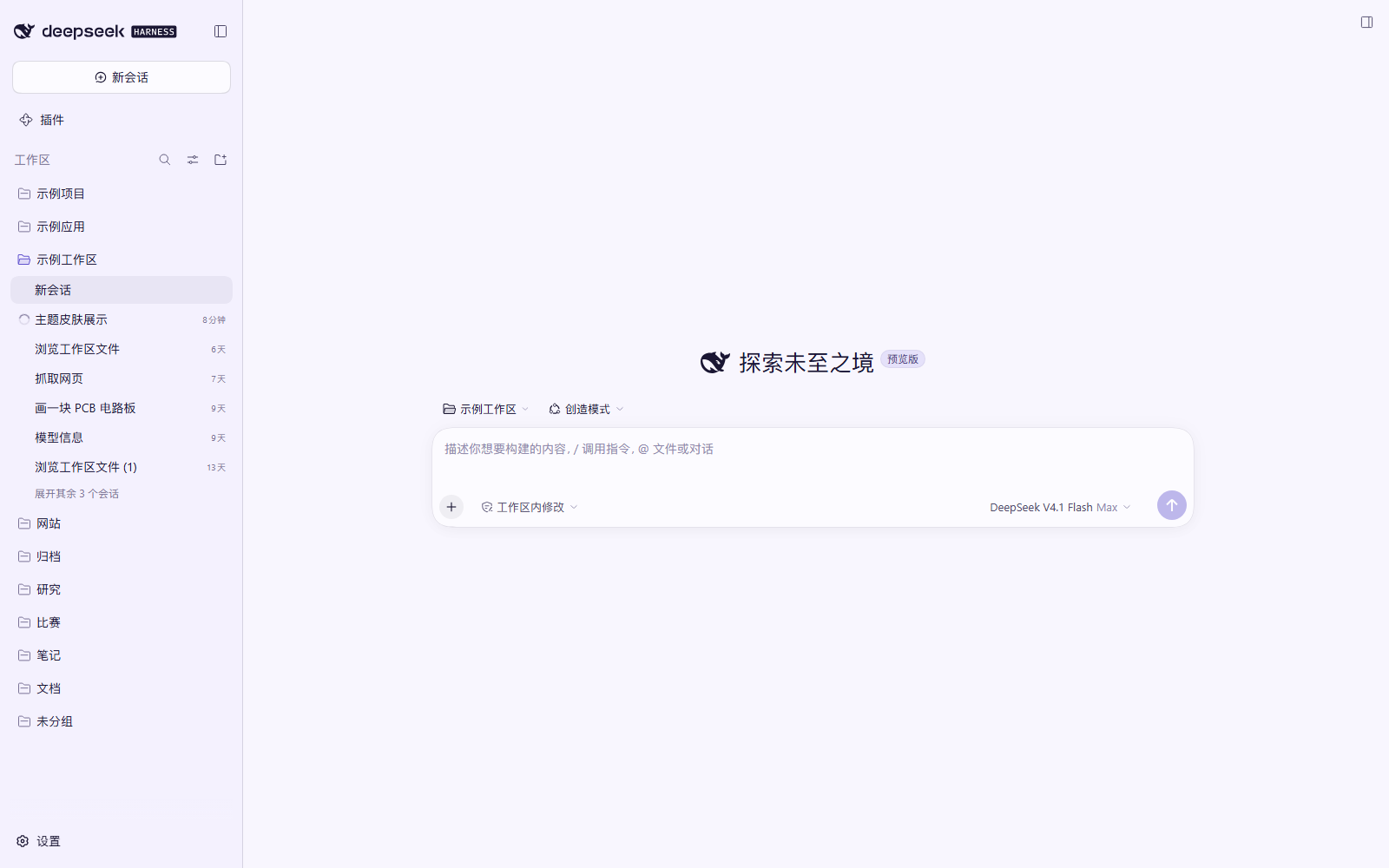
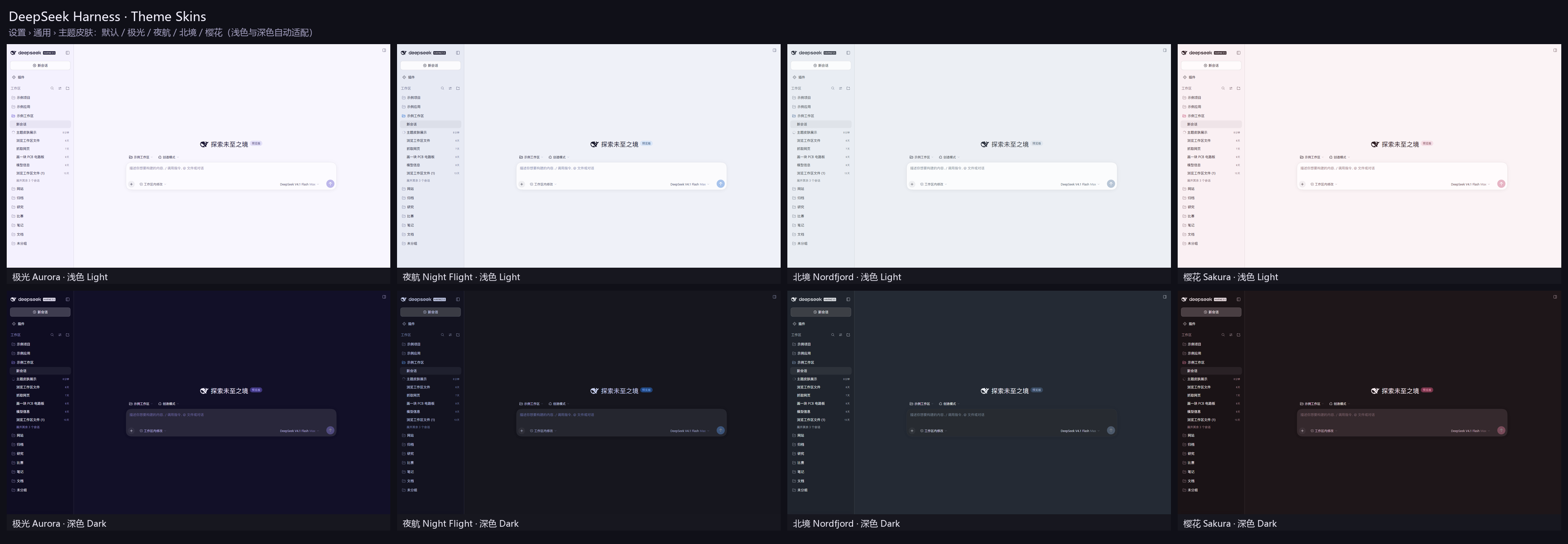
为 DeepSeek Harness Web 界面准备的 4 套精选配色:极光 Aurora、夜航 Night Flight、北境 Nordfjord、樱花 Sakura。 浅色 / 深色自动适配,一键切换,重启后仍会记住;不想要时点「默认」即可完全恢复原生外观。




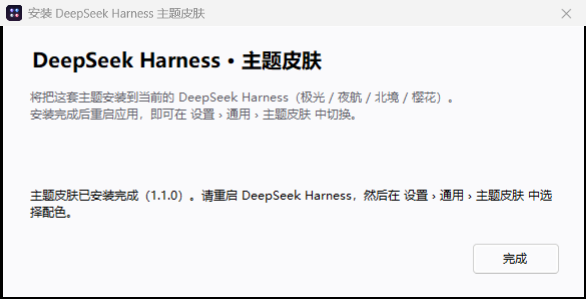
⬇️ 下载即用(Windows 一键安装)
不想折腾源码?下载一个 exe,双击即可,无需 Node / Git / 联网:
| 文件 | 用途 |
|---|---|
| DSH-ThemeSkins-Setup.exe | 一键安装(约 190 KB) |
| DSH-ThemeSkins-Uninstall.exe | 一键卸载 |
| dsh-theme-skins-portable.zip | 便携版(给 Agent 或手动安装用) |
安装程序会:把插件复制到 %LOCALAPPDATA%\dsh-theme-skins → 用 Harness 自带的 pnpm 把插件登记进当前 profile(找不到运行时时自动改用目录链接 + 直接写入依赖)→ 启用 bundle。
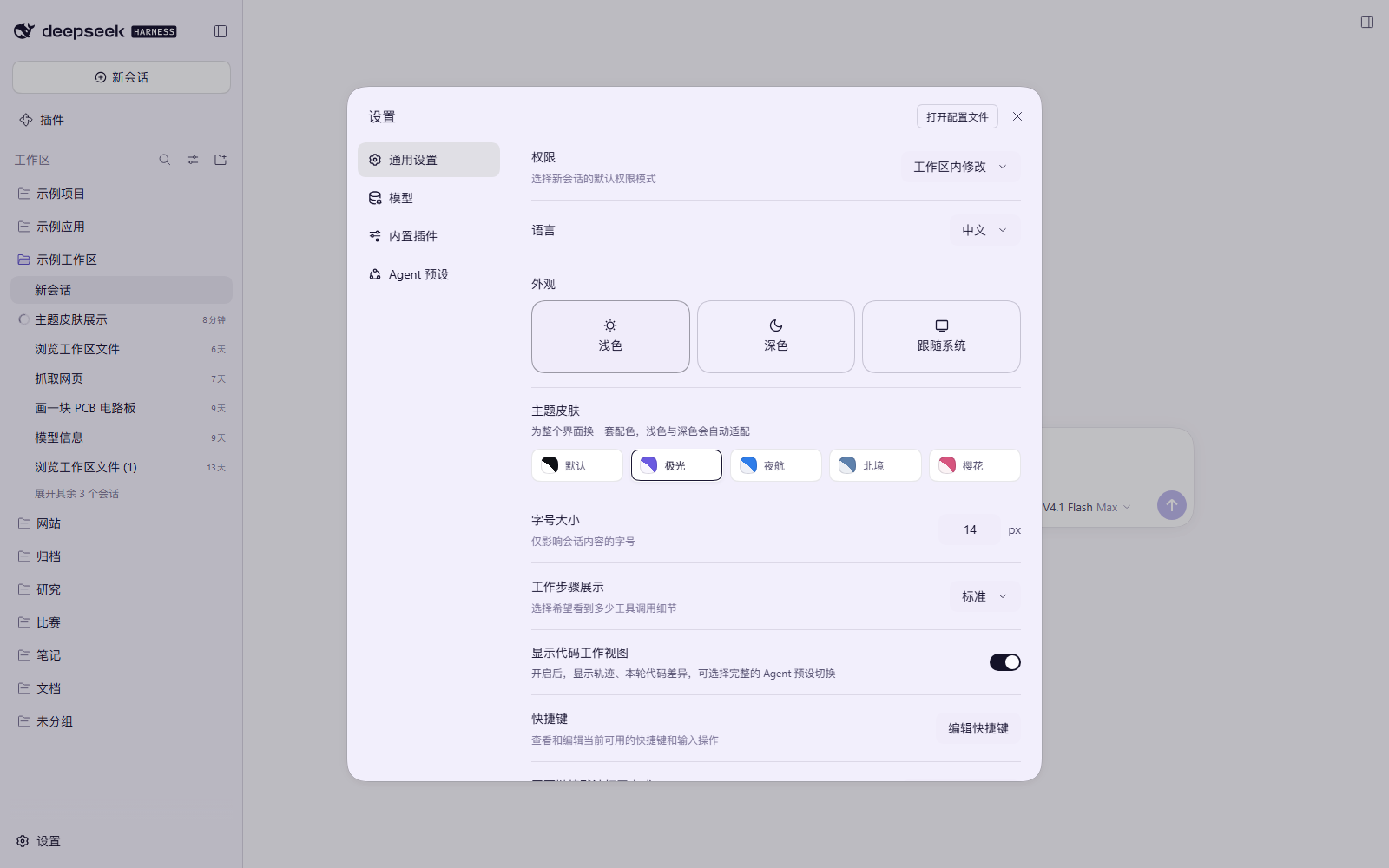
装好后重启 DeepSeek Harness,在 设置 › 通用 › 主题皮肤 里切换。卸载运行 Uninstall.exe,同样重启后恢复原生界面。
小提示:exe 未做代码签名,Windows SmartScreen 可能提示「已保护你的电脑」——点「更多信息 → 仍要运行」即可。不放心的话可以按本文档的「构建与打包」一节,用源码自行编译(逻辑透明,可逐行审阅)。
✨ 特性
- 4 套完整配色 + 1 个「默认」选项,共 5 种外观;
- 每套主题自带 浅色 / 深色两套色板,跟随「设置 › 外观」里的 浅色 / 深色 / 跟随系统 自动切换;
- 覆盖 DSH 设计系统的完整颜色 token:画布、表面层、边框、文字层级、主色、状态色、代码高亮、用户气泡、菜单/弹窗、滚动条、diff 颜色……共 104 个 token;
- 零布局改动:不重写 DOM、不替换组件,以
ctx.theme.overrideTokens的 token 覆盖层实现,禁用插件即完全还原; - Windows 一键安装 exe(自带全部文件,无需 Node / Git),也提供便携版与源码安装方式;
- 中英双语设置行,选择保存在浏览器
localStorage; - 无第三方依赖,
client.js是预构建的单文件模块,安装即用。
🎨 主题一览
| 主题 | id | 浅色 | 深色 |
|---|---|---|---|
| 极光 Aurora(默认) | aurora |
薰衣草纸感 + 靛蓝 | 深海靛蓝夜色 |
| 夜航 Night Flight | nightflight |
雾蓝灰 + 天蓝 | 蓝黑底 + 霓虹蓝 |
| 北境 Nordfjord | nord |
雪原灰蓝 + 霜蓝 | 极夜蓝灰 + 冰蓝 |
| 樱花 Sakura | sakura |
奶油粉 + 玫瑰 | 暗紫梅 + 樱花粉 |
| 默认 Default | default |
DSH 原生外观 | DSH 原生外观 |
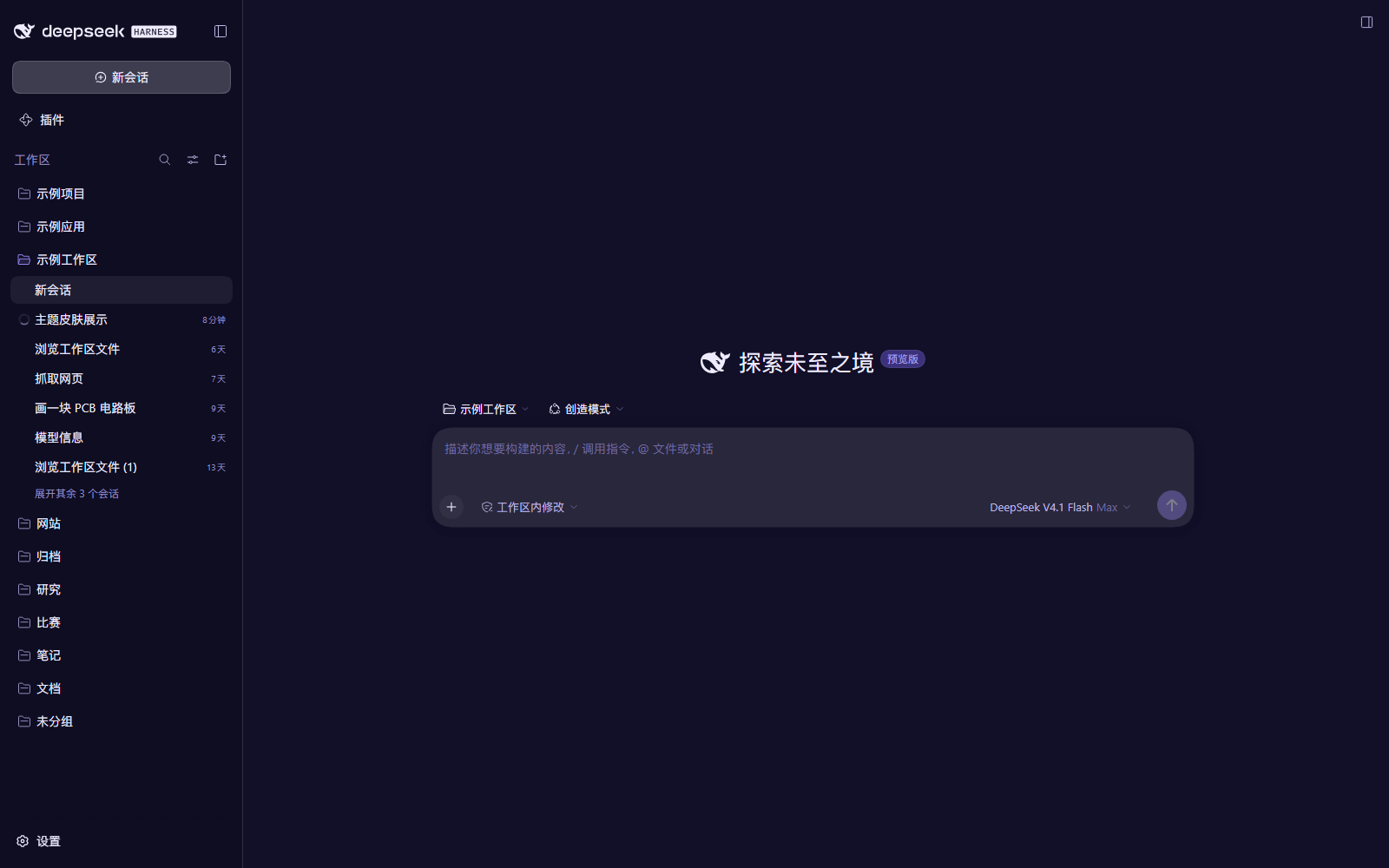
🖼 截图
四套主题 × 浅色/深色总览:
设置页里的切换入口(设置 › 通用 › 主题皮肤):
深色示例:
📦 其他安装方式(源码 / Agent / 手动)
前提:DeepSeek Harness 桌面端(0.2.x,Web GUI 由
@deepseek-ai/dsh-client-ui-theme提供theme服务)。 Windows 用户优先用上面的 exe;没有 exe(或想从源码安装)时用下面的方式。
推荐方式:由 Harness 里的 Agent 安装(Plugin Manager)
把本仓库克隆/下载到一个固定目录(安装后 profile 会用
link:引用该目录,之后不要移动或删除它):git clone https://github.com/123WE-glitch/dsh-theme-skins.git dsh-theme-skins在 Harness 会话中让 Agent 执行 Plugin Manager 的
install_bundle,target填仓库的绝对路径(例如C:/Users/you/Projects/dsh-theme-skins)。安装会自动完成:pnpm add link:<path>、profile 依赖、bundle 选择、以及热加载。
手动安装(等价操作)
# 1) 进入当前 profile 目录:Windows 下一般为 C:\Users\<you>\.dsh\profiles\desktop
cd "$DSH_PROFILE_DIR"

# 2) 链接本仓库(路径用正斜杠)
pnpm add "link:C:/path/to/dsh-theme-skins"
然后编辑 profile 的 package.json:
{
  "dependencies": {
    "@local/dsh-theme-skins": "link:C:/path/to/dsh-theme-skins"
  },
  "dsh": {
    "profile": {
      "bundles": ["...", "@local/dsh-theme-skins"]
    }
  }
}
重启 Harness(或刷新 Web 页面)即可生效。
🔁 切换与还原
设置 › 通用 › 主题皮肤 → 点选 默认 / 极光 / 夜航 / 北境 / 樱花。
- 颜色模式不用单独选:主题会跟随「外观」的 浅色/深色/跟随系统;
- 点「默认」立即完全恢复 DSH 原生外观;
- 卸载:运行
DSH-ThemeSkins-Uninstall.exe,或在 设置 › 插件 中移除该 bundle(或让 Agent 调用plugin_manager的remove_bundle)。
🛠 自定义 / 添加主题
编辑
src/theme-core.mjs里的SKINS:paper/ink:整套中性色阶的两端锚点(会据此生成--dsw-static-*色阶);accent:主色(链接、业务态、选中态);light/dark:各自模式的表面、文字、边框、代码块、滚动条、语法高亮颜色。
重新生成浏览器模块:
node src/build-client.mjs重新安装 bundle(或重启应用)以加载新的模块代。
新增一套主题时,还需要在 src/build-client.mjs 的 ZH / EN 字典里补一行该 id 的显示名。
🧪 开发工具(可选)
src/ 下附带若干在本机正在运行的 DSH Web GUI 上使用的脚本:
| 命令 | 作用 |
|---|---|
node src/preview.mjs all |
把主题 token 直接注入真实页面并截浅色/深色图(不安装、不落盘设置) |
node src/verify.mjs <outDir> [steps.json] |
安装后的端到端截图验证(点击/滚动/截图步骤计划) |
node src/docs-shots.mjs |
生成 docs/ 截图(自动把个人会话名替换为示例文本) |
node src/audit-contrast.mjs |
粗略 WCAG 对比度自检 |
python src/make-gallery.py <rawDir> <out.png> |
把各主题截图拼成总览图 |
脚本通过 DevTools 协议驱动一个 headless Chrome/Edge/Chromium;为了访问本地 GUI,它会读取你自己的 $DSH_HOME/.credentials.yaml 并铸造浏览器会话 cookie(仅本机使用)。可用环境变量:CHROME_PATH(浏览器可执行文件)、DSH_HOME(默认 ~/.dsh)、DSH_WEB_URL(默认 http://127.0.0.1:19387)。
🔨 构建与打包(生成 Release 里的 exe)
安装程序是单个 C# 源码(packaging/Installer.cs)+ 内嵌的 base64 插件文件(packaging/generate-payload.mjs 生成),用 .NET Framework 自带的 csc.exe 编译,无需 Visual Studio:
# 1) 构建 Setup.exe / Uninstall.exe / 便携版 zip  → 输出到 dist\
powershell -ExecutionPolicy Bypass -File packaging/build.ps1

# 2) 冒烟测试:用临时 profile 跑 安装 → 重复安装 → 卸载 → 无运行时降级路径
powershell -ExecutionPolicy Bypass -File packaging/test-install.ps1

# 3)(可选)给文档截一张安装器窗口图
powershell -ExecutionPolicy Bypass -File packaging/capture-installer-shot.ps1 docs\installer.png
- 依赖:Windows + .NET Framework 4.x(系统自带
csc.exe)、Node.js(构建脚本也会自动使用 Harness 运行时的 node);只有重新生成图标才需要 Python + Pillow; dist/、packaging/Payload.g.cs、packaging/icon.png都是构建产物,已被.gitignore忽略;- 安装器行为:解压到
%LOCALAPPDATA%\dsh-theme-skins→ 寻找$DSH_HOME/dsh-runtimes/*/dependencies里的 pnpm 执行pnpm add link:<dir>→ 修改 profilepackage.json的dsh.profile.bundles;找不到 pnpm 时降级为目录 junction + 直接写依赖。卸载器逆向执行。 - 静默安装(适合脚本):
DSH-ThemeSkins-Setup.exe --silent(退出码 0/1);也可用--uninstall触发卸载模式。
🧠 实现原理
- 这是一个标准 DSH bundle 插件:
cordis.patch.yml向 profile 插入一行插件,Host 端index.js为空壳,界面逻辑全在浏览器端client.js; client.js在 Cordis 插件树中依赖theme/slots/locale服务;- 每套主题被展开成 104 个 CSS 变量覆盖项(
--dsw-static-*基础色阶、--dsw-alias-*语义色、--dsw-specific-*、--dsw-menu-*、--shiki-token-*),以{ light, dark }成对提供; - 通过
ctx.theme.overrideTokens(source, tokens)叠加覆盖层:ui-layout 会把当前颜色模式对应的值写到document.body的内联样式上,因此切浅色/深色/跟随系统时自动换值,无需重新注册; - 设置行注册在
settings.general.item槽位(与「外观」「字号大小」同一区域),卡片式选择器 + 双色圆形色板; - 插件卸载/禁用时覆盖层随之移除,界面回到原生外观。
✅ 兼容性
- 面向 DeepSeek Harness 0.2.x 的 Web GUI(
@deepseek-ai/dsh-client-ui-theme的theme.overrideTokens接口); - 只覆盖颜色类 token,不依赖私有 DOM 结构;后续版本只要保留该扩展点即可继续使用;
- 本项目是社区第三方插件,与 DeepSeek 官方无关。
🙏 Credits
- Night Flight 配色参考 Tokyo Night(MIT);
- Nordfjord 配色参考 Nord(MIT);
- Aurora / Sakura 为原创配色;
- DeepSeek Harness 及其设计系统归 DeepSeek 所有。
📄 License
MIT © 2026 123WE-glitch
English
A community theme plugin for DeepSeek Harness's Web UI, shipping four curated color skins — Aurora, Night Flight, Nordfjord, Sakura — plus the original look as Default.
Download & run (Windows): grab DSH-ThemeSkins-Setup.exe, double-click, restart DeepSeek Harness, then pick a skin in Settings › General › Theme skin. No Node, Git or network needed. Uninstall with DSH-ThemeSkins-Uninstall.exe. Unsigned build: if SmartScreen warns, choose More info → Run anyway, or build it yourself from packaging/ with powershell -File packaging/build.ps1.
- Every skin defines light and dark palettes; it follows the built-in Appearance setting (Light / Dark / System) automatically.
- Implemented as a pure token override layer (
ctx.theme.overrideTokens): no DOM or layout changes, and disabling the plugin fully restores the stock UI. - Overrides 104 design tokens: surfaces, borders, text tiers, accent/state colors, code blocks, syntax highlighting, user bubble, menus, scrollbars, etc.
- Bilingual (zh/en) picker in Settings › General › Theme skin, choice persisted in
localStorage. - No dependencies;
client.jsships prebuilt.
Install (recommended): clone this repo to a stable path, then ask your Harness agent to install it through Plugin Manager (install_bundle with the absolute package path). Manual alternative: inside $DSH_PROFILE_DIR, run pnpm add "link:C:/path/to/dsh-theme-skins" and add "@local/dsh-theme-skins" to both dependencies and dsh.profile.bundles in the profile package.json, then restart Harness.
Switch: Settings › General › Theme skin. Customize: edit src/theme-core.mjs, run node src/build-client.mjs, reinstall the bundle.
License: MIT. Community project, not affiliated with DeepSeek.
No comments yet. Be the first to write one.