DeepSeek Harness · 选中操作(Selection Actions)
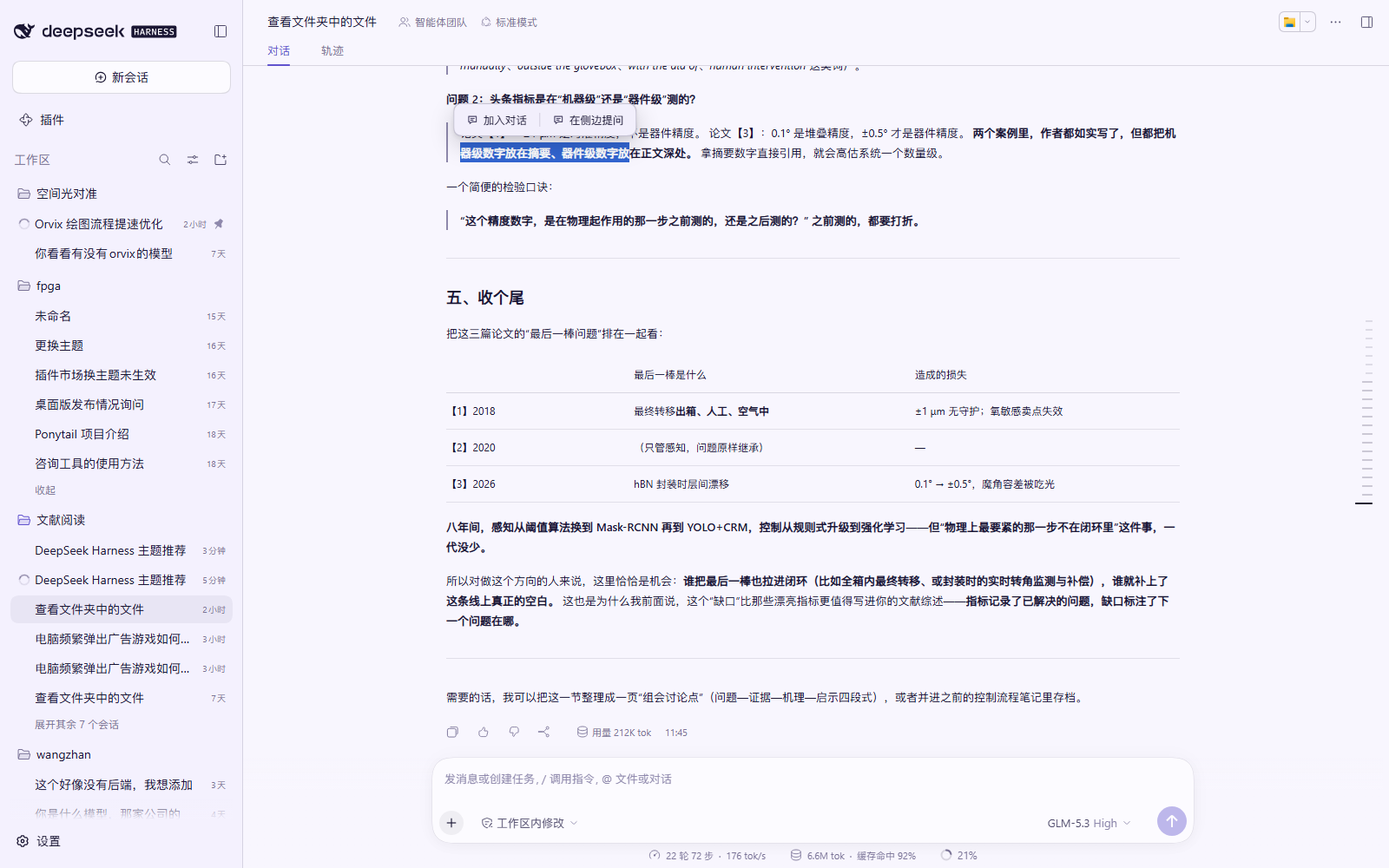
在 DeepSeek Harness 的对话里选中一段文字,立刻可以「加入对话」或「在侧边提问」——像在 IDE 里选中代码问 AI 一样顺手。




English: A DeepSeek Harness plugin that adds selection actions to chat messages — select text and either attach it to the current composer or ask about it in a side chat that reuses one tab and inherits the main conversation context.
✨ 特性
- 选中即用:在任意消息里拖选文字,弹出小工具条:
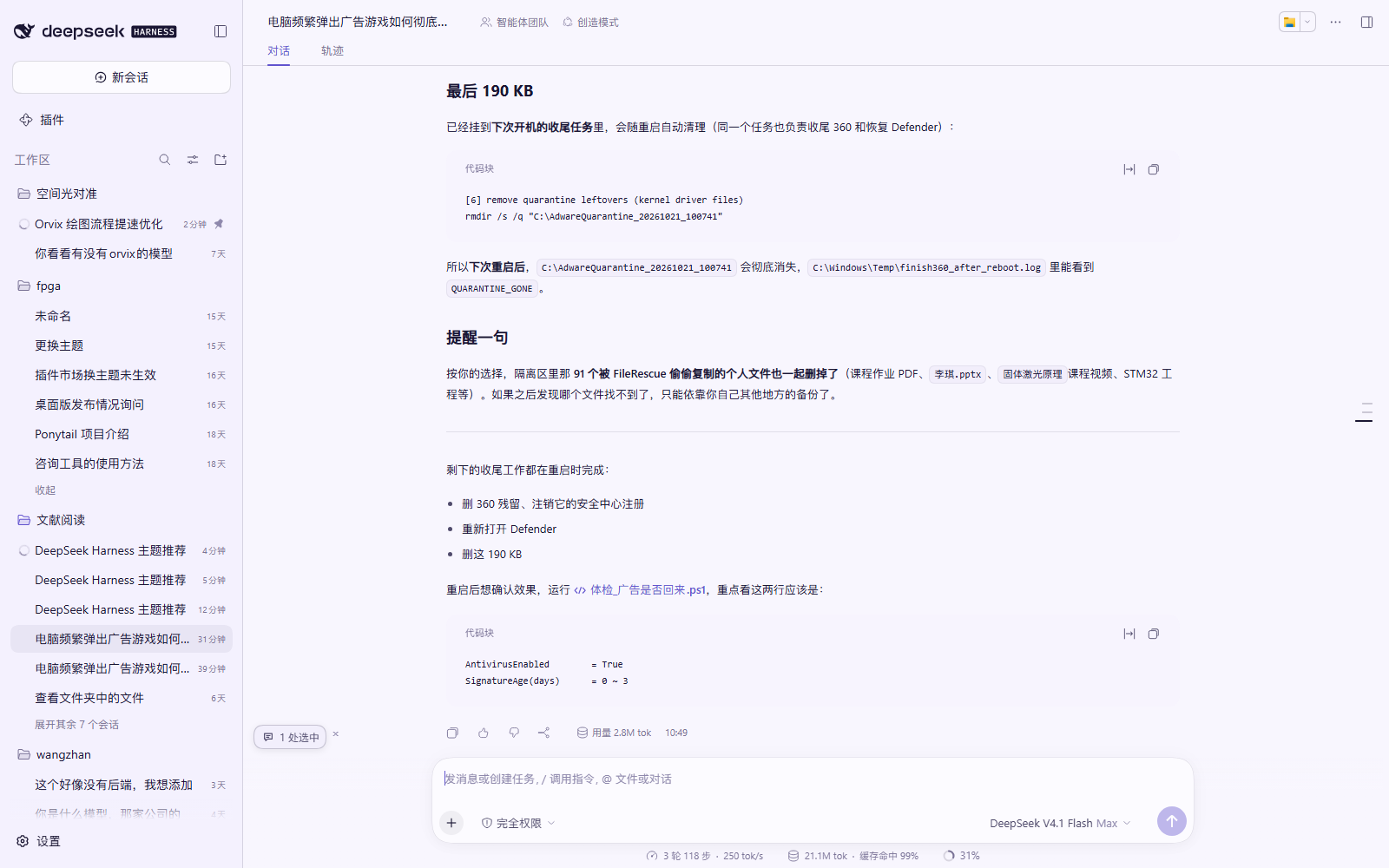
加入对话/在侧边提问; - 加入对话:选中内容以「1 处选中」胶囊出现在主输入框上方,发送时自动作为引用内容带上(没有
>、没有多余提示行、没有双引号); - 在侧边提问:在右侧边栏开一个独立侧边对话专门聊这段内容,不会打断主对话;
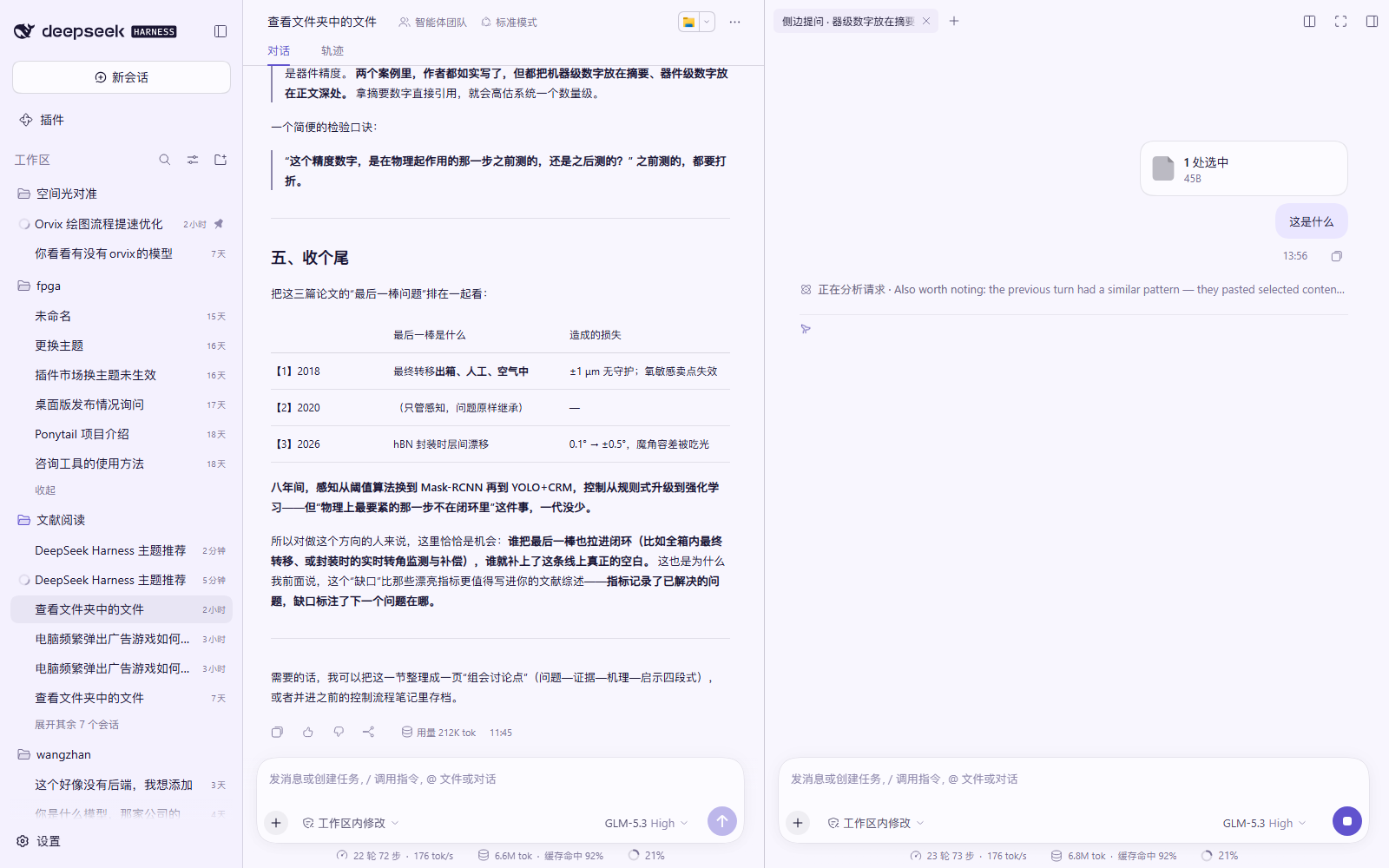
- 知道主对话在聊什么:侧边对话是主对话的 fork,继承了上下文,但只显示你新问的那一问和回答,主对话历史自动隐藏、不刷屏;
- 不往工作区里塞会话:侧边对话不会在工作区列表里多出一行,关闭标签即归档;
- 一个主对话只开一个侧边标签:第一次点击打开,之后再次点击「在侧边提问」复用同一个标签,只更新引用内容;
- 中英双语、跟随主题(不覆盖任何主题颜色,只用 DSH 设计系统 token);
- 纯客户端插件,无第三方依赖、无守护进程、不改动 DSH 本体,禁用即完全还原。
🖼 截图
侧边提问:消息以「1 处选中」小芯片附在你的问题气泡上方,下面直接是助手的回答(主对话历史不会出现):
加入对话:选中内容以胶囊形式挂在主输入框上方,发送时一起带上:
⬇️ 安装
方式一:一键脚本(推荐)
需要 PowerShell(Windows 自带)。下载本仓库后,在仓库目录执行:
powershell -ExecutionPolicy Bypass -File .\install.ps1
脚本会:
- 把插件复制到
%LOCALAPPDATA%\dsh-selection-actions; - 在当前 DSH profile(默认
~/.dsh/profiles/desktop)里登记依赖与 bundle; - 创建
node_modules链接。
然后重启 DeepSeek Harness(或按 Ctrl+R 刷新一次页面)即可生效。
自定义参数:
# 指定 DSH 数据目录 / profile 名 / 安装位置
powershell -ExecutionPolicy Bypass -File .\install.ps1 -DshHome "D:\dsh-data" -ProfileName desktop -TargetDir "D:\plugins\dsh-selection-actions"
方式二:手动安装
把本仓库复制/克隆到一个固定目录,例如
C:\plugins\dsh-selection-actions;编辑
%USERPROFILE%\.dsh\profiles\desktop\package.json,在dependencies中加入:"@local/dsh-selection-actions": "link:C:/plugins/dsh-selection-actions"在
dsh.profile.bundles数组末尾加入"@local/dsh-selection-actions";在 profile 目录创建链接(没有 pnpm 时也可以直接用 junction):
New-Item -ItemType Junction -Path "$env:USERPROFILE\.dsh\profiles\desktop\node_modules\@local\dsh-selection-actions" -Target "C:\plugins\dsh-selection-actions"重启 DeepSeek Harness。
如果你是用 pnpm/npm 管理 profile,也可以直接
pnpm add "link:C:/plugins/dsh-selection-actions",再把包名加进dsh.profile.bundles。
卸载
powershell -ExecutionPolicy Bypass -File .\uninstall.ps1
或手动:从 profile 的 dependencies / dsh.profile.bundles 中删掉 @local/dsh-selection-actions,删除 node_modules\@local\dsh-selection-actions 链接与安装目录,重启 Harness。
🎯 使用
- 在任意对话消息中用鼠标拖选一段文字,稍等片刻(约 300ms)出现工具条;
- 点「加入对话」→ 选中内容变成输入框上方的「1 处选中」胶囊 → 打字提问 →
Enter发送; - 点「在侧边提问」→ 右侧栏打开(或复用)侧边对话,胶囊出现在它的输入框上方 → 打字 →
Enter; - 胶囊右侧
×可移除引用,点胶囊可展开预览选中内容。
⚠️ 已知限制
- 依赖 DSH 客户端 Slot / Sidebar 扩展点,需要 DSH 0.2.x;DSH 大版本升级后可能需要适配;
- 侧边对话的内容视图是嵌入在侧边栏里的会话视图,行为与主对话一致(审批、工具调用、停止按钮都在侧边栏内可用);
- 侧边对话的模型/权限跟随主对话所在会话设置;
- 选中内容作为附件/引用随消息发出时,模型可能需要先读取附件再回答,首轮会略慢一点(这是刻意设计:消息里不出现大段原文);
- 只在 Chromium/Electron 的 DSH Web/桌面端测试过,其他宿主未验证。
💬 反馈与持续迭代
这个插件会持续根据使用反馈修改。 欢迎直接在 GitHub 上留意见:
- 🐞 遇到问题 / 有 bug:用 问题报告 模板提交,附上:DSH 版本、插件版本(设置 › 插件 或
package.json里的version)、复现步骤、期望结果、截图(如果方便); - 💡 使用意见 / 功能建议:用 使用意见 模板提交,写下你希望它变成什么样;
- 🗣 其他想法也可以在 Discussions 里聊(若未开启,直接开 Issue 也行)。
提交 Issue 时请尽量包含「选中哪里的文字、点了哪个按钮、看到什么、期待什么」,这样能最快定位。
当前 Roadmap(会随反馈调整)
- 支持用键盘快捷键触发(不弹工具条也能直接加入对话 / 侧边提问);
- 选中内容引用支持「多段合并」与手动编辑;
- 侧边对话支持固定模型 / 权限(不跟随主会话);
- 侧边对话回答完成后可一键「把结论写回主对话」;
- 更多平台兼容性验证与自动化测试。
🛠 开发说明
.
├─ client.js          # 客户端插件(window.__ModuleLoader__ 单文件模块)
├─ index.js           # Host 侧占位导出
├─ cordis.patch.yml   # bundle patch:把插件插入 Cordis 插件树
├─ package.json       # 包信息 + dsh.bundle / dsh.client 声明
├─ locale/            # zh / en 文案
├─ docs/              # 截图
├─ install.ps1        # 安装脚本
└─ uninstall.ps1      # 卸载脚本
- 插件通过
ctx.slots挂载悬浮工具条,通过ctx.sidebarRight打开侧边标签; - 侧边对话内容通过
ctx.resources.register({ protocol: 'dsh-resource', open })提供,标签类型sidebarask; - 发送通过会话接口
ctx.remote.session.prompt(...)/ctx.remote.subagents.prompt(...)完成,因此不依赖输入框模拟提交; - 关于版本更新:客户端插件代码在页面刷新(
Ctrl+R)后重新加载,Host 侧改动需要重启 Harness。
📄 License
MIT © 2026 123WE-glitch
No comments yet. Be the first to write one.