Delivery Box · 取件箱
A delivery inbox for DeepSeek Harness (
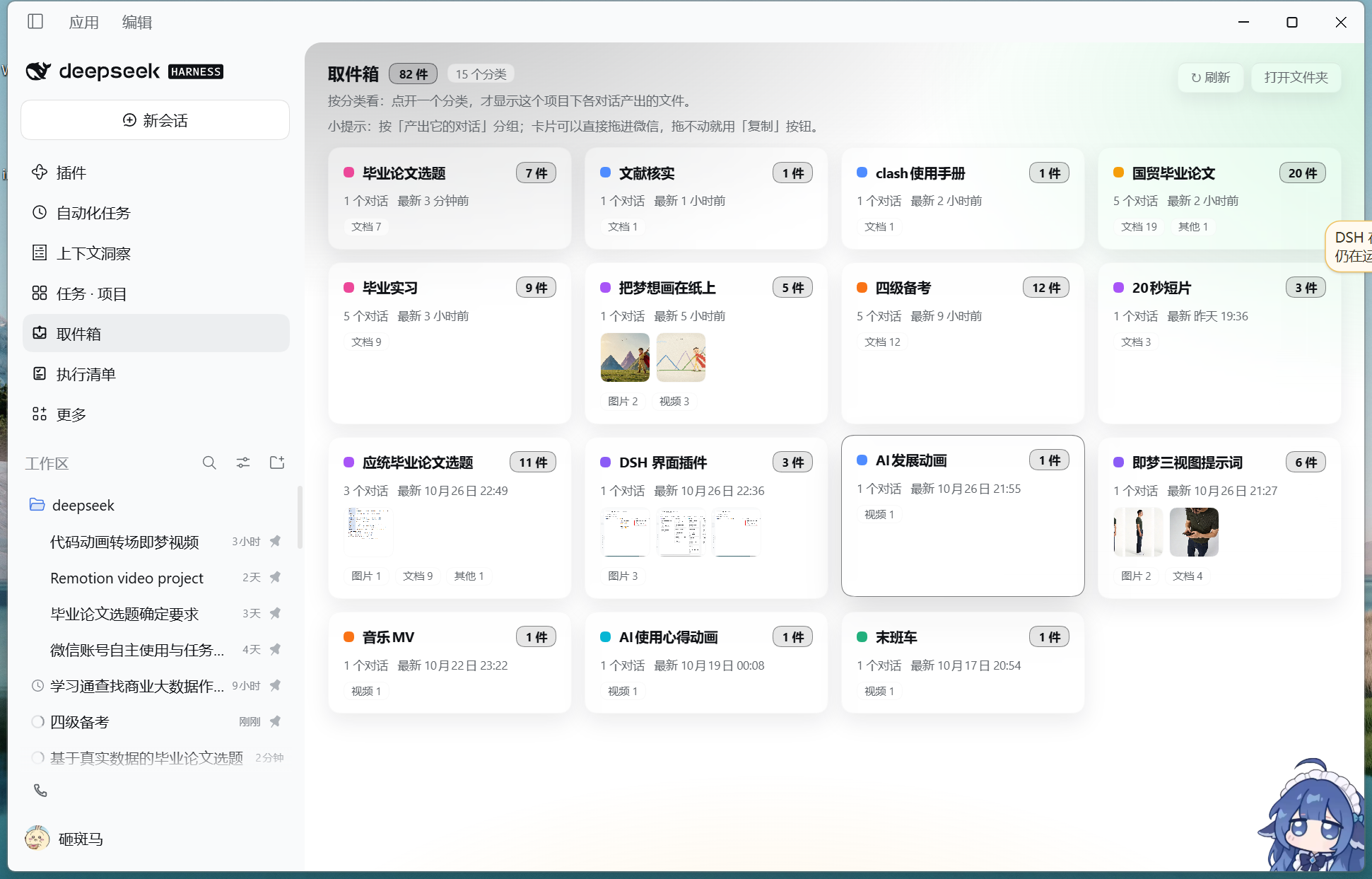
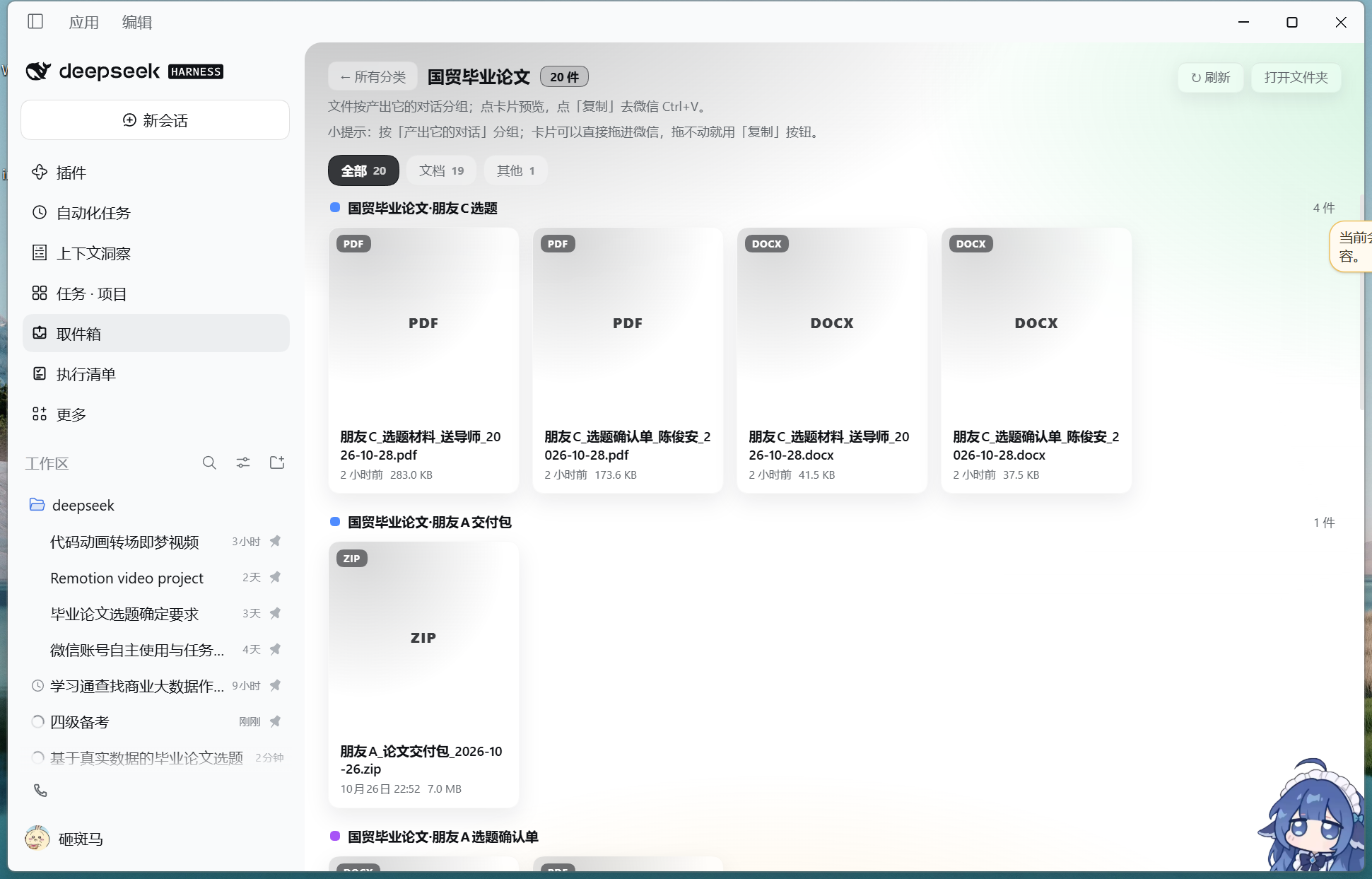
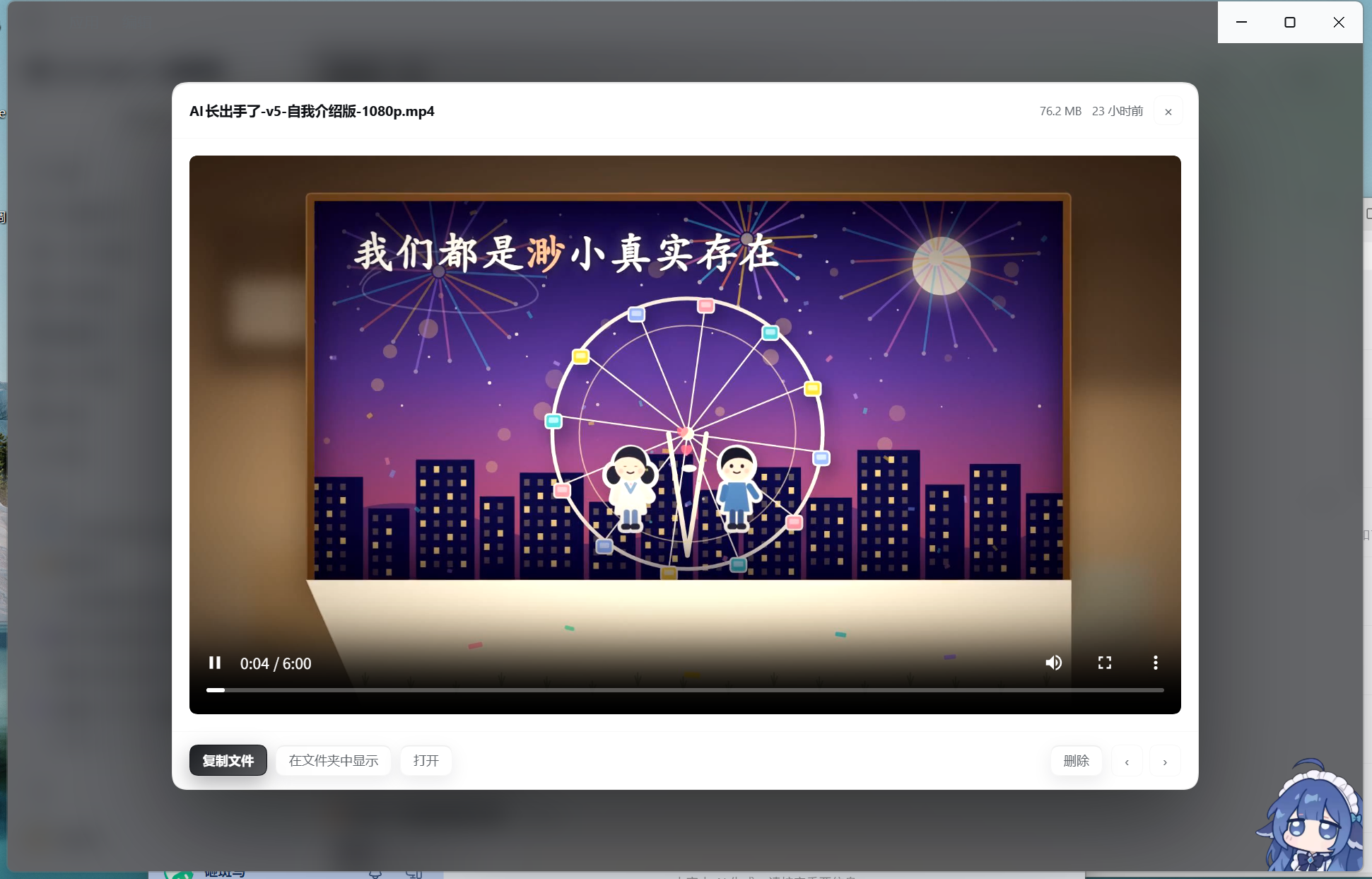
dsh). Every file the agent produces lands in one folder. A sidebar panel groups those files by project — open a project to see the files each conversation produced — previews them inline, and copies an image or a file straight to the clipboard so you can paste it into WeChat withCtrl+V. Windows desktop focus; the panel, previews and categories work anywhere dsh Web does.
This is an independent community plugin, not a DeepSeek product. Tested with DSH 0.2.1-rc.3 on Windows 11.
Why
An agent finishes a picture, a document or a video — and it is somewhere in a project folder you have to dig out yourself. Even with a nice chat UI, "where is that file?" and "how do I send it to WeChat?" stay manual work.
Delivery Box gives deliveries a single, predictable destination and a UI on top of it:
- One folder for every deliverable. Agents (or you) drop the finished file into the inbox folder.
- Two-level navigation, like a project list. Level 1 = categories (projects: dot, name, file count, number of conversations, last update, thumbnails). Level 2 = the files of that category, grouped again by the conversation that produced them — which chat made which file, at a glance.
- Preview without opening anything. Images, video (seekable), audio, PDF, plain text.
- Copy to clipboard, then paste. Images go to the image clipboard, everything else to the file
clipboard — one
Ctrl+Vin WeChat / Teams / mail, no file picker. - Reveal in Explorer / open / delete to Recycle Bin (never a hard delete).
- Live. The panel rescans the folder every 5 seconds; files dropped in by other sessions appear by themselves.
Install
A. From the plugin registry (recommended, needs dsh 0.2+)
dsh plugin --profile desktop add dsh-delivery-box
or, before it is published to npm, straight from GitHub:
dsh plugin --profile desktop add git+https://github.com/11zz-prog/dsh-delivery-box.git
Then restart DSH. The plugin appears as 取件箱 / Delivery Box in the left sidebar.
B. Desktop one-click (no CLI, Windows)
Download the release ZIP, extract it anywhere, double-click install.cmd, then fully restart DSH.
The installer finds your DSH home and profile, backs up the profile manifest and lockfile, links the plugin,
and writes inbox.config.json with your chosen inbox folder
(default %USERPROFILE%\取件箱). Uninstall with uninstall.cmd.
Cloned the repo instead of a release? Run installer\install.cmd — it detects the repository layout
and links the checkout directly (no copy).
No admin rights, and no separate Node.js install is required: the installer uses the Node that ships with DSH.
Configure
The inbox folder is resolved in this order:
DSH_INBOX_DIRenvironment variableinbox.config.jsonnext to the plugin ({ "inboxDir": "D:\\Inbox" })%USERPROFILE%\取件箱
Change it by editing inbox.config.json (or setting the variable) and restarting DSH.
Let the agent deliver automatically
Add a rule to your workspace AGENTS.md so every session files its output into the inbox:
## Delivery inbox: file every deliverable

After producing a finished file (image / video / document / report / audio / archive), run:

& "<plugin dir>\tools\投递.cmd" add <file> --origin "<this conversation or project>" --clip --json

- --origin: the conversation/project that produced it (the panel groups by it; do not omit)
- --clip: also put it on the clipboard (images → image clipboard, others → file clipboard)
- --link: hard-link large videos instead of copying (same volume; falls back to a copy)
tools\投递.cmd is generated by the installer and pins the local Node path. Without the installer,
call node <plugin dir>\tools\inbox.mjs … instead. Full template: docs/AGENTS-snippet.md.
CLI (tools/inbox.mjs)
inbox.mjs add <file> [--name "new name"] [--clip] [--reveal] [--link] [--origin "conversation"] [--project "project"] [--json]
inbox.mjs list [--json]
inbox.mjs copy [name|latest] [--mode auto|image|file] [--json]
inbox.mjs reveal [name|latest]
inbox.mjs tag [name|latest] --origin "conversation" [--project "project"] [--json]
inbox.mjs open
addcopies into the inbox (name collisions get-2), sets the intake time, optional clipboard copy.--linkhard-links instead of copying (same volume only) — great for 100 MB videos.- Source annotations live in the hidden
.origins.jsoninside the inbox folder; the panel groups by them. - Exit code is non-zero on failure (
NOT_FOUND/IS_DIR/NOT_IMAGE/BAD_NAME/EMPTY).
How it works
- Host half (
index.js) registers seven loopback routes on DSH's web server:GET /api/inbox/list,GET /api/inbox/file(single-rangeRangesupport, so video seeking works),POST /api/inbox/{copy,reveal,open,delete,open-folder}. Node built-ins only — no dependencies. - Client half (
client.js) is a hand-written bundle (no build step) that registers a sidebar entry and a main panel through DSH slots, and renders with React taken from the host page. - Data is just a folder: deliverables flat in one directory, plus two hidden files —
.origins.json(who produced what) and optionalinbox.config.json. - Clipboard is written through Windows PowerShell (
-STA,-EncodedCommand): image clipboard for images, file-drop list for everything else. Explorer reveal / Recycle Bin deletion use the same channel.
Compatibility
| DSH | 0.2.x (tested 0.2.1-rc.3) |
| OS | Windows 10/11 for clipboard, Explorer and Recycle Bin features; the panel, categories, previews and file browsing are plain Web UI |
| Node | none needed for install (dsh ships its own); CLI needs Node 18+ |
Security
- The routes are registered on the local loopback DSH web server and have no authentication: any local process can call them. Do not expose the DSH web port (or a tunnel to it) to the public internet.
- The plugin only reads/writes the inbox folder, the clipboard, and Explorer selection. Deletion goes to the Recycle Bin. Nothing is uploaded anywhere.
- Copying a file into the inbox duplicates it unless
--linkis used; hard-linked entries share the same file on disk (editing one edits both, deleting one keeps the other).
Uninstall
- Registry install:
dsh plugin --profile desktop remove dsh-delivery-box. - Desktop install: double-click
uninstall.cmd(rolls back the profile manifest/lockfile and removes the link; the plugin folder and the inbox files are kept).
Development
git clone https://github.com/11zz-prog/dsh-delivery-box.git
cd dsh-delivery-box
npm run check          # syntax + manifest + packaging sanity checks, no dependencies
Layout: index.js (host), client.js (client bundle), cordis.patch.yml (bundle row), tools/ (CLI,
optional desktop shortcut helper), installer/ (Windows one-click install/uninstall), docs/.
License
MIT — see LICENSE.
No comments yet. Be the first to write one.