dsh-inline-figures


English | 中文
| name | dsh-inline-figures |
|---|---|
| description | Use dsh-inline-figures when a DeepSeek Harness (DSH) answer has to be understood rather than skimmed. It gives the model a draw_figure tool that renders clean vector figures inline between the paragraphs of its reply - text, figure, text - so parts and relations, flows, sequences, comparisons and counts become a picture instead of a wall of text. Figures are deterministic SVG written into the session workspace and embedded through the ordinary Markdown image channel: nothing collapses into a tool card, and no client code or new UI is involved. |
Keywords. DeepSeek Harness plugin · DSH host plugin · Cordis bundle · draw_figure · inline SVG figures · text–figure–text answers · vector diagrams in AI chat · ASD-STE100 figure labels · LLM output readability
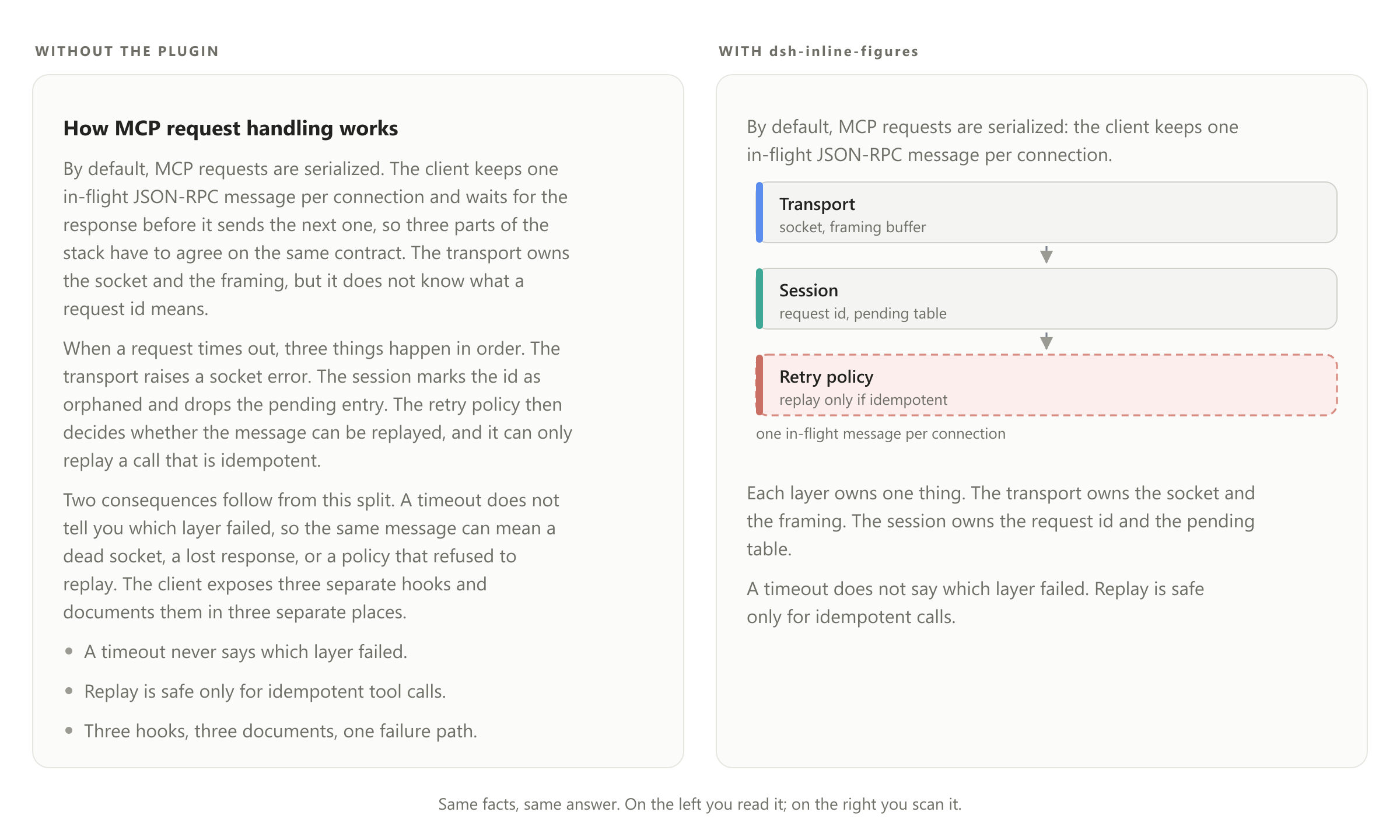
Same facts, same answer. Left: plain Markdown. Right: the model drew the structure and deleted the paragraph it replaced.
Why
Long model answers are walls of text. Two fixes are well known, and this plugin does both:
- Write plainer. The injected guidance asks for prose at roughly 80% ASD-STE100 — Simplified Technical English, the controlled language of aircraft maintenance manuals. Andrej Karpathy recommended ASD-STE100 for exactly this problem, and ranked diagrams above prose as the next step for understanding a model's output. Figure labels here are the strictest tier of the same style: noun phrases, six words at most, one concept per label.
- Draw the structure. Anything with parts, flow, sequence, comparison, or counts becomes a figure instead of a paragraph, placed at the point it illuminates.
How it works
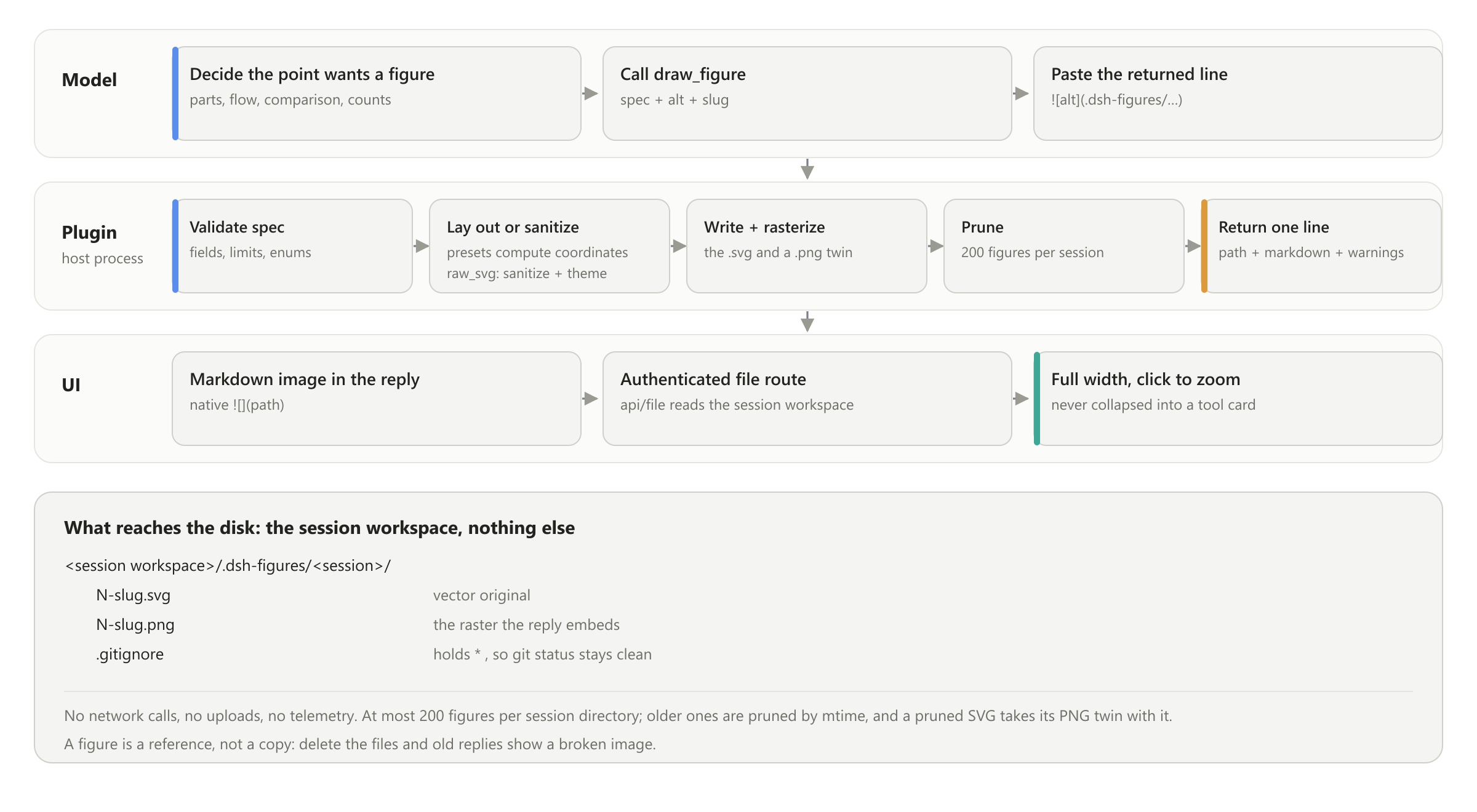
One turn, three moves. The model decides that a point needs a figure and calls draw_figure; the host plugin validates the spec, renders it, writes the file, and returns one Markdown line; the model pastes that line into the reply, where the ordinary Markdown image renders it full width. There is no new UI and no client code — the figure travels the same image channel as any other picture in a message.
Install
DSH has its own plugin manager, so nothing is copied by hand and no package-manager command runs against your profile.
# from npm
dsh plugin --profile <profile> add dsh-inline-figures

# or straight from this repository, no registry involved
dsh plugin --profile <profile> add github:0mao0/dsh-inline-figures
The Web sidebar's Plugins page does the same thing with a form, and an agent can do it with the plugin_manager tool (install_bundle, target = the directory of a local clone).
Then restart DSH. Host-side plugin code is loaded once per process, so a fresh JavaScript generation needs a restart; the plugin list can keep showing the previous state until then.
There is no build step. The harness supplies the packages this plugin imports, and sharp — the rasterizer behind previewable figures — ships prebuilt binaries.
What the harness checks before it installs
package.json pins the DSH runtime version this release was verified against, as peer dependencies on @deepseek-ai/dsh-*. The plugin manager evaluates those peers first and refuses an install on a different runtime with incompatible-version — a clear refusal, instead of a plugin that mounts and then misbehaves. To run it on another runtime anyway, grant the exact-version exemption:
dsh plugin --profile <profile> allow-version dsh-inline-figures@<version> --dsh-version <runtime> --accept-risk
Verified against dsh 0.2.0-rc.2 (cordis 4.0.4). If you need a machine that cannot reach a registry at all, docs/MAINTAINER-NOTES.md keeps the offline installer as an unsupported fallback.
The draw_figure tool
draw_figure({ spec, alt, slug? }) -> { path, markdown, warnings }
A preset spec, laid out for you — never hand-write coordinates for these:
{ "kind": "compare", "title": "Current vs target",
  "rows": [{ "left": { "label": "Manual review" },
             "right": { "label": "Automated gate", "tone": "ok" } }] }
The returned line, to paste verbatim:

kind |
Shape | Limits |
|---|---|---|
raw_svg |
Hand-authored SVG for trees, branching pipelines, state machines, anything custom | 32 KB spec |
architecture |
Layered boxes, P0/P1 badges, danger groups, feedback edges | 2–6 layers × 1–6 nodes, 8 edges |
compare |
Left/right columns with semantic tones (default/danger/ok/muted) |
1–6 rows |
timeline |
Vertical steps marked done/active/todo |
2–10 steps |
chart |
bar, line or pie, with axis ticks and label auto-rotation |
1–12 points |
Specs are validated before layout and every error names its field, so a bad call comes back as a fixable message instead of a broken image. Figures are always SVG — never ASCII art, Unicode box drawing, or a code block.
raw_svg is the primary path for free-form structure. The sanitizer rejects scripts, doctypes, entities and iframes, strips event attributes, external references, <image> and <foreignObject>, then injects a theme stylesheet and an arrow marker, so a hand-authored figure still follows the active colour scheme.
What it writes to disk
Only the session workspace, and nothing leaves the machine.
<session workspace>/.dsh-figures/<session>/
├── N-slug.svg     vector original
├── N-slug.png     the raster the reply embeds
└── .gitignore     holds *, so git status stays clean
- No network calls, no uploads, no telemetry. Rendering happens locally; the only traffic in a turn is the model call itself.
- Per session. A figure lands in the directory of the session that drew it. Each directory keeps its newest 200; older ones are pruned by modification time, and a pruned SVG takes its PNG twin with it.
- A figure is a reference, not a copy. Delete the files and old replies show a broken image, so treat the directory as part of the conversation, not as scratch space.
- If rasterization fails, the reply embeds the SVG instead, and the plugin writes
raster-diagnostic.txtbeside itself so the failure is visible to you and not only to the model.
Nothing else is written per answer. Two install-time artefacts can exist elsewhere: the offline fallback's staging copy under ~/.dsh/vendor, and sharp in the profile's node_modules.
Use the engine without DSH
lib/ imports nothing from @deepseek-ai/* or cordis, and a test enforces it. The ./engine entry is a plain module:
// from a clone:        import { ... } from './lib/engine.js'
// from the package:    import { ... } from 'dsh-inline-figures/engine'
import { drawFigure, validateSpec, sanitizeSvg, GUIDANCE_TEXT } from './lib/engine.js'

const { svg, warnings } = drawFigure({
  kind: 'timeline', title: 'Rollout',
  steps: [{ label: 'Design', state: 'done' }, { label: 'Build', state: 'active' }],
})
To reuse it in your own agent: register an equivalent tool with the same schema, paste GUIDANCE_TEXT into your system prompt, and render the returned SVG (or your own raster of it) through your Markdown image channel.
Development
node --test                                            # full suite, no dependencies
$env:UPDATE_GOLDEN='1'; node --test test/architecture.test.js   # refresh layout snapshots, then eyeball the diff
node scripts/make-readme-image.mjs                     # rebuild the before/after images
node scripts/make-readme-diagram.mjs                   # rebuild the how-it-works diagrams
node scripts/_repro-png-check.mjs                      # real cordis: mounts the plugin, executes all five kinds, proves unload cleanup
node scripts/_repro-nudge.mjs                          # real cordis: drives the nudge events
test/compliance.test.js is the gate for the official host contract described under Install: host packages as peers, the compatibility check armed, the patch row matching the package name, publishable identity, the display metadata, and every resource registered through ctx.effect.
Under a sandboxed shell, node --test can fail with spawn EPERM (it spawns one child per test file). node --test --test-isolation=none runs the same suite in one process.
Release steps, open defects, and the offline-install fallback live in docs/MAINTAINER-NOTES.md.
No comments yet. Be the first to write one.