No AI Style
Natural Writing. Faithful Meaning.
Skill v1.0 · DSH plugin v1.2.1 · English / 中文 / 日本語 · By 01NGVI-QINGYI
An agent skill and installable DeepSeek Harness plugin for academic and professional writing. Remove mechanical phrasing and unnecessary padding while keeping facts, citations, uncertainty, and the author’s voice.
Before: For clarity, it should be mentioned that the device supports two USB ports.
After: The device supports two USB ports.
Installation
Requires Node.js and npm.
Codex
npx skills add 01NGVI-QINGYI/no-ai-style --global --agent codex
Deepseek Harness
In DSH Desktop, add github:01NGVI-QINGYI/no-ai-style under Settings → Plugins. From the CLI, install the plugin with:
dsh plugin --profile web add github:01NGVI-QINGYI/no-ai-style
--profile is the profile you actually run: web for the dsh web build,
desktop for the desktop app. The plugin registers its own skill provider, so
the skill reaches every session in that profile without touching your project,
custom, or user skill roots.
Restart DSH to load the plugin. To install it as a regular agent skill instead,
run this in your Deepseek Harness project; it installs to .agents/skills:
npx skills add 01NGVI-QINGYI/no-ai-style --agent universal --copy
Claude Code
npx skills add 01NGVI-QINGYI/no-ai-style --global --agent claude-code
Pi
npx skills add 01NGVI-QINGYI/no-ai-style --global --agent pi
Cursor
npx skills add 01NGVI-QINGYI/no-ai-style --global --agent cursor
Other agents
npx skills add 01NGVI-QINGYI/no-ai-style
Choose your agent when prompted. Omit --global for a project installation.
Manual installation: copy skills/no-ai-style/ into your agent’s skills directory.
Usage
Ask your agent in plain language. Paste the text or provide a file path:
Use no-ai-style to check.
Use no-ai-style to edit.
Use no-ai-style to draft.
Use “check” for a review or a submission-readiness check. If you ask whether it is ready to submit, the agent adds a verdict and any unresolved issues.
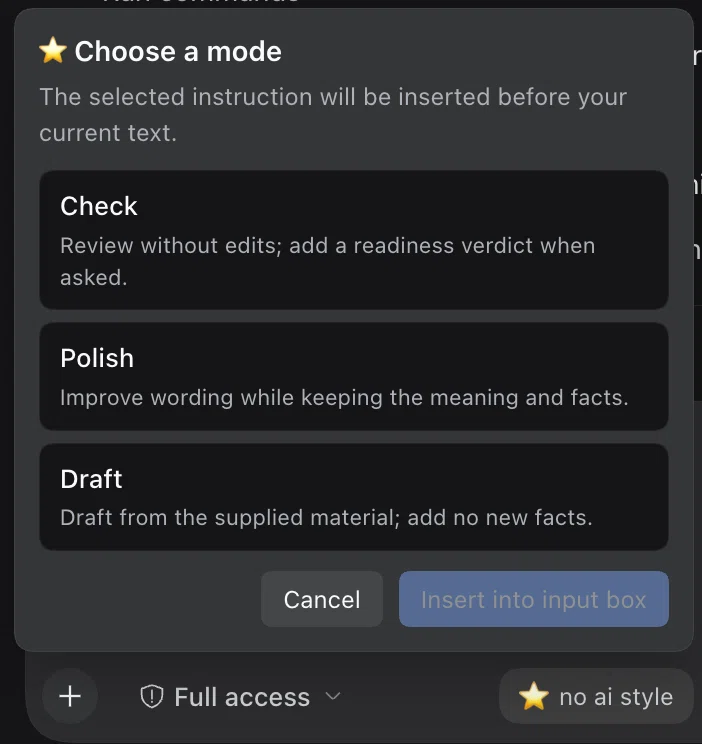
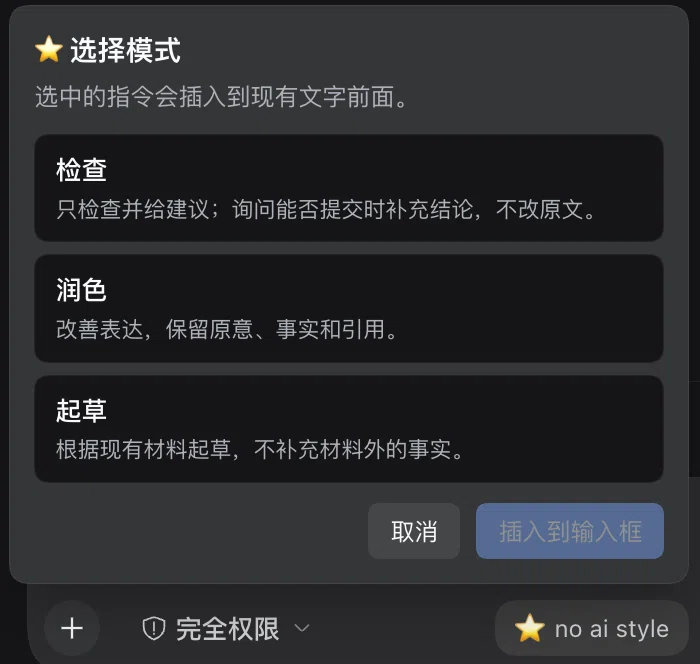
In DSH, the composer carries a no ai style button (⭐ no ai style). Click it and choose Check, Polish, or Draft. Insert adds the localized instruction before your existing draft; Cancel leaves it unchanged. The UI follows DSH’s language; Japanese appears when a Japanese DSH locale is enabled, and other unsupported locales use English. On older DSH releases, insertion is blocked while file or command reference chips are present so they are not lost.
| Mode | What you get |
|---|---|
audit |
Findings and suggestions; add a readiness verdict when requested; source files stay unchanged |
revise |
Edited prose within the requested scope |
compose |
A draft based on supplied notes and evidence |
Light editing is the default. Request a stronger rewrite when needed.
The skill follows the text’s language and keeps sound passages unchanged.
Missing evidence is marked [EVIDENCE GAP], which blocks ready;
ambiguous interpretations are marked [INTERPRETATION FLAG] for author review.
Optional checks
Python 3.9+, no external packages. Run from the repository root:
python3 skills/no-ai-style/scripts/audit_prose.py draft.md --lang auto
python3 skills/no-ai-style/scripts/compare_anchors.py before.md after.md --format json
The scripts run locally and do not upload text. Findings need contextual review;
unclosed comments or code fences produce warnings. Add --strict to return
exit code 1 for missing-evidence markers or unclosed markup.
The goal is readable, faithful prose, not AI-detector evasion. Detailed rules are in SKILL.md.
License
MIT · Project by 01NGVI-QINGYI.
No comments yet. Be the first to write one.